
Marketing automation often sounds appealing, but it can also seem like a daunting, technical topic reserved for large, highly structured companies. In reality, marketing automation can start out much more simply.
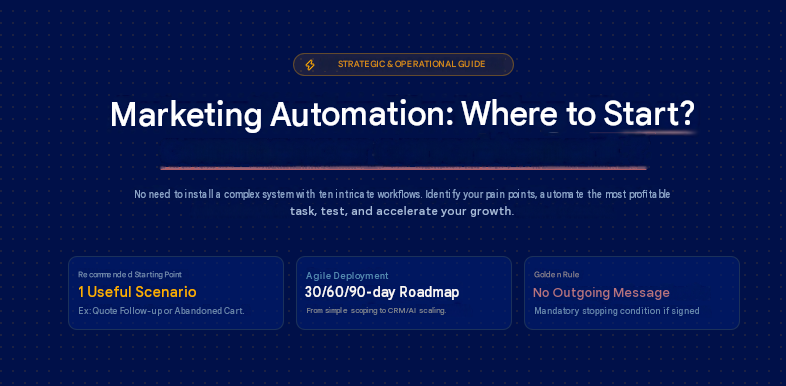
You don’t need to immediately create a complicated system with ten workflows, a perfectly configured CRM, complex lead scoring, and dozens of segments. To get started, the most important thing is to identify a specific problem in your customer journey, choose a useful first automation, test it, and then improve it.
This is where many companies go wrong. They start by comparing tools. HubSpot, Brevo, Mailchimp, ActiveCampaign, Klaviyo, Salesforce, Marketo, Zapier, Make, n8n… The list quickly gets long. However, the right question isn’t “which tool should I choose?” but rather: which marketing or sales task really deserves to be automated first?
An SME that forgets to follow up on quotes doesn’t have the same needs as an e-commerce business that’s losing abandoned shopping carts. A B2B company with a long sales cycle doesn’t have the same priorities as a SaaS company looking to improve its automated customer onboarding.
The goal of this article is simple : to help you understand where to start with marketing automation, without unnecessary jargon, using a clear method, concrete examples, a 30/60/90-day roadmap, and the first
Chapter 1 : What Is Marketing Automation ?
Marketing automation involves automating certain marketing actions based on a contact’s behavior, profile, or level of engagement.
In practical terms, this allows you to send the right message to the right person at the right time, without having to manage everything manually.
Let’s take a simple example. Someone downloads a guide from your website. They immediately receive an email with the document. Two days later, they receive a tip related to the guide’s topic. Five days later, you send them a customer case study. Then, if they click on your pricing page, your sales team receives a notification.
This scenario is an example of a marketing automation workflow, but it’s not limited to just sending emails. Marketing automation can also be used to qualify a lead, segment a customer database, create a task in the CRM, follow up on an abandoned cart, nurture a business relationship, or measure a campaign’s performance.
Marketing automation, email marketing, CRM, and AI: What’s the difference?
These terms are often used interchangeably, even though they don’t mean the same thing.
Email marketing primarily involves sending email campaigns. A monthly newsletter, for example, is a form of traditional email marketing.
Marketing automation goes a step further. It relies on triggers, conditions, and automated actions. A contact receives an email because they filled out a form, visited a page, clicked a link, or reached a certain score.
CRM, on the other hand, is used to centralize sales information: contacts, companies, opportunities, quotes, appointments, and communication history. Marketing CRM becomes truly powerful when it’s connected to your automation workflows.
AI can provide additional support. It can help draft email variations, analyze segments, suggest actions, or personalize certain messages. But it doesn’t replace your strategy, your offering, or your understanding of the customer.
For a company that wants to make serious progress, the challenge often lies in connecting these building blocks : content, CRM, email marketing, data, automation, and reporting.
This is also why a marketing automation project is often part of a broader strategy: feel free to explore our digital transformation solutions focused on AI to integrate your tools.
What Marketing Automation Can Do
A good marketing automation strategy can help you save time, but that’s not its only benefit.
It can also improve the quality of customer follow-up, reduce oversights, speed up lead qualification, streamline the relationship between marketing and sales, and make your campaigns more measurable.
Here are a few common use cases :
- sending a welcome email after a sign-up;
- automatically following up on a quote request;
- recovering an abandoned shopping cart;
- sending an automated email sequence after a white paper is downloaded;
- notifying a sales rep when a prospect becomes a hot lead;
- reactivating an inactive customer;
- requesting a review after a purchase;
- track marketing automation KPIs in a dashboard.
In an SME, these automations often have an immediate impact because they address very tangible losses. These might include, for example, prospects who haven’t been followed up on, incoming requests that aren’t properly tracked, or customers who are forgotten after a purchase.
What marketing automation shouldn’t do
Automation is not a magic solution. It does not fix a poorly positioned offer. It does not transform a weak message into a compelling sales pitch. It does not replace a true understanding of the customer journey. Nor does it compensate for a poorly qualified contact list.
Automating a flawed process too early simply means doing something that works poorly, but faster.
Before creating automated campaigns, we need to ask ourselves a simple question : What specific problem do we want to solve ? That’s the real starting point.
Chapter 2 : Where to start with marketing automation ?
To find out where to start with marketing automation, put the tools aside for a few minutes. Instead, take a sheet of paper, a whiteboard or a shared document, and list the moments when your prospects or customers interact with your business.
They might arrive via an advert, a Google search, a landing page, a form, a newsletter, a phone call, a quote, a shopping basket, a download, a booking or a purchase.
At each stage, ask yourself : what happens next ? This is often where the weak points become apparent.
A form is filled in, but no one replies for 48 hours. A quote is sent, but no follow-up is scheduled. A prospect downloads a guide, then nothing happens. A customer makes a one-off purchase but is never contacted again. Someone abandons their shopping basket but receives no reminder. These moments are the best candidates for your first marketing automations.
Mapping out repetitive tasks
Start by identifying the tasks that you or your team carry out frequently.
For example :
- sending the same confirmation email;
- following up with a prospect after a quote request;
- passing a lead on to a sales representative;
- sending a document following the completion of a form;
- sending a reminder about an appointment;
- sending a request for feedback;
- following up with inactive customers;
- creating the same report every week.
These tasks are worth looking at because they are time-consuming but generally follow a fairly consistent pattern.
If you send the same type of message manually every week, there is probably a process that can be automated.
This is exactly the sort of issue addressed by our smart workflow integration service, which is designed to automate repetitive tasks when a business wants to move from manual operations to more reliable processes.
Identifying drop-off points in the customer journey
A drop-off point is a moment when a prospect shows interest but leaves the journey due to a lack of follow-up.
This could be an abandoned form, an abandoned shopping basket, a quote left unfollowed up, a qualified lead never called back, or a customer who might have made a repeat purchase but was never contacted.
These losses are sometimes invisible. You monitor your traffic, your campaigns or your incoming enquiries, but you don’t always measure what happens afterwards. Yet this is often where the greatest potential lies.
A simple example: a company receives 80 quote requests per month. It follows up manually with some of the prospects, but not all of them. By automating a gentle follow-up on day 2 and then day 7, it can recover opportunities without increasing its acquisition budget. The gain does not necessarily come from a new marketing channel. It comes from better follow-up.
Prioritising using an impact/simplicity matrix
Not all automations are created equal. Some are simple to set up and can deliver results quickly. Others require more data, more integrations and greater coordination between teams.
To start with, use a very simple matrix :
| Task to be automated | Business impact | Simplicity | Priority |
| Welcome email after form submission | High | High | High |
| Automatic quote reminder | High | Medium | High |
| Advanced lead scoring | Medium to high | Low | Medium |
| Complex behavioural segmentation | Medium | Low | Low to begin with |
| Abandoned basket | High | High if e-commerce | Strong |
| Automated reporting | Medium | Medium | Medium |
The right first automation often falls within the following zone : high impact, low or medium complexity.
That is why welcome emails, quote reminders, abandoned baskets and post-download sequences are good starting points.
Choose a single initial objective
A common mistake is trying to automate everything at once.
It is better to choose a single initial objective :
- generate more appointments;
- convert more quotes;
- recover abandoned shopping baskets;
- qualify leads before passing them on to the sales team;
- save time on follow-ups;
- re-engage inactive customers;
- improve customer onboarding.
- A clear objective allows you to build a clear workflow.
If your objective is to convert more quotes, your first workflow should probably focus on sales follow-ups. If your objective is to better support new contacts, start with a welcome or nurturing sequence. If your objective is to grow your e-commerce business, abandoned baskets may be a priority.
Chapter 3 : The first marketing automation workflows to set up
When starting out with marketing automation, there’s no need to strive for originality at all costs.
The best initial workflows are often the simplest ones. They address obvious needs: welcoming, following up, reassuring, qualifying and reactivating.
The welcome email following registration or form submission
The welcome email is one of the first marketing automations to set up. It is sent following a newsletter subscription, a contact request, a download, the creation of an account or a request for information.
Its purpose is simple: to confirm the action, establish the relationship and guide the next steps. A good welcome email may include :
- a clear confirmation;
- a sentence providing context;
- the promised link or resource;
- the next step;
- an invitation to reply or get in touch.
Example for a B2B company :
“Hello, thank you for your enquiry. Please find the requested guide below. To help you get started, we’ll also be sending you some practical advice in the coming days on setting up your first marketing automation workflow.”
Structuring this initial contact is essential, but automating the follow-up communications is even more so. That is precisely what our Newsletters & Email Sequences service is all about : we build automated, seamless and engaging customer journeys for you that stand the test of time.
Automatic follow-ups on quotes or sales enquiries
For an SME or a service-based business, automatic follow-ups on quotes are often one of the most cost-effective approaches. Why? Because the prospect has already shown a strong interest.
They have asked for a price, a proposal, an appointment or a discussion. The problem rarely stems from a complete lack of interest. Rather, it is down to timing, hesitation, internal deliberation or simply an oversight.
A simple workflow in this context might look like this :
- Day 0 : quote sent manually or automatically;
- Day 2 : short and helpful follow-up email;
- Day 5 : reminder highlighting a benefit or addressing an objection;
- Day 10 : final, more open-ended message, offering a discussion.
The stop condition is essential. If the prospect replies, books an appointment or signs up, they must be removed from the sequence.
Without a stop condition, you risk sending an automated follow-up to someone who is already in discussion with your team. That’s when automation becomes irritating.
The lead nurturing sequence following the download of a guide
Lead nurturing involves supporting a prospect who is not yet ready to buy. It is particularly useful in B2B, where the decision-making cycle is long. A prospect may need to compare options, convince their management, understand the issues at stake, estimate a budget or clarify their needs.
This simple scenario might follow this structure :
- Email 1 (immediate) : delivery of the guide;
- Email 2 (Day 2) : explanation of a common problem;
- Email 3 (Day 5) : example or customer case study;
- Email 4 (Day 8) : checklist or method;
- Email 5 (Day 12) : invitation to request an assessment.
For this nurturing strategy to bear fruit, the starting point must be flawless. That is why we create high-value lead magnets (e-books, client case studies, white papers). The more your initial resource solves a specific problem, the higher the conversion rates the automated sequence we then build will achieve.
Abandoned shopping baskets or form abandonment
In e-commerce, abandoned shopping baskets are a classic scenario in marketing automation. A customer adds a product to their basket, perhaps starts the checkout process, and then leaves the site. Without a follow-up, this intention to purchase often disappears.
A simple scenario here might include :
- a quick initial reminder;
- a second email offering reassurance;
- a third message with a gentle nudge, if your sales strategy allows it.
- Reassurance can relate to delivery, returns, customer reviews, secure payment or product availability.
For a service-based business, the equivalent might be a form abandonment. The customer starts a request but does not complete it. A well-written follow-up can help them resume without feeling pressured.
Reactivating dormant contacts
An email database often contains contacts who no longer open emails, click on links or make purchases. Ignoring them is a mistake. Approaching them too aggressively is another.
Customer reactivation must be a gradual process. You can start by segmenting contacts who have been inactive for 3, 6 or 12 months, then send a short campaign :
- a message to re-establish contact;
- a useful offer or value-added content;
- a simple question;
- an option to remain subscribed or unsubscribe.
The aim is not just to sell. It is also to clean up your database, improve email deliverability and gain a better understanding of which contacts are still interested.
Chapter 4 : Which scenarios should you choose depending on your type of business?
The right marketing automation scenario depends heavily on your business model. A sequence that works perfectly for an e-commerce business may be useless for a consultancy firm. A B2B workflow heavily focused on lead scoring may be out of proportion for a small local business.
For a B2B SME
In B2B, the central focus is often lead qualification. Not all prospects are at the same stage of the buying journey. Some just want to find out more. Others are comparing service providers. Others are ready to request a demonstration, a quote or a meeting.
The priority scenarios are often :
- content download followed by lead nurturing;
- request for a quote followed by an automated follow-up;
- visit to a key page followed by a sales notification;
- simple scoring based on behaviour;
- automatic transfer to the CRM.
Example : a prospect downloads a white paper on sales automation. They receive a sequence of three emails. If they click on the ‘pricing’ or ‘request a demo’ page, a task is created for a sales representative.
The aim is not to harass the lead. The aim is to identify the right moment to start a meaningful conversation.
For e-commerce
In e-commerce, the most effective scenarios often revolve around the initial purchase, repeat purchases and customer loyalty.
The priorities are generally :
- welcome email;
- abandoned basket;
- abandoned checkout;
- post-purchase;
- request for a review;
- product recommendations;
- cross-selling;
- re-engaging inactive customers.
Example : a customer makes their first purchase. Three days after delivery, they receive an email with usage advice. Ten days later, they receive a request for a review. Thirty days later, they receive a recommendation for a related product based on their purchase.
This approach helps to build a relationship after the sale, rather than focusing all efforts on customer acquisition.
For a local business
A local business can also benefit from marketing automation, even with a small contact database.
Useful scenarios are often very simple:
- appointment confirmation;
- pre-appointment reminder;
- follow-up after a quote request;
- request for a Google review;
- follow-up message after a service visit;
- seasonal follow-up.
Example : a plumber, a beauty clinic, a surveying firm or an estate agent can automate appointment reminders and requests for reviews. The benefit is twofold: fewer missed appointments and more social proof.
For a SaaS service
In a SaaS model, marketing automation is closely linked to product usage. The aim is not just to convert customers; it is also to activate, support and retain them, and prevent churn.
Priority scenarios might include :
- automated customer onboarding;
- a reminder if the user has not activated a key feature;
- a support email following a period of inactivity;
- an upgrade offer based on usage;
- an internal alert for a high-risk account.
Example : a user creates an account but does not set up their first project. After 24 hours, they receive a simple email with a short video or a checklist. After 72 hours without any action, a notification can be sent to the customer success team.
For an agency or consultancy firm
In an agency, consultancy firm or intellectual services company, the decision-making process relies heavily on trust.
The scenarios should therefore be more informative than promotional. You can automate :
- sending content after initial contact;
- following up on a commercial proposal;
- sharing a client case study;
- inviting them to an audit;
- assessing their needs before a call.
Example : following an incoming enquiry, the prospect receives a confirmation email, followed by content explaining the working method, and then a client case study relevant to their sector. The sales representative can then join a conversation that is already better focused.
Chapter 5 : How to create a well-structured marketing automation workflow?
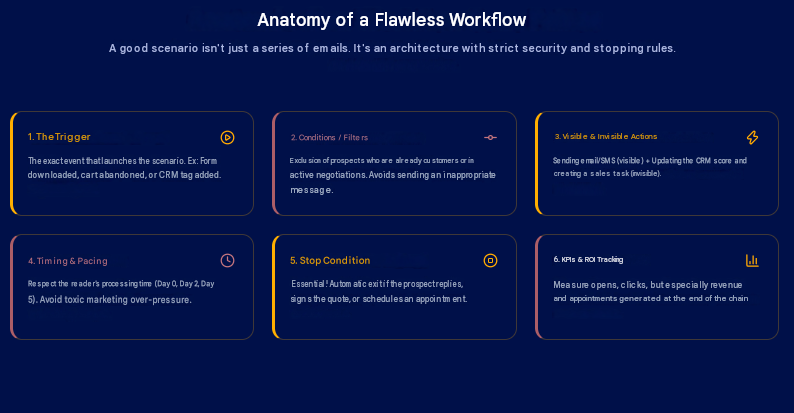
A marketing automation workflow is not simply a series of emails. It is a structured sequence : a trigger, conditions, actions, timeframes, exclusions, objectives and KPIs. The clearer this sequence is, the easier the workflow will be to maintain.
1. The trigger
The trigger is the event that sets the automation in motion. It may be an action taken by the contact :
- filling in a form;
- subscribing to a newsletter;
- downloading a document;
- adding a product to the basket;
- visiting a key page;
- clicking on a link;
- requesting a quote;
- creating an account.
It can also be a change within the CRM: lead status, pipeline stage, score achieved, date of last contact, or a customer who has been inactive for 90 days.
The trigger must be specific. “Send an email to prospects” is too vague. “Send an email to new contacts who have filled in the quote request form” is actionable.
2. Conditions
Conditions help to ensure that the same message is not sent to everyone. They may relate to :
- the type of contact;
- the segment;
- the acquisition source;
- the CRM status;
- purchase history;
- consent;
- recent behaviour;
- level of engagement.
Example : a prospect who has already booked an appointment should not receive the same follow-up message as a silent prospect. An existing customer should not be included in a sequence designed for cold leads. Marketing segmentation is therefore a cornerstone of automation.
3. Automatic actions
An automatic action may be visible or invisible to the contact. Visible actions often include sending an email, a text message, a notification, a resource or an invitation.
Invisible actions may include adding a tag, changing a score, creating a CRM task, notifying a sales representative, moving a contact to a list or updating a property.
Invisible actions are often the most important for the quality of follow-up. They help to keep the database clean, ensure the right information is passed on to the sales team and enable the performance of marketing automation to be measured.
4. Timing
An effective workflow respects the reader’s pace. Sending five emails in two days can create excessive marketing pressure. Waiting three weeks to follow up on a quote may be too late.
Timing must be appropriate to the context. An abandoned shopping basket can be followed up on quickly. A complex B2B cycle requires more breathing space. An educational sequence can be spread over several days or weeks.
The right pace depends on the level of intent. The stronger the intent, the quicker the follow-up can be. The more exploratory the intent, the more educational the content needs to be.
5. Exit conditions
This is one of the points most often overlooked. An exit condition specifies when a contact should be removed from the workflow.
For example :
- they have replied;
- they have made a purchase;
- they have booked an appointment;
- they have signed the quote;
- they have become a customer;
- they have unsubscribed;
- they have been passed on to a sales representative.
Without an exit condition, you risk creating absurd situations. A prospect may receive an automatic follow-up even though they have already signed. A customer may receive a new business acquisition email even though they are already being looked after. A good workflow also knows when to stop.
6. Associated KPIs
Each workflow must have its own metrics. For an email sequence, you can track the open rate, click-through rate, response rate, unsubscribe rate and deliverability.
For a sales follow-up, you should focus on tracking responses, appointments, accepted quotes and revenue generated.
For an abandoned basket, the key KPIs are the recovery rate, attributed revenue and conversion rate.
Marketing automation reporting must always link the performance of messages to a business objective. Otherwise, you risk optimising open rates without knowing whether this is actually delivering results.
Chapter 6 : Data and segmentation: the foundation before the tool
The quality of your automation depends directly on the quality of your data. If your contact database is disorganised, contains duplicates, is incomplete or poorly segmented, your workflows risk sending the wrong messages to the wrong people. It’s rarely dramatic, but it’s crucial.
Cleaning up your database before automating
Before implementing marketing automation, start by checking your database.
Look for duplicates, invalid email addresses, contacts with no source, inconsistent statuses, unidentified former customers, prospects with no history and segments that are no longer relevant.
A clean database allows you to personalise messages more effectively, improve email deliverability and avoid errors.
Example : if a contact appears twice in your CRM with two different statuses, they may receive two conflicting sequences. This is exactly the sort of problem you need to fix before automating.
Structuring the essential fields
You don’t need fifty fields to get started. A few well-organised pieces of information are often enough :
- first name;
- email;
- company;
- contact type;
- acquisition source;
- lead status;
- product or service of interest;
- date of last contact;
- consent;
- stage in the sales pipeline.
These fields are then used to personalise workflows.
A prospect who has come via a white paper should not necessarily receive the same message as a contact who has arrived via a quote request. An active customer should not be treated as a cold prospect.
Creating simple segments
To begin with, avoid overly complex segmentation. Start with a few useful segments :
- new leads;
- hot prospects;
- prospects to follow up on;
- active customers;
- inactive customers;
- newsletter subscribers;
- abandoned baskets;
- quotes sent;
- unengaged contacts.
These segments already enable you to create more relevant automated campaigns. Segmentation is only valuable if it triggers a useful action. If you create a segment that nobody uses, it serves no purpose.
Avoid excessive segmentation
Excessive segmentation creates a false sense of precision. You create fifteen segments, twenty rules, thirty exceptions, and then nobody understands how the system works.
To start with, it’s better to have a simple segmentation system that’s used regularly than a complex architecture that’s never utilised. The aim is to build a reliable foundation. Sophistication will come later.
To centralise your information without losing your teams along the way, our agency supports you with data governance to build a sound foundation that can genuinely be utilised by everyone.
Chapter 7 : Lead scoring : should you implement it right from the start ?
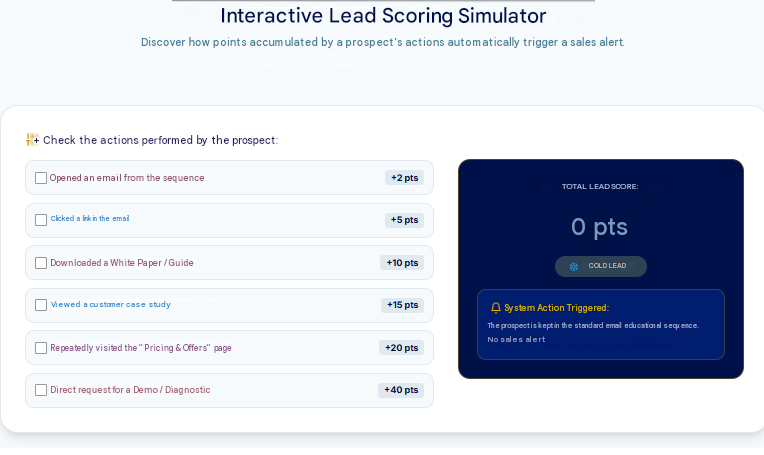
Lead scoring involves awarding points to a prospect based on their profile or actions. For example, a contact might earn points when they download a guide, open an email, click on a key page, visit a pricing page or request a demonstration.
The idea is simple : the higher the score, the more potentially valuable the lead is to the sales team.
When lead scoring is useful
Lead scoring becomes relevant when you have :
- a steady volume of leads;
- a fairly long sales cycle;
- several stages of lead maturity;
- a sales team;
- a CRM system that is used effectively;
- content or pages that allow you to gauge intent.
In B2B, it can help distinguish between someone who is simply curious, a prospect still considering their options, and a contact ready to speak to a sales representative.
Example : a prospect reading a blog post may be at the early stages of their decision-making process. A prospect who visits your pricing page three times, downloads a case study and requests a demo is much further along the journey.
Example of a simple scoring system
You can start with a very basic scoring system :
| Action | Score |
| Email open | +2 |
| Email click | +5 |
| Lead magnet download | +10 |
| Pricing page visit | +20 |
| Case study view | +15 |
| Demo request | +40 |
| Unsubscribe | -50 |
| Extended inactivity | -10 |
When the score exceeds a threshold, for example 40 or 50 points, a notification can be sent to a sales representative. It’s not perfect, but it’s enough to get started.
When to avoid lead scoring
Lead scoring isn’t always necessary at the outset. If you receive few leads, if your sales cycle is very short, or if your CRM isn’t reliable, it’s better to start by automating follow-ups and organising your data.
Scoring based on poor-quality data can create more confusion than value. In this case, start with a simple rule: any request for a quote or an appointment automatically creates a sales task.
Chapter 8 : Which marketing automation tool should you choose ?
Choosing a marketing automation tool can quickly become complicated. Every solution promises to simplify your campaigns, personalise your messages, improve your ROI and automate your conversion funnel. But the best marketing automation software isn’t necessarily the most comprehensive. It’s the one your team will actually use.
Key criteria
Before choosing a tool, assess a few key criteria :
- your budget;
- the size of your contact database;
- your technical expertise;
- the quality of the integrated or connected CRM;
- segmentation options;
- available workflows;
- integrations with your website, CRM or e-commerce platform;
- deliverability;
- GDPR compliance;
- clarity of reporting;
- ease of use.
A very powerful tool can become a hindrance if nobody knows how to configure it. Conversely, a simpler tool may be more than enough to get your first marketing automations up and running.
Tools to get you started
To begin with, there are several options that may suit your needs, depending on your situation :
- Brevo is often chosen by SMEs for email marketing, simple workflows, text messaging and its user-friendly approach.
- Mailchimp may be suitable for basic newsletter and email automation needs.
- MailerLite is popular for its simplicity.
- ActiveCampaign offers more advanced features for workflows, segmentation and sales automation.
- HubSpot Starter may be worth considering if you want to integrate marketing, CRM and sales within a single platform.
- Klaviyo is particularly well-suited to e-commerce marketing automation. The choice therefore depends less on the tool’s popularity than on your specific use case.
Intermediate or advanced tools
For more advanced requirements, some companies turn to HubSpot Pro, Salesforce, Marketing Cloud, Marketo, Customer.io or more bespoke solutions.
These tools are useful when volumes, segments, sales cycles and integrations become more complex. However, they also require a more structured approach.
An advanced tool that is poorly configured can result in workflows that are difficult to maintain, reports that are hard to read and marketing pressure that is poorly managed.
Automating across multiple tools
Your marketing automation isn’t always limited to a single piece of software. You can connect different tools using solutions such as Zapier, Make or n8n.
Example : when a form is completed on your website, an automation can create a contact in the CRM, add a row to a tracking spreadsheet, send a confirmation email and notify a sales representative on Slack.
These automations between tools are very useful, but they must be documented. Otherwise, nobody will know why a contact is receiving a particular message, why a task is being created or why data is being amended.
Don’t choose the tool before you’ve defined your use cases
It’s a simple rule : don’t choose the tool until you’ve defined your initial use cases. First, make a list of what you want to automate. Only then should you check which tool can do this effectively.
This prevents you from paying for unnecessary features or choosing a solution that’s too limited for your actual needs.
Chapter 9 : AI and marketing automation in 2026
AI now plays a significant role in discussions about marketing automation.
It can help to produce content, analyse behaviour, personalise messages or speed up certain tasks. However, it must remain at the service of a clear strategy.
Marketing automation using artificial intelligence is only worthwhile if it improves the relevance, speed or quality of follow-up.
Useful use cases
AI can help you to :
- draft several variations of an email subject line;
- rewrite a nurturing sequence;
- segment a database according to specific behaviours;
- summarise a prospect’s correspondence;
- suggest a next sales action;
- personalise certain messages;
- analyse a campaign’s performance;
- detect weak signals of engagement.
Example : following a request for a demo, AI can summarise the information from the form and help the sales representative prepare for their call. The workflow, meanwhile, handles creating the task, sending the confirmation and updating the CRM.
It is this combination that makes it so valuable: automation for execution, AI to assist with analysis or personalisation.
Companies wishing to take this further can assess their current usage with an AI Audit, particularly to distinguish useful use cases from gimmicks.
What must remain human
Certain decisions must remain human. Your positioning, your brand tone, your offers, your promises, your commercial judgements and your sensitive messages must not be left to an automated process.
AI can make suggestions. It can speed things up. It can compare options. But it does not always understand your customers, your commercial context, your legal constraints or the true nature of your relationship with a prospect.
This is even more true for high-stakes communications: sensitive sales follow-ups, dissatisfied customers, negotiations, contract renewals, contract terminations and complex enquiries.
Risks to avoid
The main risk of using AI in marketing automation is that it may produce messages that are too generic, too numerous or insufficiently controlled.
Misuse can lead to :
- artificial personalisation;
- contextual errors;
- inaccurate promises;
- repetitive emails;
- excessive sales pressure;
- a loss of brand consistency.
To avoid this, stick to a simple rule: every automated scenario must be reviewed as if it were being sent to a real, important customer. Because that is exactly what it is.
Training teams
The tool alone is not enough. If the marketing, sales or customer service teams do not understand the workflows, segments, stop rules and data used, automation can become opaque.
Part of the success therefore lies in training your teams in digital tools and AI. This helps ensure that the system does not rely on a single person or on a configuration that nobody dares to change.
Chapter 10 : Marketing automation and the GDPR: the rules to follow
Marketing automation often involves personal data: email address, first name, company, website behaviour, purchase history, clicks, forms and preferences.
You must therefore incorporate the GDPR from the outset. It is not a formality to be dealt with after the event. It is a prerequisite for trust.
Verifying consent
Before sending automated campaigns, check that you have the right to contact the individuals concerned. Consent must be clear, documented and linked to a specific purpose.
You must also provide a simple opt-out option. In B2B, certain rules may vary depending on the context, but this does not exempt you from adopting a clear, transparent and reasonable approach.
Managing marketing pressure
Marketing pressure refers to the volume of messages received by a single contact over a given period.
A contact may be subscribed to a newsletter, a nurturing sequence, a reactivation campaign and a sales follow-up. Without prioritisation rules, they may receive too many messages.
This is one of the reasons why your workflows must be coordinated. A good system doesn’t just send messages; it also checks whether the contact is already receiving something else.
Protecting email deliverability
Email deliverability refers to the ability of your messages to reach the inbox rather than the spam folder.
It depends in particular on :
- the quality of your database;
- the bounce rate;
- the complaint rate;
- contact engagement;
- send frequency;
- your domain’s authentication;
- the reputation of your senders.
Poorly designed automation can harm your deliverability. For example, sending too many emails to a cold or outdated database can degrade your performance. This is why reactivation must be gradual and measured.
Documenting workflows
Every workflow must be documented. Specify its objective, trigger, segments, emails, stop conditions, KPIs and the person responsible.
This documentation helps to avoid problems when the team changes, when a tool is updated or when a scenario needs to be corrected. An undocumented automation quickly becomes a black box.
Chapter 11 : 30/60/90-day roadmap for marketing automation
Implementing marketing automation becomes much simpler with a roadmap. Here is a step-by-step approach over 90 days.
Days 1 to 30 : define the scope and launch the first workflow
During the first month, don’t try to do everything.
Your aim is to lay the foundations :
- choose a priority objective;
- identify the marketing tasks to be automated;
- clean up essential data;
- select a suitable tool;
- create a simple initial workflow;
- test the workflow from start to finish;
- check consent levels;
- track a few KPIs.
The first scenario could be a welcome email, a quote reminder or a post-download sequence.
At this stage, simplicity is an advantage. You want to prove that automation can work, not to build a perfect architecture.
Days 31 to 60: Connect the CRM and measure results
The second month is all about consolidation. You can connect your marketing automation tool to the CRM, refine your segments, create rules for passing leads to sales, and track the initial results.
It’s also a good time to review your messages. Are open rates satisfactory? Are click-through rates high enough? Are prospects responding? Are sales teams receiving genuinely actionable leads? Are contacts being removed from workflows correctly ?
This stage enables you to move from automation that simply ‘sends’ messages to automation that genuinely helps the business.
Days 61 to 90: gradually scaling up
The third month is when you can add new workflows. You can create :
- a customer reactivation workflow;
- an abandoned basket workflow;
- a review request workflow;
- a lead nurturing workflow;
- a simple lead scoring system;
- a monthly reporting system;
- a coordinated retargeting campaign.
Retargeting can be a useful addition to your workflows, particularly when you want to re-engage visitors or prospects across multiple channels.
To maximise the impact of your campaigns, our agency synchronises your automated workflows with multi-channel retargeting strategies. We ensure that your high-potential visitors receive the right message at the right time, whether in their inbox or on their social media feeds.
The aim is not to add automations for the sake of it. Every new workflow must address a specific problem.
Chapter 11: A complete example of a first marketing automation workflow
Let’s take a simple example: a B2B company offers a guide for download on its website.
Objective: to convert some of the downloads into qualified appointments.
Step 1: the trigger
The workflow starts when a contact fills in the download form. The contact is added to the CRM with the source “Marketing Automation Guide”. They immediately receive the requested resource.
Step 2: Immediate email
Possible subject line: “Your guide is ready”
Content: short, clear, useful.
The email thanks the contact, provides access to the guide and informs them that they will receive some additional tips in the coming days.
Step 3: Day 2 email
Objective: to explain a common problem.
Topic: many companies start with the tool rather than the scenario.
The email can provide the prospect with a simple method for identifying the first task to automate.
Step 4: Day 5 email
Objective: to provide evidence.
You can share a concrete example: an SME that has automated its quote follow-ups, or a marketing team that has set up a nurturing sequence. The idea is to show a real-world application, not to make an abstract pitch.
Step 5: email on Day 8
Objective: to suggest a next step.
You can invite the contact to carry out a mini-audit, request an assessment or visit a service page.
At this stage, the message must remain useful. The prospect must not feel as though they are being pushed too hard towards a sale.
Step 6: Sales notification
If the prospect clicks on a key page, such as a pricing page, a contact page or a services page, a task is created in the CRM. The sales representative can then follow up with more context.
Step 7: Exit conditions
The contact is removed from the workflow if they:
- book an appointment;
- reply to an email;
- become a customer;
- unsubscribe;
- are marked as irrelevant.
This step safeguards the user experience.
Step 8: KPIs to monitor
For this scenario, the relevant KPIs are :
- open rate;
- click-through rate;
- response rate;
- appointments generated;
- opportunity conversion rate;
- attributed turnover;
- unsubscriptions.
With this data, you can progressively improve the subject lines, content, timing and calls to action.
Chapter 12 : Marketing automation KPIs: what should you measure ?
Measuring the performance of marketing automation is not just about looking at open rates. Open rates provide an indication, but they do not tell you whether your automation is generating sales, appointments or more loyal customers. It is therefore important to distinguish between three levels of KPIs.
Execution KPIs
These metrics check that the system is working.
You can track :
- number of active workflows;
- volume of emails sent;
- bounce rate;
- delivery errors;
- blocked contacts;
- successful CRM synchronisations;
- automatically created tasks.
These KPIs are technical, but important. If your workflow isn’t triggering correctly, the business metrics won’t follow.
Engagement KPIs
These metrics measure how contacts respond :
- open rate;
- click-through rate;
- response rate;
- unsubscribe rate;
- complaint rate;
- time to interaction;
- engagement by segment.
They help to improve messages, subject lines, offers and timing. Be careful, however, not to optimise solely for clicks. An email may have a good click-through rate but little commercial impact.
Business KPIs
These are the most important metrics. Depending on your business, you can track :
- appointments generated;
- quotes sent;
- quotes accepted;
- abandoned baskets recovered;
- sales attributed;
- revenue generated;
- conversion rate;
- customer acquisition cost;
- customer lifetime value;
- repeat purchases;
- churn prevented.
This is where the ROI of marketing automation becomes measurable. Marketing automation must be linked to sales performance. Otherwise, it risks remaining nothing more than a simple mailing tool.
Chapter 13 : Mistakes to Avoid in Marketing Automation
Marketing automation can deliver excellent results. But if used incorrectly, it can also cause confusion, irritate prospects or damage your reputation. Here are the most common mistakes.
Automating too much too quickly
This is probably the number one mistake. A company discovers its tool, then quickly sets up several workflows: welcome, newsletter, scoring, abandoned basket, follow-up, reactivation, post-purchase, retargeting, advanced segmentation.
A few weeks later, nobody knows exactly who is receiving what. Start with a single workflow. Test it. Measure it. Improve it. Then add the next one.
Automating a poor message
A weak message remains a weak message, even when automated. If your email doesn’t answer a genuine question, doesn’t address any objections, doesn’t add any value or sounds like a generic follow-up, automation will only amplify the problem.
Content remains key. That’s why services such as SEO Web Copywriting & Blog Articles can complement an automation strategy. Workflows need good messages, but they also need useful content to direct prospects towards.
Overlooking stop conditions
A workflow without stop conditions is risky. It may send inconsistent messages, follow up with someone who is already a customer, or continue to contact a prospect who has already responded. Every scenario must have a clear exit point.
Neglecting the CRM
Without a CRM, some automation is still possible. But as soon as you start qualifying leads, following up on sales leads or tracking opportunities, a CRM becomes essential.
Marketing automation and the CRM must share the right information. Otherwise, marketing sends messages on one side, the sales team works on the other, and nobody has a complete view of the customer journey.
Failing to monitor deliverability
A poorly maintained database, overly frequent mailings or unengaged contacts can damage your email reputation. Deliverability must be monitored from the outset.
Remove or isolate invalid contacts, monitor unsubscribes, avoid cold mass mailings and verify your domain authentication.
Failing to measure revenue
Many companies track opens and clicks, but not sales. This is not enough. An abandoned basket workflow must be linked to revenue recovered.
A quote follow-up must be linked to signed quotes. A B2B sequence must be linked to appointments, opportunities and sales. Without this, you don’t really know what’s working.
Chapter 14 : Checklist Before Publishing Your First Workflow
Before activating your first marketing automation workflow, check the following points.
- Is your objective clear ? A workflow should address a specific problem: follow-up, conversion, qualification, retention, or reactivation.
- Is the trigger clearly defined ? You need to know exactly what action triggers the workflow.
- Is the segment correct ? Verify that the right contacts are entering the workflow.
- Is consent respected ? Make sure contacts are allowed to receive your messages.
- Have the emails been proofread ? Check for errors, links, personalized variables, and calls to action.
- Are the timeframes reasonable ? Avoid sequences that are too fast or too aggressive.
- Are exit conditions defined ? A contact should exit the workflow when they respond, make a purchase, schedule an appointment, or unsubscribe.
- Is the CRM updated ? If the workflow involves sales, the information must be properly tracked.
- Are the KPIs defined ? Decide in advance what you will measure.
- Is the scenario documented ? Note its objective, how it works, and the person responsible.
Always test the workflow with an internal contact before publishing it. This is the easiest way to spot errors.
Chapter 15 : How to Integrate Marketing Automation into a Broader Strategy ?
Marketing automation shouldn’t stand alone. It works best when integrated with your customer acquisition, content, SEO, landing pages, advertising campaigns, and sales follow-up.
The Connection to SEO
SEO attracts qualified visitors. But if nothing is planned for after their visit, part of that audience will leave without taking further action.
A blog post can therefore lead to a guide, a checklist, a diagnostic assessment, or a newsletter sign-up. Then, marketing automation takes over. This is where content strategy and automation come together.
Generating traffic to your site is an excellent first step, but letting your visitors leave without capturing their contact information represents a significant loss of revenue. Our agency connects your sales funnels to a rigorous Semantic SEO Audit & Keyword Strategy. We precisely target your future customers’ search queries to attract a qualified audience ready to engage with your automated workflows.
The Connection to Landing Pages
An optimized landing page captures attention and turns a visit into action. But automation handles what comes next : confirmation emails, follow-ups, segmentation, sales notifications, and lead nurturing.
Getting clicks on your ads is one thing; maximizing their conversion is another. Our agency designs optimized landing pages that integrate seamlessly with your automation tools. Every form submission instantly triggers a targeted nurturing sequence and a notification to your sales team so they can strike while the iron is hot.
A landing page without follow-up loses some of its potential. A workflow without a good entry page lacks fuel.
The Connection to Advertising Campaigns
Google Ads, Meta Ads, or LinkedIn Ads campaigns can generate traffic quickly. But again, it all depends on what happens after the click.
A prospect arriving from an ad may follow a specific path, different from a prospect coming from SEO or a referral.
This is particularly important for optimizing acquisition costs. If you’re paying to generate a lead, you need to maximize the chances of converting it. Marketing automation helps structure this follow-up process.
To ensure every penny invested pays off, our agency integrates your automation tools with your Google Ads, Meta Ads, or LinkedIn Ads campaigns. We immediately qualify paid traffic using highly personalized follow-up workflows to maximize your return on investment (ROI).
The Connection to AI
AI can help optimize messages, test variations, identify segments, and analyze performance. But it must be managed carefully.
Tools such as AI-powered automation campaigns can be useful when a company already has active campaigns, sufficient data, and a commitment to continuous improvement.
To get started, stay pragmatic. A good, simple workflow is better than complex AI automation that isn’t properly managed.
Conclusion
Marketing automation shouldn’t be approached as a major technical undertaking from day one.
The best starting point is often much simpler: a forgotten follow-up, a form that wasn’t properly followed up on, a quote with no response, an abandoned shopping cart, or a customer who was never reactivated.
Choose a specific problem. Create an initial scenario. Test it. Measure the results. Improve it. Then gradually add new workflows. It’s this gradual progression that makes all the difference.
FAQ on Marketing Automation
What is marketing automation ?
Marketing automation involves automating certain marketing actions based on a contact’s behavior or profile. For example, it allows you to send a welcome email, follow up on a quote, recover an abandoned shopping cart, or qualify a lead in a CRM.
Which marketing automation tool should I choose ?
The best software is the one that integrates with your existing CRM, aligns with your internal capabilities, and fits your budget (Brevo, ActiveCampaign, HubSpot, etc.). At Honadi, our experts audit your processes to recommend the ideal tool for you, without unnecessary extra costs. With us, the technology adapts to your strategy.
What’s the difference between marketing automation and email marketing ?
Email marketing mainly involves sending email campaigns, often to a list of contacts. Marketing automation is based on workflows triggered by specific actions or conditions: sign-up, click, download, purchase, reaching a certain score, abandoned cart, or a change in CRM status.
Where should I start with marketing automation ?
Start by identifying a repetitive task or a drop-off point in your customer journey. The best initial workflows often include the welcome email, quote follow-up, abandoned cart, post-download sequence, or customer reactivation.
What if I don’t have content to fuel my scenarios ?
You don’t need dozens of articles. Repurpose your sales presentations, webinars, or internal documents. A single, highly relevant guide is enough to get started. If you’re starting from scratch, we’ll help you design high-value lead magnets, specifically tailored to trigger your first conversion funnels.
What’s the first marketing automation you should implement ?
The best first automation depends on your business. For a B2B small or medium-sized business, an automated quote follow-up or a nurturing sequence is often a good choice. For an e-commerce business, abandoned carts are usually a top priority. For a local business, appointment reminders and review requests can be very useful.
How does automation actually help my sales reps ?
It eliminates cold calling. Your sales reps no longer waste time on casual browsers and can focus on negotiations. We set up lead scoring that automatically alerts your sales reps as soon as a prospect becomes “hot,” backed by their full browsing history.
What are some examples of marketing automation scenarios to use ?
You can create a welcome email scenario, an automatic prospect follow-up, an automatic customer follow-up, an automated email sequence after a guide is downloaded, an abandoned cart follow-up, automated customer onboarding, a review request, or a customer reactivation campaign.
Which tool should you choose to get started with marketing automation ?
To get started, you can look into tools like Brevo, Mailchimp, MailerLite, ActiveCampaign, HubSpot Starter, or Klaviyo, depending on your business. The right tool depends on your budget, your CRM, your integrations, your technical expertise, and your initial workflows.
Can you do marketing automation without a CRM ?
Yes, it’s possible to do marketing automation without a CRM for simple scenarios like a newsletter, a welcome email, or a post-signup sequence. However, as soon as you want to automate sales follow-ups, lead qualification, or quote reminders, a CRM is highly recommended.
Is marketing automation useful for an SME ?
Yes, marketing automation for SMEs is often very useful because it saves time and allows you to better track prospects without having to hire additional staff right away. The most useful scenarios generally include follow-ups, welcome emails, review requests, nurturing sequences, and customer reactivation.
How much does marketing automation software cost ?
The price of marketing automation software varies depending on the number of contacts, features, integrations, and the level of support. Some solutions offer affordable plans to get started, while advanced platforms may require a larger budget. The most important thing is to choose a tool that fits your actual needs, not just your future ambitions.
Which KPIs should you track in marketing automation ?
The marketing automation KPIs you should track depend on the scenario. For an email sequence, monitor opens, clicks, replies, and unsubscribes. For a sales follow-up, track appointments, signed quotes, and sales. For an abandoned cart, measure the recovery rate and attributed revenue.
How can you avoid spamming your prospects ?
We believe that a good workflow adapts to user behavior. We help you set up intelligent lead scoring and define moderation rules that protect your brand image while ensuring you follow up only with the hottest prospects.
How Can AI Be Used in Marketing Automation ?
At Honadi, we integrate AI as a powerful productivity tool for your campaigns, but we make it a point to “humanize” every touchpoint. We build sequences where technology works behind the scenes to deliver messages that are always authentic, engaging, and aligned with your editorial style.
How long does it take to launch your first workflow ?
To avoid the “overly complex” approach that delays launches, we favor an iterative method. Together, we identify the most cost-effective automation in the short term to generate your first ROI quickly, before gradually scaling the rest of your conversion funnel.
What mistakes should you avoid when getting started ?
Strategy must always come before the tool. Before any technical setup, we conduct an audit of your current system and design precise nurturing scenarios based on your business objectives. This saves you valuable time and ensures you’re investing exactly where it matters most.
How can I measure the return on investment (ROI) of my automations ?
ROI isn’t measured by email open rates, but by changes in customer acquisition costs and reductions in the sales cycle. At Honadi, we set up custom reports to link your workflows to your revenue, so you can see the real impact of each scenario on your sales.
Is there a risk that my automated follow-ups will sound robotic ?
Only if you neglect the copywriting. The tool manages when the message is sent, but you control the message itself. We design your sequences using a conversational approach and advanced variables. Your prospect can be sure they’ll receive a unique message, written specifically for them.