
Choosing an AI tool in 2026 has become more difficult than it first appears. Two years ago, the question seemed fairly simple. Should you use ChatGPT or Midjourney?
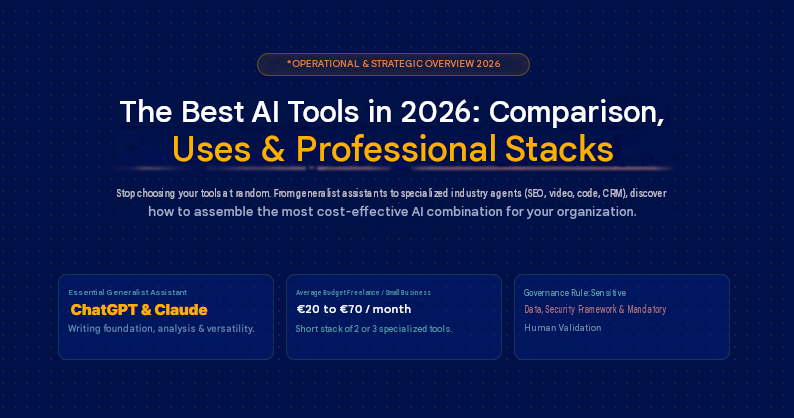
Today, the market is far more crowded. General-purpose AI assistants can write, analyse documents and generate images. They can also create tables, search the web and are beginning to carry out tasks.
Specialist tools, meanwhile, have focused on specific areas such as SEO, design and video. Others target sales prospecting, customer support and coding. There are also dedicated tools for reporting, project management and e-commerce.
The real issue is no longer simply which AI tool is the best in 2026. A better question is which combination of AI tools can genuinely help you work better, move faster and make fewer mistakes.
This guide compares the best AI tools in 2026 based on their real-world uses. It will help you choose a general-purpose tool, then add only the specialist solutions that deliver measurable value.
Quick answer: what are the best AI tools in 2026?
No single tool is superior in every situation. ChatGPT remains our preferred general-purpose option, but other solutions become more relevant as the requirement becomes more specific.
A sensible approach is to choose one primary tool for everyday tasks. You can then add a specialist solution when research, creative production or development represents a significant part of your work.
Best general-purpose AI tool: ChatGPT for versatility
ChatGPT is the most balanced option for getting started. It combines writing, document analysis and image generation within a single interface. It can also conduct research and support technical tasks.
This versatility saves you from opening several tools to prepare a summary, work on a file or create an initial visual. Professional plans add advanced features and connections to company resources. ChatGPT therefore suits both independent professionals and teams looking for a single entry point into AI.
Its main limitation comes from this same versatility. A specialist solution may deliver better results when one use case becomes central, particularly for documentary research or art direction.
For a business that wants to go further, conducting an AI audit can help identify where ChatGPT delivers genuine value and where a specialist tool would be more appropriate.
Best AI tool for writing: Claude or ChatGPT, depending on the content
Claude is particularly useful for working with long documents and maintaining a consistent editorial voice. It suits analyses, reports and content that requires several rounds of revision.
ChatGPT remains more versatile when writing needs to be combined with research, files or visuals. It will often be more practical for preparing a complete campaign, while Claude is worth testing for more in-depth editorial production.
The decision should not be based on a single generated text. Compare both tools using your own brief, then measure how long it takes to correct the result. Current Claude plans also include Claude Code and different usage levels for individual or professional needs.
Within an SEO content writing strategy, the tool does not replace the editorial method. It can accelerate specific stages such as rewriting, creating FAQs or adapting content to a defined audience.
The main limitation is that an AI tool can produce fluent text without necessarily producing accurate text. Human validation remains essential, especially for technical and legal topics. The same applies to financial or medical content.
Best AI tool for research: Perplexity for sourced answers
Perplexity remains our recommendation for finding information quickly and tracing it back to its sources. The tool searches the web, summarises the results and adds citations to the pages it used.
This approach makes verification easier, but it does not remove the need to open important sources. A citation may be relevant even when the summary is incomplete or misinterprets a nuance.
Perplexity is particularly useful for monitoring, creating an initial market overview or preparing a brief. These valuable findings can then support a more structured semantic SEO audit and keyword strategy, especially when the objective is to gain visibility in both Google and AI answer engines.
Best AI tool for creating images: three choices depending on the context
Midjourney remains a leading option for exploring an artistic direction and producing highly polished visuals. Its personalisation features, including moodboards, make it easier to create a consistent visual universe. Version V8.1 also produces high-definition images.
ChatGPT Images 2.0 is better suited when you want to describe a scene precisely, modify a visual through conversation or include readable text. OpenAI particularly highlights improved typography rendering and multilingual support.
Adobe Firefly is the logical choice for teams already using Adobe products. It brings together several creative models and uses a credit system that varies by subscription.
For a broader graphic design and video strategy, the right AI tool must fit your brand guidelines, recurring formats and production constraints. Generating an attractive image is not enough. You must also be able to use it properly.
Best AI tool for creating videos: the format determines the choice
Runway offers one of the most complete environments for generating and editing creative sequences. The platform provides access to several models and mainly charges for usage through credits. It suits advertising, visual concepts and productions that require greater control.
Veo 3.1 is worth considering for cinematic sequences that combine visuals and sound. For training videos or avatar-led presentations, Synthesia and HeyGen will generally be easier to deploy. Both platforms offer voice, translation and virtual presenter features.
Kling remains an interesting alternative for visual generation. Its relevance should nevertheless be assessed according to availability in your country and the models offered when the project begins.
For short-form video creation for social media and advertising, the best result often comes from a hybrid workflow. It may combine an AI-generated script with assisted generation or editing. Human validation and adaptation to each platform’s conventions remain necessary.
Best AI tool for coding: Cursor, Claude Code or GitHub Copilot
Cursor suits developers who want an AI-centred environment. Its editor can work across several files and use agents with the context of the project. Team plans add centralised administration and privacy features.
Claude Code is particularly relevant for terminal-based tasks and complex work across a codebase. It is included with certain Claude subscriptions, while API usage is billed separately.
GitHub Copilot is the most natural choice for organisations already structured around GitHub and their usual integrated development environments. It works across many environments and now offers agents, a command-line interface and several subscription tiers.
In a custom application or website development project, AI can accelerate certain stages. Final quality still depends on the architecture, business understanding and technical validation.
Best AI tool for businesses: choose based on your ecosystem
A company that uses Word, Excel and Teams should generally consider Microsoft 365 Copilot. Its integration with the Microsoft environment limits changes in working habits and makes access administration easier.
For an organisation working in Gmail, Docs and Drive, Gemini in Google Workspace offers comparable continuity. Google integrates AI features across the different Workspace editions, with capabilities that vary by subscription.
ChatGPT Business remains more suitable when a team needs a cross-functional assistant that is independent of a single office suite. The final choice should also account for connectors, governance and the rules applied to data.
Training teams in digital tools and AI can make the difference between an underused subscription and a genuine change in working methods. The challenge is not only technical. It is operational.
Summary table of the best AI tools in 2026
| Main use | Our recommendation | Relevant alternative | Choose it mainly to |
| General-purpose use | ChatGPT | Claude or Gemini | Centralise several tasks within one interface |
| Writing | Claude | ChatGPT | Produce and revise long-form content |
| Sourced research | Perplexity | ChatGPT with search | Obtain a summary supported by sources |
| Image creation | Midjourney | ChatGPT Images or Firefly | Explore a style or produce controlled visuals |
| Creative video | Runway | Veo or Kling | Generate sequences and test concepts |
| Avatar video | Synthesia | HeyGen | Create multilingual training materials and presentations |
| Development | Cursor | Claude Code or GitHub Copilot | Work with the context of a codebase |
| Microsoft-based business | Microsoft 365 Copilot | ChatGPT Business | Integrate AI into Word, Excel and Teams |
| Google-based business | Gemini Workspace | ChatGPT Business | Use AI in Gmail, Docs and Drive |
This table summarises the positioning observed in July 2026. Features and plans can change quickly. The best tool remains the one that genuinely reduces working time without excessively increasing correction work, risk or the number of subscriptions.
How did we rank the best AI tools?
An AI tool can produce an impressive demonstration without remaining useful in everyday work. We therefore looked beyond the quality of its first result when building this comparison.
We also assessed the consistency of its responses and the time required to correct them. Another factor was how easily the tool integrates into a professional environment. The advertised price matters, but it must be compared with the actual cost of use and the level of control available to the business.
The assessment criteria we used
Each solution is evaluated against seven criteria. Their importance varies by use case. Creative quality will be decisive for an image generator, while security will carry more weight for an assistant connected to internal data.
| Criterion | Main question | Why it matters |
| Output quality | Is the content produced ready to use? | An appealing but inaccurate result requires more corrections |
| Reliability | Does the tool provide consistent and verifiable answers? | Errors can affect a decision or publication |
| Ease of use | Can a new user obtain a good result quickly? | A complex interface slows adoption across teams |
| Integration | Does the solution work with the tools already in use? | Effective integration reduces duplicate data entry and unnecessary switching between interfaces |
| Total cost | What budget is actually required over a year? | The subscription does not always include credits or connectors |
| Data security | Can the business control the content that is submitted and retained? | Sensitive information should not be exposed unnecessarily |
| Compliance | Do the available features support compliance with applicable rules? | The tool must fit within a governance framework suited to its use cases |
Output quality should be tested across several tasks. An assistant may excel at summarisation but deliver average results when asked to produce long-form content. An image generator may create a spectacular scene while struggling with text or visual consistency across a series.
Reliability does not mean that the tool never makes mistakes. The more useful question is whether errors are easy to identify and whether the solution allows you to trace the sources it used. For strategic research or market analysis, a verifiable answer is often more valuable than highly convincing wording with no supporting reference.
Ease of use concerns both the interface and the quality achieved without complex configuration. An advanced tool may be excellent for a specialist but offer poor value if every employee needs several hours of training before they can use it properly.
Integration becomes critical once AI enters a recurring workflow. A solution connected to a customer relationship management system or office suite may deliver more value than a slightly more capable tool that remains isolated from the rest of the working environment.
The total cost should include paid options and usage-based charges. Training time, human corrections and automation maintenance must also be included. A low-cost plan can therefore become more expensive when it requires extensive reworking.
Security and compliance involve more than choosing a professional plan. Businesses must examine data-use policies and administrative options. They should also consider whether specific features can be disabled and whether access can be controlled.
How should you choose the right category of AI tool?
Start with the task that takes up the most time rather than the most popular tool. If your main requirement is writing and analysing documents, a general-purpose assistant may be enough. A specialist platform becomes more relevant when video, coding or visual creation is a regular part of your work.
Then ask yourself three questions:
- Does the result deliver a measurable time saving?
- Does the tool fit into the way you work?
- Can your team control the data and identify errors?
Avoid adopting several solutions that cover almost the same functions. Two general-purpose assistants can sometimes be useful for comparing results, but they also create additional costs and fragmented working habits.
The best choice is therefore not necessarily the tool with the highest overall score. It is the one that addresses your priority need with an acceptable balance of quality, control and cost.
Which AI tool should you choose for your profile?
Choosing the right AI tool depends less on the technology itself than on your context. The same solution may be excellent for a freelancer, too limited for an SME, too risky for a legal team or unnecessarily complex for a small e-commerce business.
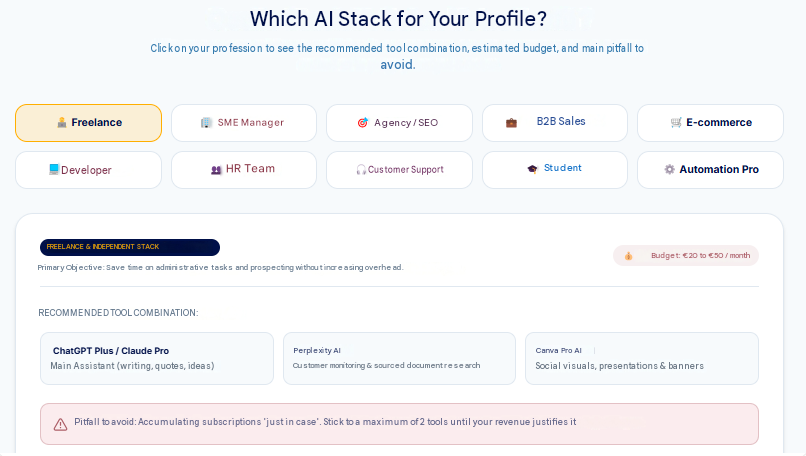
For a freelancer: a short, versatile and cost-effective AI stack
A freelancer rarely needs ten AI tools. The main objective is to save time without unnecessarily increasing fixed costs. Freelancers need to produce work, sell their services and manage clients. They must also organise projects and sometimes create their own marketing content. The right stack should therefore remain simple.
An effective combination for a freelancer might include:
- ChatGPT or Claude for writing, ideas, sales proposals, emails and structuring deliverables;
- Perplexity for research, monitoring and sourced answers;
- Canva AI for simple visuals, presentations and social media assets;
- Notion AI or a documentation workspace for organising projects, notes and processes.
The mistake to avoid: subscribing to several tools “just in case.” A freelancer should first identify the tasks that recur every week. If a tool is used only once a month, it must deliver very clear value to justify its cost.
For an SME: choose an AI stack that can be administered and adopted by the team
An SME needs to think differently from a freelancer. It is not simply choosing a tool for one person. It is selecting a working environment for several employees, with data, access rights and established habits. Confidentiality requirements may also apply. Collective adoption therefore becomes the key criterion.
A basic SME stack may include:
- a general-purpose assistant for cross-functional use cases;
- an AI meeting tool for minutes and follow-up;
- a productivity tool integrated into the existing ecosystem;
- an automation tool for repetitive tasks;
- an internal AI policy to govern use.
The mistake to avoid: focusing on the number of tools rather than their consistency. A poorly governed AI stack quickly creates confusion. Everyone uses a different tool, data circulates without clear rules and responses are not checked. No one can then measure the actual benefit.
For an SEO or marketing agency: combine research, production, creation and analysis
An SEO or marketing agency has broader requirements. It needs to produce content, analyse competitors and create visuals. It must also prepare campaigns, write briefs and monitor performance. In some cases, it may need to scale part of its production. AI can create considerable value, but only when it fits into a clear editorial and strategic method.
A relevant stack may include:
- ChatGPT for outlines, briefs, angles, scripts, rewrites and tables;
- Claude for long-form content, text audits and detailed summaries;
- Perplexity for research, sources and competitor monitoring;
- Surfer, Frase or YourTextGuru for SEO and semantic analysis;
- Canva AI, Midjourney or Adobe Firefly for visuals;
- CapCut or Runway for short-form video;
- Notion AI or ClickUp Brain for organising projects and deliverables.
AI can help turn one message into posts, emails and video scripts. It can also produce advertising hooks and FAQs. However, people must retain control over the offer, supporting evidence and brand consistency. Final quality also requires human oversight.
The mistake to avoid: creating volume without depth. A long but generic article offers little value. Strong AI-assisted content should include examples and sources. It should also provide market analysis, useful comparisons and genuine subject-matter expertise.
For a director or manager: prioritise synthesis, decision-making and follow-up
A director does not use AI in the same way as a writer, designer or developer. The main requirement is often greater clarity. This means understanding information quickly, making better decisions and preparing meetings. It also involves prioritising, tracking projects and turning scattered information into action.
A suitable stack may include:
- Microsoft Copilot or Gemini Workspace, depending on the office ecosystem;
- ChatGPT or Claude for summaries, analyses, decision notes and scenarios;
- Perplexity for market and competitor monitoring;
- Noota, Fathom or Fireflies for meeting summaries;
- Asana AI, ClickUp Brain or Notion AI for project tracking.
The main risk: confidentiality. Directors often handle sensitive information, including strategy, finances and HR matters. Contracts and sales data may also be involved. This information should not be submitted to just any tool without first checking its privacy settings and terms of use.
OpenAI states, for example, that data from its Business, Enterprise, Edu and API offerings is not used to train its models by default. This type of assurance should be checked for every tool before it is used professionally.
For a sales team: accelerate preparation, follow-up and CRM work
Sales teams can gain considerable value from AI, particularly in B2B sales cycles. Their challenge is not simply writing emails. They need to prepare meetings more effectively, follow up at the right time and make better use of recurring objections.
A sales stack may include:
- ChatGPT or Claude for emails, scripts, objection handling and proposals;
- Perplexity for researching an account or industry;
- Noota, Fireflies or Fathom for summarising calls;
- HubSpot AI, Salesforce Einstein or an AI-enabled CRM for tracking prospects;
- Make, Zapier or n8n for automating selected follow-up tasks.
Example: after a sales meeting, a transcription tool can produce a summary. AI identifies the objections, needs and budget. It can also extract the deadline and next steps. The salesperson validates the information, after which a workflow creates a CRM task and prepares a personalised follow-up.
This approach is more useful than simply generating an email automatically. It genuinely improves continuity throughout the sales process.
What to watch: do not automate the relationship to the point where it becomes impersonal. Genuine personalisation remains important in a B2B cycle. An effective follow-up should show that you understood the prospect’s context, rather than simply inserting their first name into a template.
For an e-commerce business: produce better content, analyse faster and optimise conversions
An e-commerce site can use AI at several levels, including product descriptions, visuals and advertising. It can also support emails, customer service and sales analysis. Other uses include recommendations, translation, FAQs and page optimisation.
A simple stack may include:
- ChatGPT or Claude for product descriptions, FAQs, emails and scripts;
- Canva AI or Midjourney for marketing visuals;
- CapCut for short videos;
- Shopify Sidekick when the store runs on Shopify;
- HubSpot, Klaviyo or an AI-enabled email platform for follow-ups;
- a chatbot or support assistant for frequently asked questions.
Shopify presents Sidekick as an AI assistant that can help merchants use certain data and create or modify store-related elements, depending on the available features.
For a developer: save time without sacrificing code quality
For a developer, AI can become a powerful accelerator. It can generate a function, explain an error and suggest a refactor. It may also write tests, document an API and analyse a codebase. AI can help create a prototype as well. However, it may introduce errors, vulnerabilities or technical debt when used without proper controls.
A developer stack may include:
- Cursor for working in an AI-assisted development environment;
- GitHub Copilot for code completion, suggestions and IDE support;
- Claude Code for more agentic tasks across a codebase;
- ChatGPT or Claude for explanation, planning, documentation and reasoning;
- v0, Lovable, Bolt or Replit for quickly creating interfaces or prototypes.
The mistake to avoid: treating AI as an infallible senior architect. A better approach is to treat it as a very fast junior assistant.
For serious projects, people remain responsible for the architecture and technical decisions. They must also retain responsibility for security and maintainability.
For an HR team: save time while protecting sensitive data
Human resources teams can use AI to write job descriptions and prepare interview frameworks. It can also summarise feedback, create training materials and structure internal communications. Another use is analysing HR trends.
However, HR is also one of the areas where caution is most important. HR data is sensitive. It may concern applicants, employees and performance reviews. It can also include salaries, personal circumstances or confidential information. An HR team should therefore never use an AI tool without an appropriate framework.
A sensible HR stack may include:
- a secure professional assistant for documents and summaries;
- an AI meeting tool with clear consent rules;
- a well-structured internal knowledge base;
- a tool for creating training materials;
- strict rules governing prohibited data.
Example: AI can help produce a clearer job description from a manager’s brief. It can also suggest a structured interview framework. Recruitment decisions, assessments and individual cases must nevertheless remain under human control. Particular attention should be paid to bias and confidentiality.
For a student or learner: learn faster without outsourcing the thinking
Students and people in training can use AI to understand a lesson, ask questions or generate exercises.
A simple stack may include:
- ChatGPT or Claude for explanations and rewriting;
- Perplexity for finding sources;
- NotebookLM for working with course documents;
- Canva for creating visual materials;
- Notion AI for organising notes.
The most useful approach is not to ask AI to “do the assignment.” It is to use the tool as a tutor. For example:
- “Explain this concept as if I were a beginner.”
- “Ask me five questions to check that I have understood.”
- “Correct my reasoning.”
- “Give me a concrete example.”
- “Turn this lesson into a revision sheet.”
Example: a marketing student can upload notes to NotebookLM and request a summary. They can then use ChatGPT to create a set of practice questions. Learning remains active because the student must answer, verify and rephrase the material.
The mistake to avoid: confusing time saved with skills lost. If the tool does everything, the user learns very little. When it explains, asks questions and corrects mistakes, it can become an effective learning aid.
For a customer support team: respond faster without damaging the relationship
Customer support is a very practical AI use case. A support team can use AI to summarise enquiries, classify tickets and suggest responses. It can also detect urgent cases, enrich the knowledge base and automate selected simple answers.
A support stack may include:
- a customer support platform such as Intercom, Zendesk AI or HubSpot;
- ChatGPT or Claude for rewriting and improving responses;
- a chatbot connected to the knowledge base;
- a workflow tool for creating or routing tickets;
- a clean and up-to-date documentation base.
The mistake to avoid: overlooking the quality of the knowledge base. If the information is outdated, the chatbot will provide poor answers. Before placing AI in a customer-facing role, the content must be structured. This includes procedures, policies and FAQs. Escalation cases, response templates and exceptions must also be documented.
For businesses that want to connect support with practical actions, transactional chatbot integration can extend the workflow. Customer support can then track orders, book appointments or update information. It can also qualify a request before passing it to the appropriate person.
Summary table: which AI stack should you choose for your profile?
| Profile | Recommended AI stack | Priority | What to watch |
| Freelancer | ChatGPT or Claude, Perplexity, Canva AI, Notion AI | Save time without increasing costs | Avoid too many subscriptions |
| SME | ChatGPT Business, Microsoft Copilot or Gemini, meeting tool, Make/Zapier | Collective adoption and security | Govern sensitive data |
| SEO/marketing agency | ChatGPT, Claude, Perplexity, SEO tool, Canva, CapCut | Produce better work faster | Avoid generic content |
| Director/manager | Copilot or Gemini, ChatGPT, Perplexity, meeting tool | Synthesis, decisions and follow-up | Protect strategic data |
| B2B sales team | ChatGPT, Perplexity, meeting tool, AI CRM, automation | Preparation and follow-up | Maintain genuine personalisation |
| E-commerce business | ChatGPT, Canva, CapCut, Shopify Sidekick, AI email platform, chatbot | Conversions and product content | Do not neglect the offer or user experience |
| Developer | Cursor, GitHub Copilot, Claude Code, ChatGPT, v0/Bolt | Accelerate coding and prototyping | Human review is essential |
| HR | Secure professional assistant, meeting tool, documentation base, training materials | Structure work and save time | Sensitive data and bias |
| Student | ChatGPT, Perplexity, NotebookLM, Notion, Canva | Understand and revise | Do not outsource the thinking |
| Customer support | Zendesk/Intercom/HubSpot AI, chatbot, knowledge base | Respond faster | Quality of internal sources |
This table provides a basis for decision-making, but it should not replace real testing. Two businesses in the same industry may have very different requirements depending on their size, existing tools and security expectations.
The best method is to choose a minimal stack and test it for a few weeks on specific use cases. Measure the benefits, then add only the tools that solve a genuine problem.
Free vs paid: is an AI tool worth paying for in 2026?
The answer is yes, but not always. A free AI tool is often enough to explore the technology, run tests and learn how to write effective prompts. It can also handle a few simple tasks. However, the limitations quickly become apparent once use becomes regular, professional or sensitive. Free tools often provide fewer features and fewer privacy options.
What a free version can really do
Free plans are useful for learning. They allow you to test an assistant, develop good habits and compare responses. You can also create a small amount of content, summarise a simple document or generate ideas. Another option is to produce an initial draft.
In practical terms, a free version may be enough to:
- rewrite an email;
- create an initial list of ideas;
- summarise a short text;
- prepare a simple outline;
- generate a few hooks;
- understand a technical concept;
- test a tool before subscribing.
A free version can also help teach teams the basics. This includes writing a clear instruction and requesting a specific format. Teams can also learn how to verify a response and avoid submitting sensitive data.
However, it is important to be realistic. Free plans are not designed to support intensive professional use. For a business, they provide a useful learning environment. They do not always provide a reliable production foundation.
What paid versions unlock
Paid plans become relevant when a tool moves from being an experiment to becoming part of everyday work. They may provide more advanced models, higher usage limits and better file handling. Other benefits can include search features, project workspaces and connectors.
Some plans also provide image generation, agents and team administration. Enhanced security, support and privacy controls may be included as well.
Example: a sales team that uses AI to analyse meeting summaries and write proposals should not rely exclusively on free personal accounts. It needs a shared framework, clear usage rules and a minimum level of control.
Training teams in digital tools and AI can help prevent a disorganised rollout. The business must define who uses each tool and for which tasks. It should also specify which data can be used and where human validation is required.
How much should you budget for an AI stack in 2026?
For an independent professional, a monthly budget of €20 to €70 is often sufficient. This can cover a general-purpose assistant and, when necessary, a specialist research or creative tool.
A small team can quickly reach €50 to €150 per user per month when it combines an office suite, a creative platform and several assistants. The budget rises further when video platforms, agents or usage-based services are added.
| Level of adoption | Indicative monthly budget | Likely configuration |
| Individual testing | €0 to €20 | Free plans or a single subscription |
| Regular freelancer use | €20 to €70 | Primary assistant and specialist tool |
| Small team | €40 to €120 per user | Business plan and specialist tools |
| Advanced use | €100 to €300 per user | Several platforms and automations |
| Custom deployment | Variable | APIs, connectors and maintenance |
These figures are intended only for planning. The actual cost depends on the country, annual billing and usage volumes. APIs may also add a variable expense based on the amount of text processed or the services used.
How do you calculate the ROI of an AI tool?
Start by measuring how much time the task requires before adoption. Then compare it with the time needed when using the tool, including corrections.
A simple formula can be used:
Monthly value created = hours saved × hourly cost + additional revenue – subscription cost
Suppose a tool costs €30 per month and saves four hours. If one hour of work is worth €40, the gross benefit is €160. After deducting the subscription, the estimated monthly value is €130.
The calculation must include human reworking. Content produced in ten minutes but corrected for an hour does not deliver the advertised saving.
The hidden costs of AI tools
Subscriptions represent only part of the total cost. Here is why.
1. Fragmentation
The first hidden cost is fragmentation. A company may accumulate tools because every team tests a different solution. Eventually, several subscriptions overlap and data circulates across different environments. No one has a clear view of which tools are actually being used.
2. Human reworking
The second hidden cost is human reworking. When AI produces weak responses, the team must spend time correcting and restructuring them. The benefit may then become limited or even negative.
3. Data risk
The third hidden cost is data risk. A free or poorly configured tool may be used with information that should never have left the company. Examples include contracts, customer data and internal figures. HR documents and sales information may also be exposed.
4. Dependency
The fourth hidden cost is dependency. When an entire working method relies on one tool with no backup, the company becomes vulnerable to changes in pricing, features or terms of use.
5. Insufficient training
The fifth hidden cost is insufficient training. A powerful tool used poorly produces average results. Many companies believe they are buying productivity, but they are only buying access. Productivity comes later, through a clear method.
Example: a marketing team may pay for several AI tools and continue producing generic content when it has not defined its editorial direction or quality standards.
This is why on-page SEO optimisation remains necessary even when good AI tools are available. AI can accelerate production, but it does not replace a clear content architecture or a proper understanding of search intent.
Free or paid, depending on the use case
The decision becomes easier when use cases are classified by their risk level and frequency. The table below provides a practical overview.
| Use case | Can a free plan work? | Is a paid plan recommended? | Is a business framework required? |
| Simple brainstorming | Yes | Not essential | No |
| Rewriting a non-sensitive email | Yes | For frequent use | No, unless customer data is involved |
| Professional SEO article | Possible for testing | Yes | Yes, when internal data or a confidential strategy is involved |
| Simple social media visuals | Yes | Yes, for regular production | Depends on brand requirements and rights |
| Analysis of internal files | Avoid when sensitive | Yes | Yes |
| Meeting summaries | Rarely sufficient | Yes | Yes, with consent |
| Sales automation | Not recommended | Yes | Yes |
| Automated customer support | Not recommended | Yes | Yes |
| HR or legal data | No | Yes, but with strict controls | Yes, strongly |
| Production code | Not as the sole basis | Yes | Yes, with technical review |
This framework avoids two extremes. It prevents you from paying too early for low-value use cases. It also prevents you from remaining on a free plan once the work has become professional and risky.
Do you need to pay for several AI tools?
Not necessarily. The right AI stack is not the longest one. It is the most coherent.
A small business can start effectively with three tools:
- a general-purpose assistant;
- a creative or productivity tool;
- a research, meeting or automation tool.
For example, it could use ChatGPT Business + Canva Pro + Perplexity. Another combination is Claude Pro + Notion AI + Fireflies. A Microsoft-based team might choose Microsoft 365 Copilot + PowerPoint/Excel + a transcription tool.
The goal is to avoid duplication. When two tools serve exactly the same purpose, keep the one the team actually uses rather than the one that appears most advanced on paper.
A useful test is to ask the following question : If we remove this tool tomorrow, which specific task becomes slower, more expensive or less reliable?
When the answer is unclear, the tool may not be essential. For businesses that want to build a coherent stack, our agency offers a comprehensive AI audit to map existing tools, overlaps and risks. It also helps identify the priority use cases.
The best ready-to-use AI stacks
An AI stack is a combination of tools that work together around your use cases. In practice, an effective AI stack often begins with three components. These are a general-purpose assistant, a specialist business tool and a research, productivity or automation tool.
Free AI stack: test without a budget
This stack suits a student, a freelancer who is just getting started, a very small business or an SME that wants to understand what AI can offer before paying.
| Requirement | Possible tool | Practical use |
| General-purpose assistant | Free ChatGPT, free Claude or Gemini | Ideas, rewriting, explanations, outlines and drafts |
| Research | Free Perplexity | Sourced research, quick monitoring and understanding a topic |
| Documents | NotebookLM, depending on Google access | Summarising files, notes, course documents or reports |
| Design | Free Canva | Social posts, simple presentations and quick visuals |
| Organisation | Free Notion or Google Docs | Notes, knowledge base and simple tracking |
AI stack for freelancers: €50 to €70 per month or less
A freelancer needs to optimise time without adding too much to fixed costs. The ideal stack should cover the most frequent tasks, including writing, research and organisation. It should also support visual creation, sales proposals and client communication.
| Requirement | Recommended tool | Why use it? |
| Primary assistant | ChatGPT Plus/Go or Claude Pro | Writing, analysis, ideas and structuring deliverables |
| Research | Free or Pro Perplexity | Sources, monitoring and client preparation |
| Design | Canva Free or Pro | Presentations, LinkedIn posts, banners and documents |
| Organisation | Notion or Google Workspace | Client tracking, notes, processes and planning |
This stack works well with a hybrid AI and human writing process. It accelerates production while allowing you to retain control over editorial quality.
AI stack for SMEs: productivity, meetings and automation
An SME needs to think about the team, security and adoption. The priority is not simply to choose the best assistant. It is to select a stack that employees will understand and actually use.
| Requirement | Recommended tool | Practical use |
| Cross-functional assistant | ChatGPT Business, Claude Team, Microsoft Copilot or Gemini Workspace | Writing, analysis, documents and summaries |
| Meetings | Noota, Fireflies, Fathom or Otter | Transcription, summaries and follow-up actions |
| Productivity | Microsoft 365 Copilot, Gemini Workspace, Notion AI or ClickUp Brain | Documents, tasks, internal research and project tracking |
| Automation | Zapier, Make or n8n | Forms, CRM, emails and repetitive tasks |
| Design | Canva Business or Canva Pro | Sales materials, social media assets and presentations |
Example: an SME with 30 employees could use Microsoft Copilot for documents and meetings. ChatGPT Business could cover cross-functional use cases, while Fireflies handles sales calls. Zapier could then create a CRM task automatically after each incoming form submission.
The main risk is fragmentation. To prevent it, define three points from the outset:
- which tools are authorised;
- which data is prohibited;
- when human validation is mandatory.
AI stack for marketing and SEO: research, content, visuals and performance
A marketing team does not simply need to produce faster. It must create useful content that suits the target audience and works across several channels. These may include SEO, LinkedIn and email marketing. Other formats include landing pages, advertisements, short videos, lead magnets and sales presentations.
| Requirement | Recommended tool | Practical use |
| Research | Perplexity, ChatGPT with search, Gemini or NotebookLM | Sources, trends, competitors and search intent |
| Writing | ChatGPT, Claude | Articles, pages, emails, scripts and FAQs |
| Semantic SEO | Surfer, Frase, YourTextGuru | Semantic fields, briefs and optimisation |
| Design | Canva AI, Adobe Firefly, Midjourney | Visuals, banners, concepts and materials |
| Video | CapCut, Runway, Synthesia or HeyGen | Shorts, Reels, training videos and avatars |
| Organisation | Notion AI, ClickUp Brain, Asana AI | Editorial calendar, tasks and briefs |
| Automation | Make or Zapier | Publishing, reporting and data transfer |
For SEO, this stack can be strengthened with an AISEO, or Artificial Intelligence Search Engine Optimization, approach. The objective is no longer only to rank well on Google. Content must also be suitable for citation by AI answer engines.
Microsoft AI stack: for businesses already using Microsoft 365
A Microsoft stack may be coherent when your company already works with Outlook, Teams and Word. The same applies to Excel, PowerPoint, SharePoint and OneDrive. The benefit is not simply having an AI assistant. It is connecting AI to the documents, meetings and emails that teams already use, along with their existing tools.
| Requirement | Microsoft or complementary tool | Practical use |
| Office assistant | Microsoft 365 Copilot | Word, Excel, PowerPoint, Outlook and Teams |
| Meetings | Teams with Copilot or a complementary tool | Summaries, decisions and actions |
| Data | Excel + Copilot, Power BI Copilot depending on the environment | Analysis, reporting and tables |
| Presentations | PowerPoint Copilot | Slides, summaries and sales materials |
| Automation | Power Automate or Zapier/Make | Internal workflows |
| Complementary assistant | ChatGPT or Claude | External analysis, long-form writing and creativity |
Example: a consulting SME could use Copilot to summarise Teams meetings and prepare PowerPoint slides. It could also extract key points from Word documents and analyse selected Excel tables. Claude could complement this stack for long notes, while Perplexity supports monitoring.
Google Workspace AI stack: for teams already using Gmail, Docs and Drive
A Google stack may feel more natural when your company mainly works with Gmail, Google Docs and Sheets. The same applies to Slides, Drive and Meet. The objective is similar to the Microsoft approach. AI is integrated into tools that employees already use rather than forcing them to adopt a separate environment.
| Requirement | Google or complementary tool | Practical use |
| Workspace assistant | Gemini in Google Workspace | Emails, documents, spreadsheets and meetings |
| Document research | NotebookLM | Summarising files, reports and knowledge bases |
| Productivity | Google Docs, Sheets and Slides with AI, depending on the edition | Writing, tables and presentations |
| Meetings | Google Meet with AI features, depending on the plan | Summaries, notes and follow-up |
| Complementary assistant | ChatGPT or Claude | Advanced writing, long-form analysis and creativity |
| Design | Canva | Presentations, visuals and marketing materials |
Example: an agency could use Gemini to work in Docs and Sheets. NotebookLM could help query client documents, while Canva supports presentations. ChatGPT could then be used for campaign angles or more creative content.
For an SEO-friendly website redesign project, this stack can centralise briefs, content and audits. It can also organise internal links, keyword tables and client approvals.
AI stack for video creators: from script to publication
A video creator, e-commerce brand or social media team needs a highly practical stack. The workflow must cover the entire production chain, from the initial idea and script to visuals and video. It should also support voice, editing and subtitles, followed by platform adaptation and publication.
| Stage | Recommended tool | Practical use |
| Idea and script | ChatGPT or Claude | Hooks, scenarios, angles and short scripts |
| Research | Perplexity | Trends, sources and examples |
| Image or scene | Midjourney, GPT Image, Adobe Firefly | Concepts, visuals and thumbnails |
| Generative video | Runway, Kling or Veo, depending on access | Sequences, moods and scenes |
| Avatar or training | Synthesia or HeyGen | Presentations, tutorials and multilingual videos |
| Voice | ElevenLabs | Narration, dubbing and audio |
| Short-form editing | CapCut | Subtitles, pacing and TikTok/Reels/Shorts formats |
| Final design | Canva | Thumbnails, covers and variations |
Example: a cosmetics brand could ask ChatGPT for three video angles and use Canva to create the visuals. CapCut could produce the short edit, while ElevenLabs provides the voice-over. Runway could generate a few atmospheric shots.
The key is not to use every tool for every video. It is to create a repeatable workflow.
For a TikTok or Reels campaign, producing five simple variants with different hooks is often more effective than creating one highly polished video. AI makes faster testing possible, provided the brand remains consistent.
AI stack for e-commerce: product descriptions, visuals, follow-ups and support
In e-commerce, AI can contribute at several points in the customer journey. These include discovery, product pages and advertising. It can also support email, customer service and reviews. Other applications include FAQs, abandoned-cart follow-ups and sales analysis.
However, the stack must remain focused on conversion. Producing more content is not enough when product pages fail to reassure customers or the purchasing journey is weak.
| Requirement | Recommended tool | Practical use |
| Product descriptions | ChatGPT or Claude | Descriptions, benefits, FAQs and objections |
| Customer research | Perplexity, customer reviews, internal analysis | Objections, trends and customer vocabulary |
| Design | Canva AI, Midjourney or GPT Image | Visuals, banners and campaigns |
| Short videos | CapCut, Runway | Demonstrations, user-generated content and ads |
| Email marketing | Klaviyo, Brevo, HubSpot AI | Follow-ups, newsletters and segmentation |
| Shopify store | Shopify Sidekick, depending on availability | Store assistance, data and tasks |
| Support | Chatbot, Zendesk AI, Intercom AI or HubSpot | FAQs, tickets and customer follow-up |
| Automation | Make, Zapier or n8n | Orders, CRM, emails and reporting |
Example: a store selling home accessories could use ChatGPT to turn technical features into customer benefits. Canva could create the advertising visuals, while CapCut produces short videos. Klaviyo or Brevo could then send segmented email sequences.
The main point to watch is the quality of the information produced. AI can write quickly, but it must not invent promises, materials or guarantees. Delivery times must not be fabricated either. Product information should be checked before publication.
To increase conversions, this stack should support a strategy based on optimised landing pages. AI tools can accelerate production, but performance comes from the offer, evidence and design. Trust and a simple purchasing process are equally important.
AI stack for sales: prospecting, meetings and CRM follow-up
A sales stack should improve personalisation and follow-up. It should not turn prospecting into automated messages with no context. In B2B, AI is more effective when it helps salespeople make better use of their conversations.
| Requirement | Recommended tool | Practical use |
| Account research | Perplexity, LinkedIn, CRM | Industry, news and company context |
| Messages | ChatGPT or Claude | Emails, follow-ups and objection handling |
| Meetings | Fathom, Fireflies, Noota or Otter | Transcription, summaries and next actions |
| CRM | HubSpot AI, Salesforce Einstein or another AI CRM | Tracking, scoring and pipeline management |
| Automation | Zapier, Make or n8n | Tasks, notifications and data enrichment |
| Documentation | Notion or Google Docs | Scripts, objections and playbooks |
Example: after a sales call, the meeting tool summarises the requirements and identifies objections. It also lists the next steps. AI then helps prepare a personalised follow-up, while a workflow automatically creates a CRM task for the appropriate date.
The value lies in continuity. Many businesses lose opportunities not because their offer is poor, but because follow-up is inconsistent. AI can reduce these omissions. A newsletter and email sequence strategy can also strengthen this stack, particularly for leads that are not yet ready to buy.
AI stack for automation and agents: move from answers to action
Automation is the most powerful stack, but it also requires the greatest caution.
An AI assistant helps you produce a response. A workflow automates a sequence of actions. An AI agent can go further by completing several steps within a defined framework.
| Requirement | Recommended tool | Practical use |
| Simple workflows | Zapier | Forms, emails, notifications and CRM |
| Advanced workflows | Make | Visual scenarios, conditions and multiple tools |
| Technical workflows | n8n | Custom automation, self-hosting and control |
| Agents | Lindy, Relevance AI, ChatGPT Agents or Notion Agents, depending on use | Research, qualification and repetitive tasks |
| Documentation | Notion, Google Drive, SharePoint | Knowledge base and procedures |
| Validation | Human in the loop | Control before sensitive actions |
Example: a company receives a request through a form. The workflow checks the type of request, adds the contact to the CRM and generates a summary. It then suggests a response, creates a task and notifies the responsible employee. A person validates the response before it is sent when the request is commercial or sensitive.
The rule is simple. Automate repetitive tasks, but retain human validation for anything that affects the customer relationship or brand image. The same applies to legal, financial and sensitive data matters.
An approach based on integrating intelligent workflows to automate repetitive tasks helps map tasks, risks and data. It also identifies the required control points before agents are deployed.
Secure enterprise AI stack: governance before deployment
A more structured organisation should not begin with the tools. It should begin with governance. As the number of AI use cases increases, the risks grow as well.
| Requirement | Recommended tool or framework | Practical use |
| Enterprise assistant | ChatGPT Enterprise, Claude Enterprise, Microsoft Copilot or Gemini Enterprise, depending on context | Secure and administrable assistant |
| Governance | AI policy, internal policies and roles | Permitted data, validation and responsibilities |
| Internal documents | SharePoint, Google Drive, Notion or a structured intranet | Reliable knowledge base |
| Security | Single sign-on, access management, logs, data processing agreement and audit | Control and compliance |
| Training | Role-based workshops, use cases and practical rules | Managed adoption |
| Measurement | Usage KPIs, time saved, quality and risks | ROI monitoring |
This stack is not the fastest to deploy, but it is the most sustainable. It suits organisations that handle customer, HR or financial data. Legal, technical and strategic information also requires this level of care.
Preliminary data governance work is particularly useful before AI is connected to internal documents. If the documentation base is poor, AI will merely make the existing problems more visible.
How to choose your AI stack in 30 minutes
When you are still unsure, start with your tasks rather than the tools. Take a sheet of paper or use a simple table. List the ten tasks that consume the most time each week, then classify them using three criteria:
- frequency: daily, weekly or occasional;
- value: low, medium or high;
- risk: low, medium or high.
Start with frequent, low-risk tasks that offer medium or high value.
| Task | Frequency | Value | Risk | Tool to test |
| Summarise a project meeting | Weekly | Medium | Medium | Fathom, Fireflies, Noota |
| Draft an article | Weekly | High | Low to medium | ChatGPT, Claude |
| Create LinkedIn posts | Weekly | Medium | Low | ChatGPT, Canva |
| Prepare a sales follow-up | Daily | High | Medium | ChatGPT, CRM, meeting tool |
| Analyse sensitive data | Monthly | High | High | Secure enterprise tool |
| Answer recurring support questions | Daily | High | Medium | Chatbot, knowledge base |
This method prevents you from choosing a tool simply because it is fashionable. Your first stack should remain short. Three tools are often enough:
- a general-purpose assistant;
- a specialist tool linked to your biggest operational problem;
- a research, productivity or automation tool.
After 30 days, retain only what is actually being used. Remove anything that remains theoretical. Add another tool only when a real task justifies it.
Example of a gradual 90-day deployment
A company that wants to adopt AI without becoming fragmented can follow a simple progression. During the first 30 days, the objective is exploration. The company tests a general-purpose assistant, defines permitted use cases and identifies repetitive tasks. It also trains a small group of pilot users.
During the next 30 days, the objective is integration. The team selects two or three priority use cases. These may involve content writing, meeting summaries or customer support. Other options include sales follow-ups, document analysis and simple automation. The first prompt templates and procedures are documented.
During the final 30 days, the objective is measurement. The company reviews what has actually changed, including time saved and frequency of use. It also assesses deliverable quality, team satisfaction and identified risks. Unnecessary tools and remaining training needs should be recorded as well.
Example: a marketing SME could begin with ChatGPT Business, Canva and Perplexity. In the second month, it could add Fireflies for client meetings and Make to transfer selected leads automatically to the CRM. In the third month, it would measure the actual gains across briefs, content, follow-ups and meeting summaries.
This gradual approach works better than a large theoretical rollout. An AI stack should be built as a working system. Start with simple use cases, train the teams and secure the data. Automation can then be introduced progressively.
Security, GDPR and privacy: what to check before using an AI tool
An AI tool can speed up writing, analysis or customer support. It can also expose sensitive information when usage rules remain unclear. Security should therefore be assessed before deployment. A successful demonstration proves neither that the processing is compliant nor that the company can control access effectively.
Data you should not send to a public AI tool
Avoid copying client files, unpublished contracts or HR information into a public version of an AI tool. Login details, passwords and API keys should also remain outside conversations. The same caution applies to sales strategies, detailed financial data and proprietary code when no approved framework is in place.
The CNIL recommends that microbusinesses and SMEs do not enter confidential, personal or strategic data into a generative AI tool without appropriate precautions.
Removing a name is not always enough to make a document anonymous. A job title, date or specific context may still make it possible to identify the person concerned.
Before approving a use case, ask a few simple questions. What data will be submitted, and for what purpose? How long will it be retained? Who will be able to access it? Does the provider reuse submitted content to improve its models?
Free, paid or business plans: security is not the same
Business plans may provide additional safeguards, but these must be checked provider by provider. OpenAI states, for example, that content from its Business and Enterprise plans, as well as its API, is not used to train its models by default. Depending on the plan, the company also provides retention settings and administrative controls.
This commitment does not remove the need to review the data processing agreement, subprocessors and hosting locations. Deletion and export options should also be checked.
A plan described as “enterprise” does not guarantee compliance on its own. Compliance also depends on the chosen purpose, the data being processed and your own configuration.
Shadow AI, customer support and sensitive data
Shadow AI refers to the use of artificial intelligence tools without approval from the organisation. In practice, an employee might create a personal account to summarise a report or analyse a client file.
Banning every use of AI rarely solves the problem. A more effective approach is to provide an approved solution and define rules that employees can understand. Teams should know which content is permitted and which information must be anonymised.
Customer support requires particular care. Users may enter an order number, address or medical information without being asked. The chatbot should request only the data it needs and mask unnecessary information in logs.
Create an AI use policy and simple governance
A useful AI policy can fit into a few pages. It should identify the tools approved for internal use, prohibited data and use cases that require validation. It should also define responsibilities when an error or incident occurs.
AI governance can remain simple in an SME. There is no need to create an excessively complex system. However, each team should not make decisions in isolation without an overall view.
A minimum governance structure can be based on four roles:
- Business sponsor. This person identifies the requirements, expected benefits and operational problems to solve.
- AI lead. This person centralises good practices, tracks the tools being tested, supports teams and documents use cases.
- Data or security lead. This person reviews risks related to data, access rights, contracts and tools.
- Validation owner. This person ensures that important deliverables are reviewed before publication or use in a decision.
Example: in an SME with 40 employees, the marketing manager could oversee routine use cases, while the director approves paid tools. A technical provider could review connectors, and a designated employee could document the rules. This is enough to get started.
Security criteria to include in an AI tool assessment sheet
Before adding an AI tool to your stack, create an assessment sheet. It can remain simple, but it should ensure that the right points are reviewed.
| Criterion | Question to ask | Why it matters |
| Data | What data will be entered into the tool? | Identify the level of risk |
| Purpose | Why are we using this tool? | Avoid unclear or uncontrolled uses |
| Training | Is the data used to train the model? | Protect internal information |
| Hosting | Where is the data stored? | Check compliance requirements |
| Access | Who can use the tool? | Limit internal risks |
| Administration | Is there a team administration console? | Manage users and employee departures |
| Retention | How long is the data retained? | Reduce exposure |
| Security | Does it provide encryption, SSO, logs or certifications? | Assess its robustness |
| Contract | Are a DPA, business terms and support available? | Govern the relationship with the provider |
| Validation | Is human review required? | Prevent errors in production |
This assessment sheet prevents a tool from being selected solely because it is popular or appears in a ranking. It requires the company to connect the tool with a specific use case, data type and level of control. This is exactly what is missing from many AI deployments.
Security and performance: finding the right balance
Too much caution can prevent innovation, while too much freedom can create risks. The right balance comes from classifying use cases.
- Low-risk uses can be opened quickly. These include brainstorming, rewriting and content ideas. Outlines and non-confidential materials may also fall into this category.
- Medium-risk uses should be governed. Examples include meeting summaries, sales proposals and branded content. The same applies to the analysis of non-sensitive internal data.
- High-risk uses should be validated. These include HR data, customer data and contracts. Automated support, important sales decisions and agents connected to internal tools also require approval, as does production code.
This classification allows the company to move forward without waiting for a perfect policy.
Example: a company may immediately allow AI for non-sensitive marketing drafts while temporarily prohibiting its use with contracts and HR data. Those restrictions can remain in place until an approved tool has been implemented.
This is a realistic approach. It allows the company to test, train, measure and improve security progressively.
Checklist before adopting an AI tool in a business
Before paying for or deploying an AI tool, check the following points:
- the use case is clearly defined;
- the expected benefit is specific;
- the users have been identified;
- the data to be used is known;
- prohibited data has been listed;
- the terms of use have been reviewed;
- the privacy settings are understood;
- access can be managed;
- human validation is planned;
- a procedure exists for handling errors;
- the tool does not unnecessarily duplicate an existing tool;
- the monthly cost is justified by actual use.
When you cannot answer these questions, the tool may not be ready for deployment. It may still be tested, but it should not yet become an official component of the organisation. Security should not prevent AI adoption. It should help make that adoption sustainable.
How should you test an AI tool before adopting it?
A successful demonstration is not enough to prove that an AI tool is suitable for your business. The examples provided by vendors are generally prepared to highlight the tool’s strengths. They do not reproduce your documents, constraints or the errors encountered in everyday work.
Start with three real use cases
Select three tasks that occur often enough to produce a measurable benefit. Avoid scenarios that are too broad, such as “improve productivity.” They do not allow tools to be compared properly.
An SME could, for example, test:
- summarising a meeting report;
- drafting a response to a customer enquiry;
- analysing a file containing anonymised sales data.
Each use case should have a defined expected outcome. For a summary, you can check whether decisions and responsibilities have been identified correctly. For marketing content, assess how closely the result follows the brief and how long rewriting takes. For an analysis, verify the calculations and conclusions.
Then use the same documents and the same prompt with every tool. Changing the prompt between tests distorts the comparison. One assistant may appear better simply because it received more context or more precise instructions.
Keep a version of the result produced without AI as well. This benchmark makes it possible to measure the actual time saved and confirm that the final quality remains acceptable.
Assess quality and rework time
A fluent response is not necessarily usable. It may contain a factual error, overlook an important constraint or use an unsuitable tone.
Assess each result across several dimensions.
| Criterion | Question to ask | Score out of 5 |
| Accuracy | Is the important information correct? | To be completed |
| Compliance with instructions | Are the format and constraints followed? | To be completed |
| Usefulness | Does the result genuinely make the work easier? | To be completed |
| Correction time | How many minutes are required to validate the result? | To be completed |
| Consistency | Does the quality remain stable across several tests? | To be completed |
| Ease of use | Can the team use the tool without constant assistance? | To be completed |
Rework time deserves particular attention. A text produced in thirty seconds may require forty minutes of rewriting. In that case, the benefit is limited, even when the first impression is positive.
Test security and integration
Review the available settings. Can the administrator control accounts and disable selected features? Can users freely connect their email or storage space? Are conversations retained, and if so, for how long?
Connector permissions should also be checked. A tool used to summarise one document should not have access to the company’s entire Drive. A sales AI may need to view selected CRM data without having permission to delete or modify records.
Integration should be tested across the complete workflow. When the assistant produces a meeting summary, check how it reaches the client folder. When it drafts an email, assess whether the employee must manually copy the text into the email platform.
A slightly less capable solution may provide greater value when it removes several manual steps. By contrast, an isolated tool may gradually be abandoned even when its results are good.
Run a pilot and measure the results
Create a small group of three to ten users. Include sufficiently varied profiles to avoid reaching a conclusion based on one person’s preferences.
Explain the permitted use cases and prohibited data. Provide a few example prompts without imposing an overly rigid method. The pilot should also show how easily employees can adopt the tool.
Measure a few simple indicators during the pilot:
- the average time required to complete the task;
- the proportion of results usable after minor correction;
- the number of significant errors;
- the actual frequency of use;
- user satisfaction.
Qualitative feedback complements the figures. A solution may save time while making the work more frustrating. It may also produce limited immediate savings but improve document consistency.
A fourteen-day testing plan
| Period | Action |
| Days 1 and 2 | Select the three use cases and measure the starting point |
| Days 3 and 4 | Configure the tools and prepare identical prompts |
| Days 5 to 7 | Test quality across several examples |
| Days 8 to 10 | Launch the pilot with a small group |
| Days 11 and 12 | Check integrations, access permissions and errors |
| Day 13 | Calculate the time saved and estimated cost |
| Day 14 | Decide whether to retain, replace or abandon the tool |
This period is not long enough to validate a large-scale deployment. It can nevertheless eliminate poorly suited tools quickly and identify those that deserve a longer pilot.
Example of a complete test for an SME
An SME wants to choose an assistant for its sales teams. It compares ChatGPT Business, Microsoft 365 Copilot and the AI built into its CRM.
All three tools receive the same fictional meeting reports. They must produce a summary, identify the next actions and prepare a follow-up email.
The team measures information quality, correction time and how easily the result can be saved in the CRM. The tool that produces the best text is ultimately not selected because it requires salespeople to perform several manual copy-and-paste steps. The integrated solution receives a slightly lower writing score but reduces total working time by a greater amount.
The right decision is therefore not always to pay for the most advanced tool. Retain a solution when it improves a real process and its risks remain manageable. Replace it when the results require too much correction. Abandon it when the benefit does not offset either the cost or the added complexity.
AI trends to watch in 2026
The market is now evolving less through the arrival of new assistants and more through the integration of AI into working processes.
AI agents are moving from answers to action
Traditional assistants generate text or provide analysis. Agents can go further by consulting resources, using software and carrying out several consecutive steps.
This development is particularly visible in software development and process automation. Agents can analyse a codebase, make changes and run tests before submitting the result for human validation. Professional platforms are also seeking to connect these agents to companies’ internal systems.
AI governance is becoming a performance criterion
In 2026, governance is no longer only a legal constraint. It also helps prevent overlapping subscriptions, fragmented data and automations that are impossible to maintain.
Companies need to inventory their tools, define permitted use cases and assign clear responsibilities.
Search is evolving towards answer engines
Online search is no longer limited to displaying a list of links. Search engines provide summaries, accept follow-up questions and sometimes combine text with voice or images.
Google has notably strengthened AI Overviews and AI Mode to support more conversational exploration of search results. Search Live has also been expanded to more countries and languages.
For businesses, this development is changing online visibility. Content needs to provide original and verifiable information rather than simply rephrasing what already exists.
AI video is becoming a creative testing channel
Generative video is gradually moving from impressive demonstrations to practical production. It can be used to create an initial sequence, animate an image or produce several variations of a concept.
Adobe, for example, has added AI-assisted generation and editing features to Firefly. The platform can turn images into videos and then incorporate the results into an initial editable sequence.
This speed makes advertising tests easier. However, it does not replace art direction or performance analysis.
Established software is becoming AI software
Artificial intelligence features are being integrated directly into software that companies already use. Microsoft is developing agents within Microsoft 365 Copilot. Google is deploying Gemini across Gmail, Docs and Meet, while Adobe is expanding its creative assistant across several Creative Cloud applications.
The best AI tool may therefore be one that the company already owns. Before adding another subscription, review the features included in your current environment and test them against your priority use cases.
FAQ about the best AI tools in 2026
What is the best AI tool in 2026?
ChatGPT remains the best general-purpose choice for most users because of its versatility. It can write, analyse files and conduct research. Claude, Gemini or Perplexity may be more relevant when the main requirement involves long documents, the Google ecosystem or sourced research.
What is the best free AI tool?
The best free option depends on the requirement. ChatGPT and Claude suit general-purpose tasks. Perplexity is particularly useful for finding information supported by sources. However, limits on messages, models and features make these free versions less suitable for intensive professional use.
Is ChatGPT the best AI tool?
ChatGPT is probably the most versatile tool, but it is not automatically the best in every category. Claude may be preferable for certain types of long-form content. Perplexity makes sourced research easier, while Midjourney or Runway provide greater control for some creative use cases.
Is Claude better than ChatGPT?
Claude can produce highly coherent writing and work effectively with long documents. ChatGPT generally offers a broader range of features within one interface. The best choice therefore depends on the tasks being performed and how long it takes to correct the results.
Is Gemini a good choice for a business?
Gemini becomes particularly useful for a business that already uses Google Workspace. Its integration with Gmail, Docs, Drive and Meet reduces the need to switch between tools. An organisation working across several ecosystems may nevertheless prefer a more cross-functional assistant or compare its features with a competing plan.
Is Microsoft Copilot worth it?
Microsoft 365 Copilot can be cost-effective when teams work in Word, Excel, Outlook and Teams every day. Its value decreases when documents are mainly stored elsewhere. Before adopting it, test it on real tasks and check which licences are required for each user.
Which AI tool should you use to write an SEO article?
ChatGPT and Claude are the two main options for structuring, writing and revising an SEO article. Perplexity can support the process with documentary research. However, the tool should not replace search intent analysis, source verification or editorial expertise.
Which AI tool should you use to create images?
Midjourney suits creative exploration and carefully developed art direction. ChatGPT Images makes conversational editing and the inclusion of text in visuals easier. Adobe Firefly will often feel more natural for teams that already use Photoshop, Illustrator or other Creative Cloud applications.
Which AI tool should you use to create videos?
Runway and Veo suit creative sequences and advertising concepts. Kling may be a relevant alternative depending on its availability and the models offered. Synthesia or HeyGen will generally be easier for producing training videos, presentations or content featuring virtual avatars.
Which AI tool should you use for coding?
GitHub Copilot suits teams already structured around GitHub. Cursor provides an editor more heavily focused on agents and project context. Claude Code is aimed at developers who want to work from the terminal. Every result must still be tested and reviewed.
Which AI tool should an SME choose?
An SME should begin by looking at the tools it already uses. Microsoft 365 Copilot suits the Microsoft ecosystem, while Gemini integrates with Google Workspace. ChatGPT Business can serve as a cross-functional assistant. Account administration and data protection should carry as much weight as the available features. HONADI can help you build an AI stack that is genuinely suited to your needs.
Which AI tool should an e-commerce business choose?
A general-purpose assistant can prepare descriptions, analyse reviews and generate campaign ideas. A visual tool can complement the stack for advertising. Native features within the e-commerce platform remain preferable for orders, catalogue management and support involving customer data. HONADI can then connect these tools to a coherent acquisition strategy for your store.
Can Perplexity replace Google?
Perplexity can speed up certain searches by providing a summary supported by sources. It does not completely replace a search engine, particularly when you are looking for a specific website, local information or several points of view. Important sources should always be opened and checked.
Are AI tools reliable?
They are useful, but no general-purpose tool is infallible. Errors may involve facts, calculations or the interpretation of instructions. Reliability also depends on the quality of the sources and the context provided. Important content should therefore always undergo human verification.
Can a business use a free AI tool?
Yes, for limited tests and non-sensitive content. A free version becomes riskier when employees submit customer data or internal documents. A professional plan with account administration and clear data-processing rules will often be more appropriate.
How much does a good AI stack cost?
A freelancer can build an effective stack with a monthly budget of €20 to €70. A business may spend more per user depending on its specialist tools, connectors and automations. The right budget is one that generates a benefit greater than the total cost.
Should you choose a French or European AI tool?
The provider’s location alone does not determine quality or compliance. Instead, review data hosting, contracts and subprocessors. Administrative options and the provider’s ability to meet your security requirements also matter. A European solution may nevertheless make some contractual discussions easier.
Which AI tools should you avoid?
Avoid solutions that remain unclear about how they use data or request disproportionate permissions. Be cautious of tools whose promises go far beyond their demonstrated features. A very low price does not compensate for inadequate security or results that are difficult to verify.
How can you tell whether an AI tool is profitable?
Measure the time required before and after adoption. Include corrections, training and subscription costs. The tool is profitable when it sustainably reduces the cost of a task or improves a useful metric, such as conversion rate or support speed. HONADI can help you define these indicators before deployment.
Can AI replace a marketing team?
No, but it can automate selected research, production and analysis tasks. Strategy, market understanding and trade-offs remain human responsibilities. Within our agency, we use AI to accelerate execution without sacrificing positioning, consistency or quality.
Can AI replace a developer?
It can generate code, explain an error and suggest changes. It does not replace an understanding of architecture, security or product constraints. Developers remain responsible for technical decisions, testing and the quality of code released into production.
How should you train a team to use AI tools?
Begin with a few use cases directly connected to the team’s work. Then show employees how to write an instruction and verify a response. Training should also cover prohibited data, common errors and the procedure to follow when a result appears doubtful.
What is the best strategy for adopting AI in a business?
Select two or three measurable use cases and test them with a pilot group. Then choose one primary tool, document effective practices and expand the deployment gradually. This approach reduces unnecessary subscriptions and makes adoption easier for teams. HONADI can structure the process so that you avoid unnecessary subscriptions and automations with no clear objective.
Does a company need an AI policy?
Yes, even in a small business. The policy can remain short, but it should specify the approved tools and prohibited data. It should also indicate which results require human validation. Its usefulness depends mainly on how clear it is and how effectively it is communicated.
What is the difference between AI, automation and an AI agent?
Artificial intelligence produces or analyses content. Automation follows a sequence of rules defined in advance. An AI agent can select several steps and use tools to achieve an objective. The more independently the system acts, the more tightly its permissions should be restricted.
Conclusion
The best AI tools in 2026 do not form a permanent ranking. ChatGPT remains the most versatile general-purpose choice, but Claude may be better suited to certain editorial tasks. Perplexity makes sourced research easier, while Midjourney, Runway and Cursor address more specialised requirements.
The right choice therefore begins with a real task. Identify the work you want to accelerate, then compare two solutions using the same documents and instructions. Measure the quality of the result and the time required to correct it.
An effective stack generally remains short. One primary assistant covers everyday use cases. A specialist tool can be added when creative production, research or development becomes a regular activity. Automation is relevant only when the underlying process is already stable.
For a business, the decision should not be based solely on the model’s capabilities. Account administration, data protection and integration with the existing environment are equally important. A slightly less impressive solution may deliver more value when teams adopt it more successfully.
Start with a limited scope, then expand it based on the results. The objective is not to collect AI tools, but to build a simple, controllable and profitable system. HONADI can help you identify the most relevant use cases and integrate them sustainably into your strategy.