
Integrating artificial intelligence into a business is about much more than opening a ChatGPT account or activating a feature in your current software. A successful integration starts with a precise business need and clear rules to guide its usage.
The goal is not to adopt AI everywhere. Instead, it lies in identifying specific tasks where technology can reduce delays or make daily work easier for your teams. Any AI initiative should be tested on a limited scale before being deployed more widely.
But how do you actually integrate artificial intelligence step-by-step into your business?
This practical guide outlines a clear methodology to help you select your first use cases, choose the right technologies, prepare your internal data, train your teams, and measure the true return on investment of deploying AI in your company.
What is artificial intelligence in business?
Artificial intelligence refers to technologies capable of executing tasks that typically require human analysis. Within a business environment, AI can classify documents, draft copy, detect operational anomalies, or suggest answers based on existing information.
Not all AI solutions work the same way. Some produce text or images, while others analyze historical data to forecast future demand, detect risks, or recommend specific business actions.
| AI Family | Primary Function | Business Example |
| Generative AI | Produces text, images, or code | Preparing a summary or a sales proposal draft |
| Predictive AI | Forecasts results based on historical data | Predicting sales volumes or anticipating equipment failure |
| Natural Language Processing (NLP) | Analyzes and classifies textual content | Sorting inbound requests or extracting details from contracts |
| Computer Vision | Interprets images or video footage | Spotting manufacturing defects on an assembly line |
| AI Agents | Executes a chain of actions to reach a goal | Checking stock, drafting an order, and requesting final approval |
AI must not be confused with traditional automation. A classic automated workflow follows predefined rules, such as automatically sending a payment reminder when an invoice is past due. AI, however, analyzes context and can handle less predictable situations. Robotic Process Automation (RPA), on the other hand, primarily replicates repetitive user actions across existing software interfaces.
An AI assistant answers queries or helps a user produce a specific output. By using a Retrieval-Augmented Generation (RAG) architecture, the assistant can search through internal company documents before generating a response. AI agents go a step further by planning and executing multiple actions, connecting directly to business software through APIs.
These systems are not infallible. Generative AI can produce highly credible yet incorrect answers, known as hallucinations. Predictive models can lose reliability when underlying data or market conditions change. AI does not understand business challenges the way an experienced employee does; it calculates answers based on data, rules, and probabilities.
Therefore, integrating AI requires strict usage limits, continuous monitoring, and clearly defined human responsibility. The more an AI’s output affects a customer, an employee, or a sensitive operation, the more rigorous the human validation must be.
Why integrate AI into your business?
Artificial intelligence becomes truly useful when it improves a specific, well-defined process. Therefore, a business has no interest in accumulating software without a clear objective. It must first identify the tasks that waste time, generate errors, or consume skills that could otherwise be directed toward higher-value activities.
Automating repetitive tasks
One of the primary benefits of AI is the automation of repetitive tasks. For instance, a sales team can use AI to summarize meeting notes, draft initial versions of emails, or enrich customer profiles. While the employee retains final validation, the time spent on administrative tasks is significantly reduced.
Improving data exploitation
AI can also unlock the value of your data. Financial managers often handle numerous spreadsheets, reports, and histories without the time to analyze them quickly. A tailored AI solution can detect trends, flag discrepancies, or present key information in an easily digestible format. It does not replace the manager’s analysis, but rather helps them focus on the most critical elements.
Enhancing customer service
In customer service, artificial intelligence can classify inbound inquiries, suggest answers, or route each message to the correct representative. The benefit is not limited to speed; better initial qualification reduces unnecessary transfers and improves response consistency.
Supporting predictive decisions
Predictive models can support key operational decisions. A business can estimate future demand, anticipate stockouts, or spot equipment likely to break down. However, these forecasts depend heavily on data quality and should never be treated as absolute certitudes.
Personalizing the customer experience
AI can help personalize a service at scale. An e-commerce site can adapt its product recommendations based on observed customer behaviors. Similarly, a SaaS provider can tailor its onboarding assistance according to the user’s profile or the specific difficulties they encounter.
Yet, AI is not always the right answer. A poorly defined process does not become more efficient just because you add AI to it. When rules are simple and stable, traditional automation remains less expensive, more predictable, and easier to control. The priority must always be to choose the most adapted solution to the problem, even if that solution does not use any artificial intelligence at all.
Is your business ready to integrate AI?
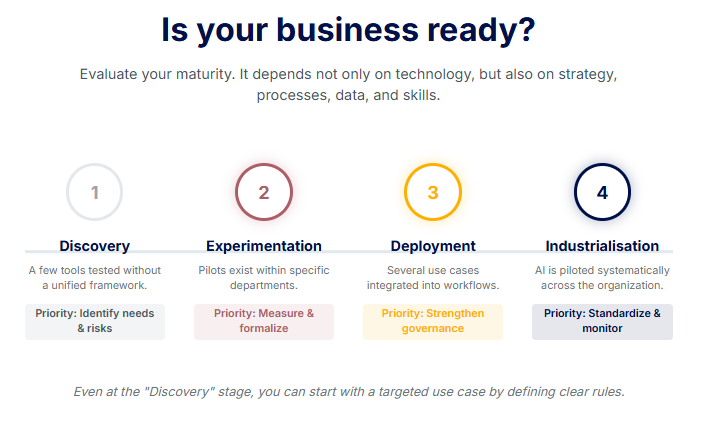
A business is ready to integrate AI when it can link a business need to exploitable data, an identified owner, and measurable success criteria. True readiness does not depend on technology alone.
Strategic alignment
A readiness assessment must first examine the strategic dimension. Leadership must know why they want to use AI and what specific outcomes they expect. A vague goal like “increasing productivity” is not enough. The objective must specify the target process, the desired outcome, and how that outcome will be measured.
Process maturity
Understanding how a task is currently performed is crucial. Teams must map out the workflow, identify where time is lost, and define which steps still require a human decision. Automating an unstable or poorly documented process will only accelerate its inefficiencies.
Data availability and quality
Data is the fuel of any AI system. It must be available, reliable, and accessible to authorized users or systems. You must also clarify who updates this data, how it is stored, and whether it contains confidential or personal information.
Technical integration
From a technical standpoint, you must verify if your existing software can communicate with the new AI solution. An isolated AI tool can produce an impressive demo, but it brings little operational value. Real utility comes when the tool integrates with your CRM, ERP, knowledge base, or daily workspace.
Skills and change management
Evaluate the skills and mindset of your teams. Users need to understand what the tool does, what its limits are, and when they must verify its outputs. Having an executive sponsor alongside an operational lead helps resolve conflicts and prevents projects from getting stuck between departments.
To structure this analysis, a professional AI audit is highly recommended, especially if your company lacks a clear, unified view of its processes, data, or technical priorities.
AI Maturity Levels
| Level | Company Situation | Strategic Priority |
| Discovery | A few tools are being tested without a unified framework. | Identify real business needs and risks. |
| Experimentation | Pilots exist within specific departments. | Measure results and formalize practices. |
| Deployment | Several use cases are integrated into workflows. | Strengthen governance and quality controls. |
| Industrialisation | AI is piloted systematically across the entire organization. | Standardize, monitor, and continuously improve. |
A business at the “Discovery” stage does not need to wait for perfect maturity to start. It can begin with a small, highly targeted use case, provided it defines clear usage rules, an owner, and an evaluation method. Maturity is built step-by-step, as the organization learns from its first projects.
How to identify the best AI use cases for your business
A good use case starts with an observable problem. This might include excessive delays, frequent errors, or tasks that take up too much time without creating enough value. The question is not “where can we add AI?”, but rather “what problem deserves to be solved better?”.
The first step involves mapping your most important processes. You must observe how work is actually performed, not just how it is described in official procedures. Email exchanges, intermediate files, and informal approvals often reveal hidden tasks that slow down the business.
The best candidates generally feature sufficient volume and a relatively stable structure. AI adds value when a team has to read numerous documents, classify requests, or prepare responses based on existing information. It can also support decision-making by spotting trends that are difficult to detect manually.
However, you must distinguish between a frequent task and a relevant AI use case. A highly repetitive but simple activity can often be handled with a classic automated rule. Artificial intelligence becomes truly interesting when the context varies, the data is unstructured, or a limited degree of interpretation is required.
Audit existing uses before adding new ones
Many companies already use AI without having an official policy in place. Employees may generate texts, summarize documents, or analyze spreadsheets using publicly available tools. This phenomenon, known as Shadow AI, occurs when usage grows without validation, without visibility, and sometimes without any control over the transmitted data.
Conducting this inventory is not solely about banning these practices. It helps you understand the real needs of your teams and pinpoint the tools that are already providing value. The company can then secure these useful practices, replace inappropriate tools, or define suitable usage rules.
Having an open discussion with users is often more informative than sending a general questionnaire. It is highly useful to ask them which tasks waste their time, which information is hard to find, and which decisions require repeated verifications.
Prioritize based on value, feasibility, and risk
Not all use cases should be launched simultaneously. A prioritization matrix allows you to compare opportunities using a common set of criteria.
| Criterion | Question to ask |
| Business impact | What concrete gain can the project produce? |
| Feasibility | Can the technology handle the task with sufficient quality? |
| Data | Is the necessary information available and reliable? |
| Cost | Does the potential benefit justify the licenses, integration, and monitoring? |
| Timeframe | Can the use case be tested within a limited scope? |
| Risk | Could an error affect a client, an employee, or a sensitive operation? |
| Adoption | Do users have an interest in integrating the tool into their work? |
An ideal first project should combine visible value, manageable risk, and a reasonable timeframe. Automatically processing meeting notes, for example, makes a better pilot project than a system tasked with independently granting employee benefits.
Quick wins allow you to learn without committing to a heavy digital transformation. Strategic projects require more preparation but can fundamentally change how the company operates. Both approaches are useful, provided you do not confuse them.
A simple scoping document can summarize the current process, the users involved, and the required data. It must also specify the expected outcome, the risks, and the metrics that will determine whether the project should continue. When the objective involves connecting different software, planning the integration of intelligent workflows to automate repetitive tasks helps distinguish between standard automation and true analytical capabilities.
The main AI use cases in business
The most relevant use cases are not necessarily the most spectacular. They often address daily needs, such as finding information, drafting a document, or detecting an anomaly. Their value depends on the context, the data quality, and the level of control maintained by the teams.
Marketing, sales, and customer service
In marketing, AI can help analyze customer feedback, produce content variations, or adapt a message to different segments. While it accelerates preparation, combining it with hybrid AI and human copywriting ensures teams retain full responsibility over the editorial line and factual accuracy.
Sales representatives can use an assistant to summarize an account’s history, prepare for a meeting, or structure a proposal. The system can leverage CRM data, provided access rights are correctly defined.
In customer service, AI can classify inbound requests, suggest responses, or retrieve procedures from a knowledge base. A chatbot can handle simple questions, while sensitive situations are escalated to a human agent. The most useful KPIs here cover handling time, resolution rate, and customer satisfaction.
Support functions and document management
HR departments can use AI to search for information within internal policies, prepare training materials, or analyze skills requirements. However, the AI must never independently make decisions regarding hiring, promotions, or disciplinary actions.
In finance, use cases typically involve document matching, variance detection, and preparing management commentary. The goal is to help professionals quickly spot operations that require their attention.
Legal teams can extract clauses, compare contract versions, or retrieve information across a set of agreements. The output must remain an analytical aid. A generated response does not constitute legal validation and must always be verified by a qualified professional.
Operations, production, and IT systems
In the industrial sector, predictive models can anticipate certain breakdowns using equipment data. Computer vision can spot visual defects on an assembly line. These systems must be tested in real-world conditions, as changes in lighting or materials can reduce their reliability.
In logistics, AI can forecast demand, recommend stock levels, and help optimize delivery routes. Results depend heavily on historical data quality and the model’s ability to account for unusual events.
IT teams also use AI to summarize incidents, search for probable causes, and assist with writing code. In cybersecurity, it can spot abnormal behavior, but it can also create new vulnerabilities if granted excessive permissions.
| Function | Example Use Case | Primary Data | Expected Benefit | Key Risk to Watch | Possible KPI |
| Marketing | Generating content variations | Briefs and existing content | Reduce preparation time | Errors or inconsistent tone | Production time |
| Sales | Meeting preparation | CRM data | Better exploit client history | Outdated information | Preparation time |
| Customer Service | Answer suggestions | Help base and tickets | Speed up handling | Incorrect answer | Resolution rate |
| HR | Searching internal policies | HR documents | Facilitate access to information | Sensitive data exposure | Useful answer rate |
| Finance | Anomaly detection | Transactions and history | Prioritize manual checks | False positives | Confirmed anomalies |
| Legal | Clause extraction | Contracts | Reduce reading time | Misinterpretation | Analysis time |
| Production | Defect detection | Images and machine data | Strengthen quality control | Undetected defects | Detection rate |
| Logistics | Stock forecasting | Sales and seasonality | Limit stockouts and overstock | Unstable forecast | Stockout rate |
| IT | Diagnostic assistance | Logs and incidents | Reduce analysis time | Unsuitable recommendation | Resolution time |
| Management | Indicator synthesis | Reports and dashboards | Accelerate decision-making | Excessive simplification | Decision time |
A use case becomes truly valuable when it integrates into daily work and produces a measurable result. The specific technology used matters far less than the quality of the chosen problem, the available data, and the planned human oversight.
How to integrate AI into your business in 12 steps
Integrating artificial intelligence must be managed as a comprehensive digital transformation project, not just a simple software deployment. Technology represents only one part of the work. You must also clarify your objectives, organize responsibilities, prepare your data, and guide users through the change.
Step 1: Appoint a sponsor and define objectives
The sponsor champions the project at the executive level. They arbitrate priorities, facilitate access to resources, and ensure the initiative remains tied to a real business goal.
The objective must be precise enough to be measured. A goal like “improve customer service” remains too vague. A more useful phrasing would be to reduce the average handling time for simple requests while keeping customer satisfaction and error rates below a defined threshold.
You must also measure the baseline situation. Without reference data, the company cannot determine whether AI has actually improved the process.
Step 2: Build the project team and assign responsibilities
An AI project cannot be handed over solely to the IT department or an external provider. Business teams understand the daily constraints of the process. Technical specialists evaluate feasibility, while legal and security functions manage risks.
A RACI matrix helps clarify who does the work, who validates decisions, and who must be consulted.
| Actor | Primary Responsibility |
| Executive or Sponsor | Validates objectives, budget, and major decisions |
| Business Lead | Describes the need and evaluates operational value |
| IT or Technical Team | Manages integration, access controls, and architecture |
| Data Team | Prepares data and monitors its quality |
| Legal or DPO | Analyzes legal obligations and personal data protection |
| Security | Assesses access, vulnerabilities, and incidents |
| HR | Supports skills development and workflow evolution |
| Pilot Users | Test the solution in real-world conditions |
In a small company, one person may fulfill multiple roles. The key is ensuring every responsibility is clearly assigned.
Step 3: Audit existing processes, tools, and practices
The audit must describe how the process actually works in reality. You must observe the software used, the files exchanged, and the manual approvals required. Makeshift solutions invented by teams can reveal needs that do not appear in any official procedure.
This audit must also inventory existing AI usage. A team might use public AI assistants to summarize documents or draft responses without management knowing. These practices highlight real opportunities, but they also expose data privacy risks.
Step 4: Prepare and govern the data
An AI solution does not automatically correct incomplete, contradictory, or outdated data. The company must identify useful sources, verify their quality, and define access conditions.
Data governance specifies who owns each dataset, who can view it, and what rules dictate its updates. For an internal assistant, it may be necessary to create a centralized knowledge base gathering procedures, product offers, and reference documents.
This preparation often fits perfectly into a broader modernisation intranet and data governance initiative, especially when information is scattered across multiple teams or software platforms.
Step 5: Select and prioritize use cases
Identified opportunities must be compared based on their value, feasibility, and risk level. A first project should deliver rapid insights without exposing the company to consequences that are hard to fix.
Priority should be given to a frequent, documented, and easily controlled task. Preparing internal summaries is often a better starting point than deploying a system tasked with making a final decision about a client or employee.
Step 6: Evaluate regulatory and operational risks
Every use case must be analyzed before choosing a solution. The company must determine if personal, confidential, or strategic data will be used. It must also evaluate the consequences of an incorrect AI output.
The level of control must be proportionate to the risk. A marketing rewording suggestion does not require the same guarantees as a tool involved in a hiring decision or fraud detection.
This analysis helps define system boundaries, human validation points, and situations where the AI must never act alone.
Step 7: Choose between buying, integrating, or building
An existing, ready-to-use solution may suffice when the need is common and integration constraints are limited. It generally allows for quick testing.
Integrating multiple tools becomes relevant when the company wants to connect AI to its CRM, ERP, or document base. Developing custom web applications is justified when the process is highly specific, strategic, or difficult to cover with standard software.
The choice must account for the total cost, but also maintenance, security, and vendor dependence.
Step 8: Select the tool, the model, and the provider
A sales demonstration is not enough to evaluate a solution. The company must test it with its own documents, real-world cases, and specific constraints.
Essential criteria include the quality of results, data protection, and rights management. You must also evaluate integration capabilities, traceability, and the ability to retrieve your data if you change providers.
The provider must clearly explain how the system works, its limitations, and the responsibilities of each party.
Step 9: Launch a pilot project with a limited scope
The pilot must test a specific hypothesis. For example, it can verify whether an assistant reduces the time needed to find an internal procedure without increasing the number of incorrect answers.
The scope must remain limited to one team, one document type, or one category of requests. This restriction makes analysis easier and reduces the impact of any errors. The pilot must include real users, a test dataset, and success criteria defined prior to launch.
Step 10: Train teams and manage change
Employees must learn how to use the tool, but also how to recognize its limitations. A useful approach to training teams on digital tools and AI explains what data can be shared, how to verify a result, and when to take back manual control.
Managers play a crucial role. They must clarify the project’s objective and listen to any difficulties encountered. Training should be tailored to the responsibilities of each profile, rather than offering identical general awareness sessions to everyone.
Step 11: Measure results and decide on scaling
The decision should not rely on a general feeling that the tool works well. You must compare the results against the initial baseline indicators.
The evaluation must cover time saved, output quality, and user adoption. It must also factor in errors, incidents, and the cost of human supervision.
A pilot can be technically successful but economically unviable. It can also produce good results but face rejection from users. Both situations require correction before any broader rollout.
Step 12: Industrialize and continuously improve
Scaling requires standardizing access, controls, and documentation. The company must plan for maintenance, performance monitoring, and incident management.
Models, data, and business needs evolve. A solution that is reliable at launch may lose relevance if procedures change or if information is no longer updated.
Industrialization therefore does not mean freezing the tool in place. It means organizing its continuous improvement, monitoring, and, if necessary, its replacement or decommissioning.
How to choose the right AI tools and technologies ?
Choosing a technology must come after defining the use case. A highly capable tool can remain useless if it does not integrate with company processes, exposes sensitive data, or if its costs outweigh the expected gains.
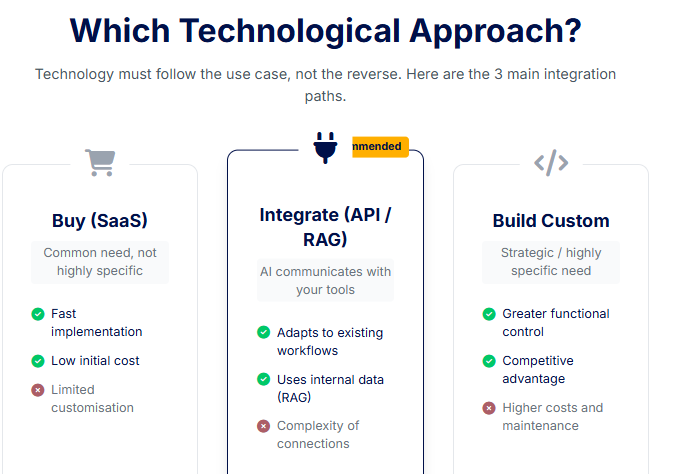
The first decision involves the necessary level of customisation. A ready-to-use SaaS solution suits common needs like writing assistance, document summarisation, or meeting analysis. It allows you to start quickly with little to no development.
An API connects an AI model directly to the company’s software. It becomes highly useful when an assistant needs to consult the CRM, trigger an action, or deliver a response within an existing application. A custom solution offers greater control, but it requires technical skills, ongoing maintenance, and a larger budget.
| Approach | When to choose it? | Key advantage | What to watch |
| Buy an existing solution | The need is common and not highly specific | Fast implementation | Limited customisation |
| Integrate multiple solutions | AI needs to communicate with business tools | Adapts to existing workflows | Complexity of connections |
| Build a custom solution | The need is strategic or highly specific | Greater functional control | Higher costs and maintenance |
Public, private, or open-source models
A public model is offered by an external provider and accessed through an interface or API. It provides fast access to advanced capabilities, but the company must verify data processing terms and available privacy options.
A private model is deployed in a more controlled environment. This approach can be highly relevant when data is particularly sensitive or integration requirements are strict. However, it does not automatically guarantee better security. Proper configuration, access management, and maintenance remain critical factors.
An open-source model can be downloaded, adapted, and hosted by the company or a service provider. It offers more technical freedom but requires specialized skills to evaluate, secure, and maintain it. Note that just because a model is open does not mean it is free to operate.
Assistant, RAG, or AI agent
A general-purpose assistant helps a user draft, analyze, or summarize content. It is suitable for tasks where the person retains control over every interaction.
A Retrieval-Augmented Generation (RAG) architecture allows the model to consult a document database before answering. It is ideal when an assistant needs to rely on the company’s internal procedures, products, or knowledge.
An AI agent can string together multiple actions to achieve a goal. It can check inventory, prepare a response, and then create a task in another software application. As its autonomy increases, its permissions, human validation checkpoints, and traceability must be tightly governed.
Evaluating the solution beyond the demo
A demonstration often uses simple examples and carefully prepared data. Therefore, the company must test the solution using its own documents, internal phrasing, and difficult edge cases.
| Criterion | What to check |
| Business fit | Does the solution actually solve the chosen problem? |
| Quality | Are the answers accurate, useful, and sufficiently consistent? |
| Data | Does the provider reuse the information to train its models? |
| Security | Can access, logs, and permissions be controlled? |
| Integration | Does the tool communicate with existing IT systems? |
| Traceability | Can you trace which data or action produced a given result? |
| Reversibility | Can data and configurations be recovered? |
| Support | Can the provider assist with incidents and system updates? |
| Total cost | Have usage, integration, and maintenance fees been factored in? |
Before signing any agreement, you must also verify contractual responsibilities, uptime guarantees, and data deletion procedures. The provider must specify what happens in the event of an incident or a major service change.
Vendor lock-in can become problematic when data, automations, and business rules are difficult to transfer. Building custom web applications can offer greater control for certain strategic processes, provided this customisation answers a real need.
How to prepare company data
An AI solution’s effectiveness depends less on the sheer volume of data than on its relevance. Thousands of outdated or contradictory documents can degrade the output, while a limited but well-structured database may be perfectly sufficient for a specific use case.
Preparation begins with a source inventory. You must identify data stored in the CRM, the ERP, and shared files. You should also check other business applications. Add to this list procedures, contracts, and email threads that contain useful knowledge but are not organized in a central repository.
Each source must then be evaluated for quality. Duplicates, outdated information, and inconsistent formats should be corrected whenever possible. You must also distinguish final reference documents from drafts or invalidated versions.
Defining rights and responsibilities
Not all available data should be accessible to every tool or user. An assistant built for the sales team does not necessarily need access to HR files or detailed financial records.
The company must define who owns each dataset, who can modify it, and how frequently it must be updated. These rules reduce errors and make it easier to trace the source when an output seems incorrect.
When AI relies on a knowledge base, documents must be organized with clear titles, dates, and status labels. An obsolete procedure must be removed or clearly flagged. Without this strict discipline, the assistant might retrieve information that is technically available but operationally false.
Minimizing exposed data
Data minimisation means transmitting only the information strictly necessary for the use case. A document can be anonymised or stripped of certain personal data before being analyzed.
Trade secrets, health data, or employee information require heightened precautions. The choice of solution must account for data processing locations, retention periods, and who is authorized to view the interactions.
A company with very little data can still use AI. It can start with a pre-trained model, a small set of documents, or rules paired with human validation. The project simply needs to be tailored to the information that is actually available.
Data quality is not a one-off task completed just before launch. Content evolves, products change, and procedures are revised. Therefore, you must assign data owners, set an update schedule, and conduct regular checks to ensure the solution maintains its relevance over time.
Security, GDPR, and the AI Act: what are the obligations?
A company using artificial intelligence must distinguish between three levels of compliance. Legal obligations are mandatory. Recommendations from regulatory authorities help implement these laws. Internal best practices complete the framework based on context and risk levels.
Identifying your role and risk level
The EU AI Act distinguishes between providers, who develop or place a system on the market, and deployers, who use it within their business. An SME adopting a tool built by a software publisher will generally be a deployer. However, its role can change if it substantially modifies the system or commercialises it under its own name.
The regulation is based on a tiered approach. Certain practices are banned. Others are subject to transparency obligations or classified as high-risk when they can affect safety or fundamental rights. This specifically includes certain systems used for recruitment, employee evaluation, and access to essential services. It also applies to biometrics.
As of July 2026, the banned practices and AI literacy obligations have been applicable since February 2025. The rules targeting general-purpose AI models have applied since August 2025. A large portion of the remaining provisions is set to apply in August 2026, while some rules regarding high-risk systems benefit from an extended timeline.
AI literacy does not mean every employee needs to undergo the exact same training. The company must adapt the required knowledge to the tools used, the person’s responsibilities, and the risks involved. For instance, employees using generative AI must know that it can produce false information and that no confidential data should be entered without authorization. This is where a targeted AI training framework provides vital safeguards for the organization.
Protecting data and individuals
The GDPR applies whenever a system collects or uses personal data. The company must define a precise purpose, limit the information processed, and inform individuals when required. It must also set a data retention period and guarantee individuals’ rights.
The first step is reducing the data sent to the system. A name, address, or customer ID can sometimes be removed before analysis. When the processing is likely to result in a high risk to individuals, a Data Protection Impact Assessment (DPIA) may be required.
You must also review the provider’s terms. The company must understand where data is processed, how long it is kept, and whether it can be used to improve the model. An option to opt out of training does not eliminate the need to monitor access, logs, or sub-processors.
Generated content can also raise intellectual property issues. An image, text, or code snippet produced by AI should not be published automatically. The team must verify sources, applicable licenses, and the risks of reproducing copyrighted material.
Securing access, actions, and monitoring
The main risks do not stem solely from the model itself. They also arise when the tool has excessive access to documents or business software.
A prompt injection attack attempts to introduce malicious instructions into a message or document to hijack the AI’s behavior. An agent connected to an email server or an ERP could then view unauthorized information or trigger an unwanted action.
Permissions must follow the principle of least privilege. The tool should only access strictly necessary data, and sensitive actions must require human validation. Commands, results, and incidents must remain fully traceable.
An internal AI policy can specify approved tools, prohibited data, and expected controls. It should also define responsibilities and the exact procedure to follow in the event of a leak, a discriminatory response, or an incorrect action.
When the introduction of AI represents a new technology or changes working conditions, informing and consulting the works council may be required depending on the company’s situation. Specific rules also apply to recruitment tools, automated personnel management processing, and systems used to monitor employee activity.
How to drive AI adoption among employees
Adoption does not rely solely on the tool’s simplicity. Employees must understand why it is being introduced, how their daily work will change, and which responsibilities will remain human.
Involving teams from the design phase
Users know the exceptions, the workarounds, and the hidden difficulties of the actual process. Involving them in the initial audit prevents the company from choosing a technically appealing solution that ultimately fails in daily operations.
This involvement goes beyond simply asking them to test a pre-selected tool. They must be empowered to flag risks, propose quality criteria, and define situations where the AI must hand the task over to a person.
Employee concerns regarding job security or workplace surveillance should not be dismissed as mere resistance to change. They often reveal a poorly explained objective, excessive automation, or a lack of guarantees regarding data usage.
Tailoring training to roles and use cases
An executive needs to understand the risks, legal responsibilities, and investment criteria. An operational user must know how to write a prompt, verify an answer, and protect sensitive information. Technical teams require much deeper knowledge of access controls, system testing, and continuous monitoring.
Therefore, an AI training strategy yields the best results when it is adapted to specific professions. A general awareness session can create a common foundation, but it must be supplemented with practical exercises based on real tools and actual situations.
Appointing AI champions can help answer questions, log incidents, and share validated practices across departments. An internal library can gather prompt examples, control procedures, and strict guidelines detailing when the tool must not be used.
Implementing phased adoption
The pilot phase should be presented as a dedicated learning period. Users must be able to compare their usual method with the new workflow and report anything that increases their workload.
Login rates are not enough to measure successful adoption. You must observe whether the tool is used in the right context, if its outputs are actually applied, and if employees maintain a critical mindset.
User feedback must lead to visible changes. A useless rule might be removed, a complex interface simplified, or a training session expanded. When teams see that their input directly improves the system, adoption becomes far more sustainable and less forced.
How to run a successful AI pilot project ?
A pilot project must test a specific hypothesis under conditions that closely mirror real work. The goal is not to prove that the tool can produce an impressive answer, but to determine whether it improves a process with an acceptable level of quality, cost, and risk.
The scope must remain small enough to be easily controlled. The company can select a single team, a specific document category, or a distinct type of request. For example, a customer service department might test AI response suggestions on order-tracking queries without immediately exposing the tool to sensitive client complaints.
Defining the baseline and success criteria
Before launch, the team must measure the current situation. They can record the average handling time, the number of errors, or the level of user satisfaction. This baseline allows them to objectively compare results with and without artificial intelligence.
The hypothesis must be formulated in a measurable way. Instead of aiming to “make work easier”, the pilot can verify if the assistant reduces the time spent searching for a procedure while maintaining a predefined correct answer rate.
Acceptance criteria must cover several dimensions. A tool can be exceptionally fast but produce too many errors. It can also be highly accurate while requiring so many manual checks that the time savings completely vanish.
| Tested Dimension | Question to Verify | Example Indicator |
| Quality | Does the result actually meet the need? | Rate of answers deemed useful |
| Accuracy | Is the provided information correct? | Confirmed error rate |
| Timeframe | Is the process faster? | Average handling time |
| Cost | Does the gain offset the expenses? | Cost per processed request |
| Security | Does the tool respect established limits? | Number of incidents or denied accesses |
| Adoption | Do users want to keep using it? | Relevant usage rate |
Testing standard situations and edge cases
The test dataset must represent the true diversity of situations encountered. It should include common requests, incomplete information, and ambiguous phrasing. It must also feature edge cases where the AI does not have the answer or should absolutely not act alone.
Pilot users must be able to flag incorrect answers, usability issues, and steps that artificially increase their workload. Their feedback complements technical metrics, as a solution can pass prepared lab tests while remaining highly impractical in daily use.
Human validation remains strictly necessary during the pilot. It helps detect errors and understand the specific conditions that trigger them. This supervision time must be factored into cost calculations, as it does not always disappear after launch.
The final decision may lead to scaling the project, adjusting it, or shutting it down. Poor results do not necessarily mean that all AI usage is impossible. The specific use case, data, or chosen technology might simply be a poor fit.
The company must also plan a rollback procedure. Users must be able to revert to their usual workflow if the tool becomes unavailable or produces abnormal results.
How to measure the ROI of AI ?
The return on investment of an AI project compares the benefits gained to all the costs incurred. The license price represents only a fraction of the calculation. You must also include data preparation, onboarding, technical connections, and the time dedicated to quality control.
Calculating the total project cost
Direct costs include subscriptions, usage fees, and potential infrastructure. To these, you add expenses related to development, integration, and external service providers.
Internal costs must also be taken into account. Employees participate in scoping, testing, and training. Others verify answers or fix technical incidents. A seemingly inexpensive solution can quickly become less attractive when it requires several hours of supervision every single week.
Finally, the total cost of ownership must anticipate long-term maintenance. Models change, data must be updated, and software integrations frequently require adjustments.
Measuring direct and indirect benefits
Direct gains are the easiest to observe. They involve time saved, reduced errors, or a lower cost per operation. A successful project can also increase processing volumes or help generate additional revenue.
Indirect benefits remain highly important, even if they are harder to convert into financial figures. AI can improve information retrieval speed, enhance the quality of work, or boost customer satisfaction. It can also reduce operational risks by helping teams spot anomalies much earlier.
The basic calculation is as follows:
ROI = ((Generated benefits – Total costs) / Total costs) x 100
Consider a fictional example. A company invests €30,000 in an internal assistant, including integration and training. During the first year, it estimates its time savings and avoided errors at €42,000. The ROI then reaches 40%. This result must be interpreted carefully, as it depends heavily on how those initial gains were evaluated.
Building a balanced dashboard
A dashboard should not be limited to financial savings. It must also track quality, adoption, and emerging risks.
| Category | Possible KPIs |
| Business performance | Handling time, processed volume, error rate |
| Technical performance | Uptime, accuracy, response time |
| Adoption | Active users, usage frequency, abandonment rate |
| Risks | Incidents, incorrect answers, manual validations |
| Profitability | Cost per operation, estimated gains, cumulative ROI |
The adoption rate must be interpreted in context. High usage is not a positive sign if employees use the tool for unintended tasks or have to constantly correct the majority of its answers.
Measurement must continue well after the pilot. Gains can increase with experience, but they can also drop when data ages or API usage costs rise. Therefore, continuous ROI optimisation involves tracking results, adjusting workflows, and stopping use cases that no longer create enough value.
How much does it cost to integrate AI in a business ?
The cost of an AI project depends less on the tool’s brand name than on the complexity of the underlying need. A ready-to-use license may suffice to assist with drafting or summarizing meetings. An assistant directly connected to internal data demands far more preparation, integration, and oversight.
Software is the first expense. Some services charge a standard monthly per-user subscription. Others bill based on the volume of text, the number of queries, or the computing power consumed. Therefore, attractive pricing during a limited pilot phase can jump significantly as the number of users grows.
Technical fees emerge as soon as the AI needs to communicate with the CRM, ERP, or a knowledge base. These include configuration, API connections, and software testing. Sometimes, developing a custom interface or setting up a specific hosting environment is also required.
Data preparation also represents a major cost. Documents must be sorted, corrected, and carefully organized. Access rights must then be defined, and information must be kept up to date. This workload exists even when no custom software development is needed.
A comprehensive budget must include several frequently overlooked expenses:
- Time dedicated to scoping and testing.
- User training and onboarding.
- Human supervision after launch.
- Security, compliance, and incident management.
- Solution maintenance and ongoing upgrades.
A standard solution generally remains more accessible than a customized project, but it offers far less control. An internal assistant or a connected automation requires a higher initial investment. A custom-built system becomes relevant when the process is highly strategic or when off-the-shelf tools simply cannot meet strict constraints.
Using an external agency can reduce the time spent by internal teams, but it does not eliminate the need for an internal business lead. The company must compare the project’s cost to the expected gains, while also considering the cost of inaction or maintaining an inefficient workflow.
Public or regional grants can sometimes fund an audit, an experiment, or a broader digital transformation. Their availability and conditions change regularly. They should always be verified with the relevant authorities at the start of the project.
How long does it take to integrate AI ?
A preliminary test can be launched in a few days when the company uses an existing tool on non-sensitive data. This test allows teams to discover the technology, but it does not constitute a true operational integration.
A pilot project usually takes several weeks. You must scope the need, prepare the data, and define evaluation criteria. Add to this the user testing phase and the resolution of initial technical difficulties.
Deployment within a specific department can span several months when it requires connections to existing software, legal reviews, or broader training programs.
Company-wide transformation remains an ongoing process. The timeframe depends primarily on the complexity of the use case, data quality, and risk levels. The number of users and overall team availability also heavily influence the schedule.
It is always better to move forward in stages rather than attempting to deploy a new solution across the entire organization all at once.
How to scale from a pilot to full deployment ?
A successful pilot should not be rolled out automatically. The company must first verify that results remain reliable as the number of users, data volume, and diversity of situations increase.
Scaling starts with process standardization. Usage rules, responsibilities, and control mechanisms must be formally documented. Users must know exactly when they can follow the AI’s recommendation, when they must double-check it, and when they must take over completely.
Integration with business tools also becomes much more critical. A solution used by a handful of testers can survive with manual copy-pasting. At scale, these manual steps risk creating errors or wasting time. It may therefore become necessary to connect the AI directly to the CRM, ERP, or document base.
Access rights must remain tailored to each profile. An AI agent should not be granted broad permissions simply to make its operation easier. Sensitive actions, such as sending an external message or altering customer data, must remain strictly subject to human approval.
The company must then continuously monitor output quality. A gradual drop in performance can occur when data ages or when users start submitting new types of requests. This operational drift must be detected through regular testing and incident analysis.
Changes in models or providers also require fresh validation. An update can alter the quality of answers, usage costs, or data privacy conditions.
Finally, every use case must be re-evaluated periodically. A tool that was highly useful during the pilot may become too expensive or be replaced by a native feature in an existing software suite. Shutting down a project that no longer creates enough value is part of healthy AI governance.
Mistakes to avoid when integrating AI
Certain common errors can weaken an AI project before you even choose your technology.
- Starting with the tool rather than the need: The company risks artificially forcing a use case onto a solution that has already been purchased.
- Deploying too many solutions simultaneously: Teams scatter their attention and become unable to measure the true value of each project.
- Choosing an overly complex pilot: Technical difficulties prevent rapid learning and make the causes of failure hard to identify.
- Neglecting data quality: The AI ends up producing inconsistent or inaccurate results based on outdated or contradictory information.
- Transmitting confidential data without controls: An unmonitored experiment can lead to data leaks or unauthorized use of sensitive information.
- Failing to designate a responsible owner: Decisions, incidents, and dataset updates remain without a clearly identified owner.
- Forgetting the baseline starting point: Without initial measurements, you cannot objectively prove any productivity or quality gains.
- Underestimating training: Users either misuse the tool or place blind, excessive trust in its outputs.
- Automating sensitive decisions: The company exposes its clients or employees to automated consequences that are difficult to correct.
- Ignoring existing usages: Shadow AI continues to grow unchecked outside of any official or secure framework.
- Getting stuck in the pilot stage: The project accumulates test after test without a clear decision to either deploy it or shut it down.
- Forgetting reversibility: The company becomes highly dependent on a single provider or architecture that is difficult to replace.
90-day AI integration roadmap
A 90-day roadmap can help an SME structure its very first AI project. This is not a universal timeline; sensitive, highly integrated, or heavily regulated use cases may require significantly more time.
Days 1 to 15: Diagnosis and governance
The company begins by defining the executive sponsor and assembling the project team. It inventories the AI tools already in use, maps out the target data, and identifies key operational bottlenecks. During this phase, it also establishes initial usage rules to limit unsecured practices.
The expected deliverable is a concise maturity and readiness assessment presenting the opportunities, risks, and maturity level of the organization.
Days 16 to 30: Use case selection and scoping
The team compares opportunities based on business impact, technical feasibility, and risk. It selects a use case that is useful enough to show visible results, yet limited enough to be tested safely.
The current process is measured to establish a baseline, recording metrics like handling time, quality, or operational cost.
Days 31 to 60: Preparation and pilot launch
The target data is cleaned, and access permissions are defined. The company selects the specific tool, prepares the test dataset, and trains the first group of pilot users.
The pilot is launched in a controlled environment. Any incorrect answers, technical bugs, or usability issues are logged to identify their root causes.
Days 61 to 75: Measurement and corrections
The pilot results are compared directly to the baseline metrics. The team verifies whether the expected time or cost savings are real and ensures the required human supervision remains manageable. The data, prompts, or user interface are adjusted to resolve issues. An underperforming project can also be stopped at this stage.
Days 76 to 90: Decision and deployment plan
Leadership decides whether to scale, modify, or stop the project. If moving forward, they define the next target teams, allocate necessary resources, and plan the ongoing controls to maintain.
| Period | Primary Actions | Responsible Party | Expected Deliverable | Validation Criterion |
| Days 1 to 15 | Diagnosis, team setup, and initial rules | Sponsor & Project Manager | Maturity & readiness assessment | Needs and responsibilities clearly defined |
| Days 16 to 30 | Prioritisation and scoping | Business Lead | Use case scoping sheet | Measurable objectives and acceptable risk |
| Days 31 to 60 | Data prep, tool selection, testing, and launch | Project Team | Operational pilot | Users, data, and tools ready for testing |
| Days 61 to 75 | Performance analysis and corrections | Business & Technical Leads | Evaluation report | Results comparable to baseline metrics |
| Days 76 to 90 | Decision and future planning | Executive Direction | Deployment or shutdown plan | Documented and funded decision |
This progressive approach ensures you move forward quickly without confusing speed with haste. The main goal of these first 90 days is to reach an informed decision based on real results, not to roll out AI across the entire company overnight.
Checklist: Before deploying your AI solution
Before pushing your AI solution to production, verify that the following points are fully documented and validated:
- The business need and expected outcomes are clearly defined.
- An executive sponsor and an operational lead are officially assigned.
- The use case has been successfully tested within a limited scope.
- The required data is reliable, authorized, and up to date.
- Legal, human, and operational risks have been assessed.
- The tool and provider have been compared against alternative solutions.
- Contractual terms, data processing agreements, and reversibility are verified.
- Access rights strictly follow the principle of least privilege.
- Internal usage guidelines and policies are shared with employees.
- Users have received training tailored to their specific roles.
- KPIs for quality, adoption, and profitability are established.
- Systematic human review is scheduled for all sensitive decisions.
- An incident reporting and management process is in place.
- Success, correction, and project shutdown criteria are documented.
- A designated owner is responsible for maintenance and data updates.
FAQ on AI Integration in Business
How do you start integrating AI into a business ?
Start by identifying a specific business problem, then measure how your current workflow performs. Next, evaluate your available data, assess potential risks, and identify the users involved before selecting a solution or launching a pilot project. To help you structure this roadmap, HONADI can conduct a comprehensive AI audit of your processes to identify the most profitable use cases before you make any investment.
Can an SME use AI without a data scientist ?
Yes. Many ready-to-use solutions do not require a data scientist. Specialized technical expertise primarily becomes necessary when you need to connect multiple software systems, exploit highly specific proprietary data, or build a custom application.
What budget is needed for a first AI project?
The budget depends on the project’s scope, data requirements, and necessary integrations. You must account for software licenses, internal time, training, and quality controls. An AI audit conducted by our agency can help you accurately price the entire project and anticipate hidden costs before making a commitment.
How long does it take to see results ?
A simple test can yield initial insights in just a few days. Running an operational pilot generally requires several weeks. Projects involving sensitive data, multiple departments, or complex technical connections typically span several months.
How do you choose a professional AI tool ?
Evaluate the tool using your own data and complex scenarios. Verify output quality, data confidentiality, access rights, and integration capabilities. You should also factor in reversibility and the total cost of ownership after the pilot.
Can you use ChatGPT with company data ?
This depends entirely on the account type, your security settings, and the sensitivity of the information. Always verify the provider’s data processing terms before any use. Confidential or personal data should never be shared without authorization and adapted security controls.
How do you protect confidential information ?
Minimize the data sent to the tool to what is strictly necessary, define approved applications, and configure access rights by user profile. Data logging, stripping sensitive information, and mandatory human validation also significantly reduce the risk of data leaks.
What obligations does the AI Act impose on businesses ?
Obligations depend on the company’s role and the system’s risk level. Requirements may cover AI literacy, system transparency, technical documentation, and human oversight. High-risk systems are subject to much stricter requirements.
Should a company write an internal AI policy ?
Establishing a clear AI policy is highly recommended as soon as multiple employees start using AI tools. It specifies approved software, prohibited data, mandatory quality controls, and the designated contact person in case of a security incident.
How should you train employees on AI ?
Training must be tailored to specific roles. A standard user needs to know how to write a prompt, verify a response, and protect data. Managers and technical teams require an additional level of knowledge regarding risks and governance. HONADI regularly supports businesses in upskilling their teams through custom AI training programs to guarantee successful tool adoption.
How do you measure the return on investment ?
Compare the total benefits generated against all project costs. Factor in time saved, errors avoided, and any additional revenue. Be sure to offset these gains against integration, training, maintenance, and human supervision time.
Which processes should you not automate ?
Avoid complete automation when your underlying data is insufficient, workflows are unstable, or the consequences of an error are difficult to correct. Decisions that significantly impact an employee or a customer generally require robust human intervention.
What is the difference between an AI assistant and an AI agent ?
An assistant responds to a direct query and helps a user produce a specific output. An AI agent can plan and execute a multi-step chain of actions across different tools. This autonomy requires stricter permissions, controls, and traceability.
How do you scale from a pilot to full deployment ?
Verify that performance remains stable as data volumes and user numbers increase. Next, standardize access rights, procedures, and KPIs. To secure this large-scale transition, our agency recommends planning a rollback procedure at this stage and can support you in the technical structuring of your deployment.
Conclusion
Successfully integrating artificial intelligence into a business begins with a clear operational need, not with the selection of a tool. The most resilient projects are built on reliable data, clearly assigned responsibilities, and a level of human oversight that is proportionate to the risks involved.
A first pilot project must remain focused and measurable. This allows you to verify output quality, drive employee adoption, and prove real profitability before committing to a larger rollout.
The next step is therefore to select a single process, measure its current workflow, and draft a simple scoping document. When multiple departments, complex databases, or strict regulatory requirements are involved, HONADI can guide you through every phase of this digital transition, from the initial audit to full industrialization, without forcing a specific technology before your business needs are fully defined.