
Automating tasks with AI is not simply about saving a few minutes on repetitive operations. The main goal is to organise work more effectively and free up time for decisions that genuinely require human involvement.
You still need to determine which tasks to automate, which tools to choose and how much autonomy to give AI. A poorly designed workflow can quickly become more complicated than the original process.
This guide will help you identify the most suitable tasks, compare the main solutions and build your first automations step by step. The aim is to help you move forward gradually, with automations that remain controllable and aligned with the real needs of your business.
What is AI task automation?
AI task automation involves assigning part of a repetitive process to software and asking it not only to perform actions, but also to interpret information. Traditional automation follows a fixed rule. AI-enhanced automation can read an email, identify the customer’s intent, produce a summary and then suggest an appropriate response.
The aim is not to replace human work systematically. Instead, it is to remove predictable operations that consume time without requiring complex decisions. This allows you to focus more attention on exceptions, sensitive interactions and tasks that require judgement.
For a business that wants to move beyond a few isolated automations, a digital and AI transformation approach can connect new tools with existing processes and team capabilities.
How does AI automation work?
A workflow is an organised sequence of actions that begins with a trigger. This may be the submission of a form, the addition of a file or the arrival of a message.
The system then retrieves the required data. An AI model analyses it to classify content, produce a summary or extract information. It may also generate a response. Rules determine what should happen based on the result.
When the risk of error is high, human approval takes place before the final action. The workflow can then send an email, update a customer relationship management system (CRM) or create a task. Logging records each operation so that the process can be reviewed more easily.
When a process needs to connect several software applications while incorporating an analysis stage, intelligent workflow integration can structure the sequence and preserve control points at every step.
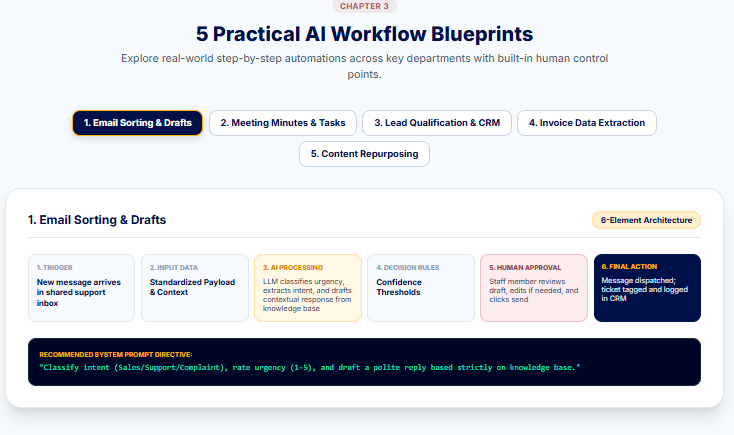
A reliable automation is based on six elements:
- a trigger;
- input data;
- AI processing;
- decision rules;
- human approval when required;
- a final action supported by an activity history.
Traditional automation vs AI automation
Traditional automation applies conditions defined in advance. For example, every invoice received in a specific email inbox can be saved in an accounting folder. This method is suitable when the data is predictable and the rules remain stable.
AI becomes useful when the content varies. It can recognise that a document is an invoice despite differences in layout, extract the amount and then flag an inconsistency. AI adds interpretive capabilities, but it also introduces a degree of uncertainty. Sensitive decisions should therefore remain governed by rules and, where necessary, human approval.
AI assistants, workflows, RPA and AI agents
These technologies do not provide the same level of autonomy.
| Technology | How it works | Autonomy | Example use | Technical level |
| AI assistant | Responds to a one-off request | Low | Writing an email | Beginner |
| Automated rule | Executes a fixed condition | Low | Sending a notification | Beginner |
| No-code workflow | Connects several applications | Medium | Adding a lead to a CRM | Intermediate |
| RPA | Reproduces actions within an interface | Medium | Entering data into legacy software | Intermediate |
| AI agent | Analyses a situation and uses several tools | High | Handling a customer request | Advanced |
An assistant generally waits for your instruction. A workflow links actions according to a predefined scenario. Robotic process automation (RPA) imitates a user’s clicks when no direct integration is available. An AI agent has greater decision-making autonomy, which requires tighter controls.
Real benefits and important limits
A well-designed automation reduces processing time, limits certain data-entry errors and creates more consistent working methods. It also improves traceability because every action can be recorded. Its value becomes particularly clear as the volume of work increases.
However, automation should not replace human judgement in sensitive legal, financial or managerial decisions. The same principle applies to crisis management and complex customer relationships. In these situations, AI can prepare information or suggest an action, but the final decision should remain with a person.
How do you know which tasks to automate with AI?
Not every task is worth automating. The right starting point is not the tool, but the process that is costing you time. A strong candidate generally has three characteristics. It occurs frequently, follows an identifiable logic and produces a result that you can verify.
Before building a workflow, review a typical working week. Record the operations you repeat, how long they take and the errors they generate. This step prevents you from investing in an automation that looks attractive on paper but delivers little practical value.
When several teams, tools or databases are involved, an AI audit can help identify the genuinely important tasks, technical dependencies and risks that should be addressed before launching a project.
Characteristics of a task suitable for automation
A task has good automation potential when it is frequent, time-consuming and sufficiently structured. Processing incoming forms is one example. The information may vary, but the fields and expected actions generally remain the same.
The task should also be measurable. You need to be able to compare processing time, error rates or costs before and after automation. Reversibility matters too. An action that is easy to undo, such as moving a file or creating a draft, is better suited to an initial test than making a payment or sending a final contract.
Seven criteria can help you make an initial selection:
- how often the task is performed;
- the time it consumes;
- the volume to be processed;
- the stability of the process;
- the quality of the available data;
- whether the result can be checked;
- the level of risk if an error occurs.
A task does not need to meet every criterion perfectly. However, the more frequent and predictable it is, the more likely the automation is to deliver a return.
Prioritise tasks with an impact-feasibility matrix
An impact-feasibility matrix allows you to compare several ideas without being distracted by the novelty of the tools.
| Situation | Recommended decision |
| High impact and simple implementation | Immediate priority |
| High impact and complex implementation | Controlled pilot project |
| Low impact and simple implementation | Secondary automation |
| Low impact and complex implementation | Do not pursue |
The ranking should remain practical. Impact may refer to the number of hours saved, fewer errors or a faster response time. Feasibility depends on the software involved, the quality of the data and the skills available.
Automating the classification of one hundred customer requests each week could deliver high impact with a reasonable implementation effort. By contrast, creating an autonomous agent to handle a handful of exceptional requests may cost more than the original problem.
Score each task before making a decision
A scoring framework can help distinguish between projects with similar potential. Assign a score from 1 to 5 to each criterion, then compare the results.
| Criterion | Question to ask |
| Time consumed | How many hours does this task require? |
| Frequency | Does it occur every day or only a few times a year? |
| Volume | How many items need to be processed? |
| Risk of error | Is an error easy to detect and correct? |
| Data quality | Is the information received complete and readable? |
| Ease of integration | Do the tools offer a connector or an application programming interface (API)? |
| Human review | Does a person need to check every result? |
| Potential gain | What cost or delay could automation reduce? |
A high score does not mean that the task should be automated immediately. It mainly indicates that the task is worth prototyping. Testing must confirm that the expected gains exist in practice.
Tasks that should remain under human control
Avoid fully automating decisions that are difficult to reverse, rely on sensitive information or could directly affect a person. Recruitment, credit approval and responses to disputes require stronger oversight.
Unstable processes are also poor candidates. If the rules change every week, the workflow will require constant maintenance. A task that is rare, quick or highly creative often provides too little benefit to justify the configuration work.
Before automating, simplify the process. Remove unnecessary steps, clarify responsibilities and standardise the input data. Automating a poorly designed process does not fix it. It only allows the same mistakes to be made faster.
Practical tasks to automate with AI
Automation becomes valuable when it addresses a specific problem. The fact that a task is repetitive is not enough on its own. You should also check that the expected outcome is clear, controllable and frequent enough to justify configuring the workflow.
The following examples cover some of the most common situations faced by businesses, agencies and self-employed professionals. Several tasks can sometimes be combined within a single automation, avoiding an unnecessary accumulation of tools and workflows.
Email management
AI can first sort incoming messages by subject, urgency or the department responsible for handling them. It can then summarise a long conversation, identify a request that has not received a response and prepare a draft suited to the context.
A consulting firm could, for example, automatically distinguish between a sales enquiry, an administrative question and a complaint. Sensitive messages would remain subject to human approval, while straightforward requests could receive a response prepared from an approved template.
This type of automation is particularly useful when several people share the same inbox. It reduces the time spent sorting messages without allowing AI to send consequential responses on its own.
Calendars and meetings
Scheduling can be automated by considering availability, the required duration and travel constraints. AI can also prepare an agenda based on previous discussions. After the meeting, it can produce a transcript and a structured summary.
The workflow can extract decisions, identify the people responsible and create the corresponding tasks in a project management tool. A thirty-minute sales meeting could therefore result in a summary, three assigned actions and a follow-up date.
The transcript should still be checked when several people speak at once or use technical terminology. An error involving a name, an amount or a deadline could change the meaning of a decision.
Administration and documents
Administrative processes often contain predictable information. An automation can extract an invoice number, its amount and its due date. It can then file the document, complete a spreadsheet or flag missing information.
The same principle applies to quotes and correspondence. Information from a form or customer relationship management system (CRM) can populate a template, after which a person reviews the document before it is sent. AI can also check that required information is present, but it should not replace legal review when the stakes are significant.
This type of workflow performs best with standardised, readable documents. Incomplete scans, unusual formats and handwritten data require additional checks.
Marketing and content creation
AI can generate editorial ideas from customer questions, repurpose an article into several posts and produce an initial brief for a writer or designer. It can also prepare a calendar, schedule content and collect performance data.
To avoid generic copy, the workflow should incorporate the company’s editorial guidelines, intended audience and business-specific examples. A hybrid AI-human writing approach makes it possible to use automation for preparation and adaptation while retaining editorial control over the substance of the content.
For example, an article can be condensed into a LinkedIn post, a newsletter and a short video script. Each version should still be adapted to its channel rather than copied automatically.
Sales and CRM
Within a sales process, AI can qualify a lead based on their industry, enquiry and level of engagement. It can enrich the CRM record, summarise previous interactions and prepare the next meeting by identifying points that require further discussion.
An automation can also trigger a personalised follow-up when the lead has not responded. The message can draw on the previous conversation, but it should require approval whenever it includes a price proposal or a specific commitment.
Incomplete data is the main risk. Poor qualification can lead to a missed opportunity or an unsuitable message. The workflow should therefore include a “needs review” category whenever the confidence level is too low.
Customer support
Customer support is well suited to automation when requests are frequent and repetitive. AI can classify tickets, detect dissatisfaction and suggest a response based on the knowledge base. More complex cases can then be routed to the appropriate person.
Transactional chatbot integration becomes relevant when an assistant needs to do more than answer questions. It may also need to retrieve an order, check its status or initiate an authorised action. Its scope should remain strictly defined to prevent uncontrolled changes.
A customer asking where their parcel is can receive an immediate response. A payment dispute or threat of legal action should instead be escalated to an adviser.
Project management and reporting
An automation can create a task from an email, remind the person responsible before a deadline and update a status when specific conditions are met. AI can also analyse delays and produce a weekly report focused on risks.
Within a marketing team, the system could identify that a campaign is still awaiting approval, alert the person responsible and add the issue to the management report. The project manager retains an overall view without having to check every spreadsheet manually.
The indicators should remain stable. If the monitoring rules change constantly, the generated report becomes difficult to compare and the automation loses part of its value.
Research, data and monitoring
AI can monitor predefined sources, summarise new developments and classify information according to its relevance. It can also clean a spreadsheet, detect duplicates or flag unusual values before human analysis.
To make the results easier to use, some data can be converted into charts or visual summaries. Infographics and data visualisation can then present trends clearly without turning the report into a dense collection of figures.
For example, a competitive monitoring workflow could compile newly published content each week, along with its themes and any identified changes in competitors’ offers. The information should still be dated and linked to its source so that it can be verified.
How to choose an AI automation tool
The right tool depends less on its popularity than on the process you need to automate. A platform that performs extremely well when writing and analysing documents may be unsuitable when you need to connect a CRM, monitor a database or reproduce actions in legacy software.
Start by defining the expected outcome, the applications involved and the required level of control. You can then choose the most appropriate category of tool.
General-purpose AI assistants
ChatGPT, Claude, Gemini and Microsoft Copilot can summarise documents, structure information and produce content. They are primarily suited to knowledge-based tasks carried out in response to an instruction.
The best choice often depends on your working environment. Gemini integrates naturally with Gmail, Docs, Sheets and Drive, while Microsoft 365 Copilot fits within the Outlook, Word, Excel and PowerPoint ecosystem. ChatGPT and Claude take a more cross-platform approach, offering workspaces and connections to a range of business tools.
An assistant on its own does not always provide true automation. If you still need to copy the data, submit the instruction and then move the result manually, you will also need an orchestration platform.
No-code automation platforms
Make, Zapier, n8n and Power Automate connect several software applications within a single workflow. They allow you to define a trigger, add conditions and then execute a sequence of actions.
Make uses a visual building environment that works well for scenarios with several branches. Zapier makes it easier to get started through its extensive catalogue of integrations. n8n offers more freedom to technical users and can be deployed on controlled infrastructure. Power Automate is particularly relevant within a Microsoft environment or when cloud automation needs to be combined with desktop actions.
Do not choose a platform solely on the basis of the number of integrations it advertises. Check that the specific actions you need are actually available for your applications.
Specialist tools for specific business functions
Some tools are designed for a specific purpose. These include transcription platforms, invoice-processing software and customer support assistants. Others focus on CRM management, project management or content publishing.
Specialist tools often require less configuration than a general-purpose platform. However, they can become limiting when a process extends beyond their intended scope. A meeting assistant, for example, may be able to summarise a discussion without creating tasks according to your own internal rules.
When no connector can support a strategically important requirement, a custom web application can connect the data and process stages without forcing the business to follow the structure of standard software.
RPA solutions
Robotic process automation, or RPA, reproduces a user’s actions within an interface. It can open software, complete fields or move files when no application programming interface (API) is available.
This method remains useful for legacy systems, but it is more fragile than a direct integration. A change to a button or window can interrupt the workflow. Power Automate offers desktop flows designed for this type of automation.
Autonomous AI agents
An AI agent receives an objective, selects certain steps and uses tools to make progress. It may search for information, query a software application and then initiate an authorised action.
Make, Zapier and n8n now include features that combine agents, workflows and human approval. This additional autonomy also increases the risk of unexpected actions. An agent should therefore have limited permissions, clear escalation rules and a reviewable activity history.
Nine criteria for selecting a tool
Compare platforms against a consistent framework rather than relying on a simple feature list.
| Criterion | What to check |
| Available applications | Are the essential software applications genuinely supported? |
| Ease of use | Can the team modify the workflow without remaining permanently dependent on a specialist? |
| Customisation | Can you add rules, code or advanced conditions? |
| Error management | Does the system detect failures and allow the operation to be retried? |
| Human approval | Can a mandatory approval stage be added? |
| Security | Where does the data travel, and how is access managed? |
| Volume | Does the plan support the expected number of executions? |
| Total cost | Are operations, users and AI usage billed separately? |
| Maintenance | Who will monitor the connections, rules and updates? |
For an initial project, prioritise a tool that your team can understand and monitor. A highly flexible platform loses much of its value if nobody can diagnose an error or adapt the workflow when the business process changes.
Comparison of the best tools for automating tasks
No single platform is the strongest choice for every use case. Make is well suited to visual workflows, Zapier simplifies initial integrations and n8n provides greater technical control. Power Automate has a clear advantage when a business already works within Microsoft 365.
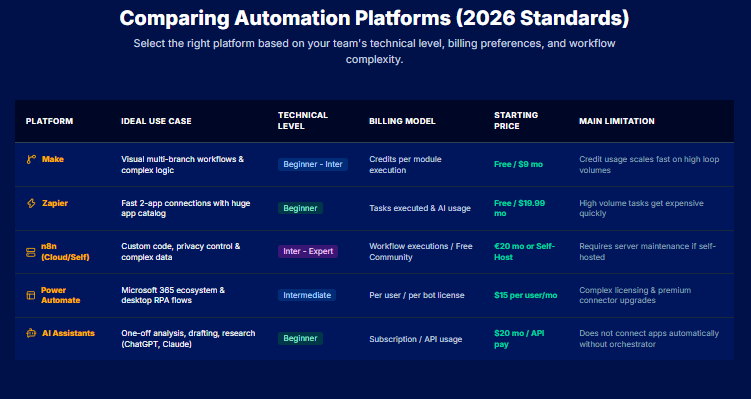
Costs should not be compared solely on the basis of the subscription price. Make charges according to credits, Zapier according to tasks and n8n Cloud according to complete workflow executions. AI model usage, hosting and technical maintenance may also add to the overall cost.
| Tool | Best use | Level | Billing model | Starting price* | Main limitation |
| Make | Visual workflows with several branches | Beginner to intermediate | Credits consumed by workflow modules | Free, then $9/month | Costs increase with the number of steps executed |
| Zapier | Fast connections between commonly used applications | Beginner | Tasks and AI feature usage | Free, then $19.99/month | High-volume workflows can use the allowance quickly |
| n8n Cloud | Complex and customisable workflows | Intermediate to expert | Complete workflow executions | €20/month | More technical learning curve |
| Self-hosted n8n | Control over infrastructure and data | Expert | Hosting and maintenance managed by the business | Community edition available | The team must manage security and updates |
| Power Automate | Microsoft 365 and desktop automation | Intermediate | Licence per user or per bot | $15 per user/month | Licences and connectors can be difficult to compare |
| General-purpose AI assistant | Analysis, writing and one-off processing | Beginner | Subscription or API usage | Varies by platform | Does not always connect different applications on its own |
Important: These starting prices were observed in July 2026 and generally apply to annual billing. Taxes, allowances and AI model costs may be additional. Make includes 1,000 monthly credits in its free plan, while Zapier limits its free plan to 100 tasks per month. n8n Cloud starts at €20 per month for 2,500 workflow executions, billed annually.
For beginners, solo professionals and small businesses
Zapier is often the most accessible starting point when you need to connect two applications without building complex logic. A user could, for example, automatically record form submissions in a spreadsheet and then send a confirmation.
Make becomes more relevant when the workflow contains several conditions. Its visual interface helps users understand how data moves through the process and identify the different branches in the scenario. A small business can use it to connect forms, its CRM and its email marketing platform without developing a complete application.
A simple interface does not remove the need to document your automations. Training teams to use digital tools and AI can help prevent workflows from becoming impossible to understand as soon as their original creator leaves the project.
For visual workflows, Microsoft 365 and complex scenarios
Make is well suited to visual requirements, but n8n offers greater freedom when a workflow needs to manipulate data, include code or precisely control calls to external services. It is more appropriate for teams with in-house technical expertise.
Power Automate remains the most coherent choice for an organisation using Outlook, Excel, SharePoint and Teams. It can also combine cloud flows with attended RPA on a computer. However, its licensing model requires careful review when several users, bots or premium connectors are involved.
Zapier can also manage multi-step workflows. Its main strengths remain its extensive catalogue of connections and its fast setup, rather than fine-grained control over highly complex scenarios.
For self-hosting and sensitive data
n8n is the most suitable option when a business wants to host the platform itself and control its infrastructure. This choice does not automatically guarantee better security. It transfers responsibility for access, backups and updates to the team administering the server.
For sensitive data, the best tool is therefore the one whose deployment method, permissions and traceability meet the organisation’s actual requirements. A professional cloud plan may be preferable to a poorly monitored internal installation.
Five AI workflow examples explained step by step
An effective workflow connects a trigger, a processing stage and a measurable action. AI should only be introduced when a step requires the system to understand, classify or produce information. Traditional rules remain preferable for entirely predictable operations.
Workflow 1: Sort emails and prepare responses
This problem often occurs in shared inboxes. Messages accumulate, several people read them and some requests remain unanswered.
The workflow begins when an email arrives. AI analyses the subject line and message content to identify the category, level of urgency and sender’s intent. The message can then be assigned to the appropriate department, marked as a priority or added to a processing queue.
For straightforward requests, AI prepares a draft using previously approved responses. A team member reviews the text before it is sent. Complaints, legal enquiries and ambiguous situations are automatically escalated to an appropriate specialist.
A prompt can instruct the model to return three structured elements:
- the message category;
- its priority level;
- a suggested response based only on the information available.
The workflow must not fill in missing information. Useful indicators include the average time to first response, the number of incorrectly classified messages and the proportion of drafts that require correction.
Workflow 2: Turn a meeting into minutes and tasks
Manual note-taking often forces one person to choose between contributing to the discussion and documenting it. As a result, the meeting minutes may be delivered late or fail to capture certain decisions.
The workflow begins by recording or transcribing the meeting, with the participants’ consent. AI then organises the content around the topics discussed, confirmed decisions and points that still need clarification.
A second stage extracts the actions and specifies the person responsible, the deadline and the expected outcome. The proposed tasks are submitted for approval before being created in the project management tool. Participants then receive a summary with the next steps.
The prompt must distinguish a confirmed decision from a simple suggestion. It can also be instructed to flag actions for which no owner or deadline was specified.
The most common errors involve names, amounts and technical terms. Human review therefore remains necessary before the minutes are distributed. The time taken to publish the minutes and the proportion of corrected tasks can be used to assess the workflow’s reliability.
Workflow 3: Qualify and follow up with leads automatically
A sales team wastes time when every form submission receives the same treatment, regardless of how advanced the lead is in the buying process. A workflow can help classify enquiries without allowing AI to decide their value on its own.
When a form is submitted, the information is added to the customer relationship management system (CRM). AI analyses the stated need, the business sector and any constraints mentioned. It then assigns a category, such as priority enquiry, needs further qualification or low-quality lead.
The sales representative receives a summary containing the information needed for the first conversation. When the lead does not respond within the defined period, the system prepares a personalised follow-up based on the original enquiry.
The prompt must not invent a budget, deadline or intention to purchase. When the available information is insufficient, the lead should be placed in a “needs review” category.
The workflow can also flag contacts who may require advertising follow-up without automatically launching a campaign. A multichannel retargeting strategy should be based on appropriate consent and clear segmentation. Its messages should also remain consistent with the lead’s journey.
Useful key performance indicators (KPIs) include the time taken to handle a new enquiry, the response rate to follow-ups and the proportion of lead classifications changed by the team.
Workflow 4: Extract and verify invoice data
Entering invoice data manually takes time and increases the risk of errors involving amounts, dates or reference numbers.
The workflow begins when a document is received by email or added to a folder. A recognition tool extracts the main information. AI can then identify the supplier, invoice number and due date despite variations in layout.
Rules check the consistency of the extracted data. The total can be compared with the individual amounts, while the supplier’s name can be matched against an existing record. Any significant discrepancy triggers human review.
Once the document has been approved, the workflow files it and sends the data to the accounting software. It must not approve a payment, change bank details or validate an unknown supplier on its own.
The prompt should return the information in a structured format and clearly identify uncertain fields. Useful indicators include the accurate extraction rate, the number of invoices requiring human intervention and the average processing time.
Workflow 5: Produce and schedule social media content
A marketing team can automate content preparation without handing complete control of its editorial strategy to AI.
The workflow begins when an article, offer or internal update is approved. AI extracts the main ideas and prepares several versions for different channels. A LinkedIn post may develop a practical insight, while Instagram copy may favour a more visual and direct message.
Each suggestion follows guidelines defined in advance. These may cover the tone, wording to avoid and permitted calls to action. A manager then checks the information, adapts the style and approves the publication schedule.
The same source content can also support newsletters and email sequences when the message is reworked to reflect the relationship with subscribers. A social media post should not simply be copied into an email without adaptation.
The main risk is the repeated production of generic or inaccurate content. The workflow should therefore include the sources used and block any unverified claim. Production time, the proportion of content requiring correction and performance by format can then be monitored to improve the process.
How to create your first AI automation in eight steps
Your first automation should be simple, measurable and easy to stop. Do not begin with an autonomous agent responsible for a critical process. Instead, choose a frequent task whose outcome can be checked quickly. Suitable examples include sorting emails, producing meeting minutes or recording a form submission in a customer relationship management system (CRM).
1. Map the current process
Describe the task as it is actually performed. Identify where it begins, which information is used and who is involved. You should also record the decisions made during the process.
Consider a sales enquiry submitted through a form. A team member reads the information and checks whether the lead matches the target profile. They then create a CRM record and assign the contact to a sales representative. Describing the process in this way makes it easier to identify exactly which stages could be automated.
2. Remove unnecessary steps
Automation should not mechanically reproduce a poorly designed process. Before building the workflow, remove duplicate steps and approvals that provide no real value. You should also clarify responsibilities when several people carry out the same check.
When the same information is copied into three different spreadsheets, first determine whether all three files are still necessary. A single, properly maintained source will be more reliable than an automation designed to synchronise several redundant documents.
3. Choose a simple, measurable task
Select an operation whose volume and duration are already known. You need to be able to compare the situation before and after the test.
A suitable first automation processes enough cases to produce meaningful results while presenting limited risk. Automatically creating a draft is safer than sending a message without approval. Filing an invoice is also less sensitive than approving or paying it.
Define one main indicator, such as processing time, the error rate or the number of manual interventions required.
4. Define the inputs and expected outcome
Specify the data the workflow will receive. Then define the output format and the conditions that determine whether the result is valid.
For an incoming email, the input data may include the sender, subject line and message body. The expected output could contain a category, a priority level and a draft response. When AI is uncertain, it should return a “needs review” status rather than making an arbitrary choice. This stage prevents vague instructions and makes testing easier.
5. Choose the tools and connections
Begin by reviewing the software already used within the business. A built-in feature may sometimes be sufficient, which removes the need to add another platform.
When several applications need to communicate, check that the connectors support the specific actions required. A CRM connection that can read contact records may not necessarily be able to update an opportunity or create a task.
Review the requested permissions as well. A workflow designed to file documents should not have permission to delete them permanently.
6. Build a limited prototype
Create an initial version with as few steps as possible. Use test data or a small sample of real data, without immediately enabling irreversible actions.
The prototype should demonstrate whether the data moves correctly through the workflow and whether AI produces the expected format. Retain human approval before a message is sent or a customer record is changed. The same safeguard should apply to any operation with a financial impact.
7. Test errors and edge cases
Do not test only ideal situations. Use an incomplete form, an unreadable document or an ambiguous message. You should also check how the workflow behaves when the target application is unavailable.
The system should report the failure, retain the data and allow another attempt. It should also prevent the same action from being performed twice after a retry.
8. Deploy, document and monitor
Activate the workflow gradually. Begin with a limited number of users or files, then expand its scope once the results are stable.
Document its purpose, connections and decision rules. Appoint someone to oversee it as well. This person will need to monitor errors, API changes and developments in the underlying business process.
Pre-launch checklist
Before activating the automation, confirm that:
- the input data is sufficiently reliable;
- errors and duplicates can be detected;
- human approval is required for sensitive actions;
- the workflow can be stopped without losing data;
- every important action is recorded;
- permissions are limited to what is strictly necessary;
- someone is responsible for maintenance;
- results will be compared against indicators defined before the test.
An automation is not truly complete until someone other than its creator can understand, monitor and correct it.
How to write an effective prompt for automation
Within a workflow, the prompt acts as a specification provided to the AI. The more precisely it defines the task, the available data and the limits to respect, the more predictable the result becomes.
An instruction such as “reply to this email” leaves too much room for interpretation. The model may choose an unsuitable tone, invent information or overlook an internal rule. An automation prompt should therefore define how the information must be processed before requesting a response.
Elements of a reliable prompt
Start by assigning AI a functional role. It may act as an assistant responsible for classifying requests, extracting data or preparing drafts. You should then define the specific objective and the context in which the task is performed.
The prompt should also specify the data received and the rules to apply. It should describe any constraints and provide the expected output format so that the next stage of the workflow can use the result.
A reliable prompt generally contains:
- the task assigned to the model;
- the information it may use;
- the decision criteria;
- prohibited actions;
- the response format;
- situations requiring human approval.
For an email automation, you may ask AI to classify the message, indicate its level of urgency and prepare a draft. However, it must not promise a refund, announce a deadline or invent information that is absent from the request.
A reusable prompt template
The following template can serve as a starting point.
Task
Analyse the request received and prepare a response for human review.
Available data
Use only the customer’s message, their previous interactions and the information contained in the authorised knowledge base.
Analysis steps
Identify the sender’s intent, the level of urgency and any missing information.
Rules
Do not invent any information. Do not confirm any commercial, legal or financial commitment.
Output format
Return the category, priority, confidence level and proposed draft.
Escalation cases
Return “mandatory review” when the request concerns a complaint, a dispute or uncertain information.
For editorial processes, a clearly defined AI writing framework can also incorporate the required tone and authorised sources directly into the workflow instructions. It can also define the necessary review controls.
Structure the output and manage uncertainty
Structured output makes it easier to transfer the result to a CRM, spreadsheet or another application. You can request a table or JSON format, which organises data into standardised fields and values.
Include a confidence level as well. When the model is uncertain, it should flag the uncertainty rather than choosing arbitrarily. A defined threshold can trigger human review before the next stage.
The prompt should also explain what happens when information is missing. For example, AI may leave the relevant field empty or explain that the data is unavailable. It may instead place the record in a category requiring review.
Test the prompt before integrating it
Test the instruction with normal, incomplete and contradictory cases. Add irrelevant or deliberately ambiguous content to confirm that the model respects its limits.
Review recurring errors and improve the rules rather than extending the prompt without a clear method. Keep several examples of the expected output. They will help AI reproduce the required format and make future changes easier to assess.
How to secure an AI-powered automation
An automation may transfer emails, customer documents or business information between several software applications. Before deploying it, you therefore need to understand which data is being used, where it is being sent and who can access the results.
Security is not simply a matter of choosing a reputable provider. It also depends on the permissions granted, the workflow rules and the organisation’s ability to detect unusual activity.
Classify and limit the data used
Start by classifying information according to its level of sensitivity.
| Category | Examples | Recommended precaution |
| Public data | Articles, catalogues and published content | Check for accuracy |
| Internal data | Procedures, meeting minutes and monitoring spreadsheets | Restrict access to the relevant teams |
| Confidential data | Contracts, negotiated prices and unpublished projects | Use controlled business tools and accounts |
| Personal data | Names, email addresses and customer history | Define a clear purpose and justify access |
| Sensitive data | Health, biometric, opinion-related or similar data | Conduct a legal assessment and apply stronger security measures |
Only send the model the information required for the task. A system responsible for classifying a customer enquiry probably does not need access to the customer’s complete purchase history. Under the General Data Protection Regulation (GDPR), the data minimisation principle requires personal data to be adequate, relevant and limited to what is necessary for the intended purpose.
This discipline reduces the consequences of incorrect configuration. It also simplifies the management of access rights and data retention periods.
Review providers, access and data retention
Before connecting a tool, examine the terms that apply to the data being transferred. Check where the data is processed and how long it is retained. You should also determine whether it may be used to improve the provider’s models. The answers may differ between free, business and application programming interface (API) plans.
Use individual user accounts rather than shared login details. Grant only the permissions that are necessary. A workflow that needs to read a folder should not be able to permanently delete every file it contains.
API keys and passwords must be stored in a secure credential manager, not in a spreadsheet or directly within the prompt. You should also establish a revocation procedure for when someone leaves the team or a connection is no longer used.
When several departments handle the same information, a data governance framework can help clarify responsibilities, access rights and retention rules.
Maintain human oversight and an activity record
Human approval should remain mandatory for operations that are difficult to reverse. This includes payments, permanent deletion and responses with contractual implications.
The reviewer must receive enough information to understand the AI’s recommendation. A simple “approve” button is not sufficient when the source, reasoning or level of uncertainty is not visible.
Keep a log recording the date, the data used and the action performed. When required by the process, also record the identity of the person who approved the result. The EU AI Act includes human oversight and logging requirements for certain categories of high-risk systems. These obligations do not apply in the same way to every automation, but they represent useful control practices.
The workflow should also include a stop mechanism. Provide an error queue, a retry option and a method for rolling back an action.
Essential GDPR checks
The GDPR applies when an automation processes personal data. You must then determine the purpose of the processing, its legal basis and who is authorised to access the information. The people concerned must receive the required information and be able to exercise their rights.
You should also verify that:
- a retention period has been defined;
- unnecessary data is deleted;
- transfers to service providers are properly governed;
- access and deletion requests can be processed;
- incidents can be detected and documented;
- responsibilities between the organisation and its providers are clearly defined.
A data protection impact assessment may be required when the processing is likely to create a high risk to people’s rights and freedoms. It helps identify risks before deployment and define the measures needed to reduce them.
When a sensitive process raises doubts, do not rely solely on the tool’s default settings. Ask the person responsible for data protection or another qualified specialist to validate the scope.
How to measure the profitability of your automation
A successful automation should not be assessed solely by the number of actions it performs. It must deliver a measurable benefit compared with the time, subscriptions and maintenance effort it requires.
Before deployment, record the performance of the manual process. This will provide a reliable baseline for determining whether the workflow genuinely reduces delays, errors or costs.
Calculate the ROI of automation
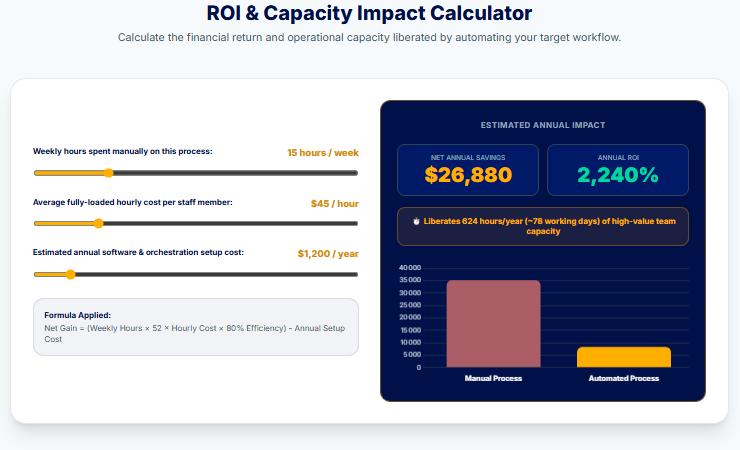
Return on investment, usually abbreviated to ROI, compares the gains generated with the project’s total cost.
ROI = (gains obtained − total cost) ÷ total cost × 100
Suppose an automation costs 2,000 euros during its first year. It saves 4,000 euros in working time and corrections. The net benefit is therefore 2,000 euros, resulting in an ROI of 100%.
This calculation should be interpreted carefully. A positive result does not necessarily mean that the project should be treated as a priority. You should also consider how long it will take to recover the investment and the level of risk involved. Other processes may also offer a better return.
Put a value on the time saved
Start by measuring how much time the task requires before automation. Then multiply the number of hours saved by the actual hourly cost of the people involved.
This cost is not limited to net salary. It may also include employment costs, overheads and supervision time. The aim is not to claim that every hour released immediately becomes a financial saving. It is to assess the additional capacity made available.
A team that saves twenty hours per month can use that time to handle more requests, improve the quality of its work or reduce delays. The benefit is operational, even when staffing levels remain unchanged.
Assess the errors avoided
Some automations create more value by reducing errors than by saving time. Incorrect data entry may lead to an inaccurate invoice, an unsuitable follow-up or the loss of important information.
To estimate this benefit, measure the average number of errors before deployment. Then assess the time and cost required to correct them, as well as their possible consequences. An error that takes ten minutes to fix does not have the same impact as incorrect information sent to a customer.
However, distinguish between errors that have genuinely been prevented and those that have simply shifted elsewhere. Automated extraction may reduce typing mistakes while introducing new interpretation errors.
Include visible and hidden costs
The subscription price represents only part of the total cost.
| Cost category | Elements to consider |
| Setup | Audit, configuration and testing |
| Software | Subscriptions, users and premium connectors |
| Usage | Credits, tasks, executions and API calls |
| Support | Training and documentation |
| Operations | Monitoring, corrections and maintenance |
| Future changes | Rule modifications and switching tools |
You should also include the time spent on human approvals. An automation that prepares one hundred records but requires a lengthy review of every result may shift the workload rather than reduce it.
Track the right indicators
Average processing time remains a useful indicator, but it is not enough on its own. You should also monitor the error rate, cost per operation and number of successful executions.
The human approval rate can indicate whether the AI is becoming more reliable or continues to generate too many ambiguous cases. You can also measure team adoption and user satisfaction.
A continuous ROI optimisation approach involves reviewing these figures regularly and then adjusting the rules, tools or scope of the automation.
Finally, compare the results with the original baseline. If the workflow saves little time, produces too many errors or requires disproportionate maintenance, it should be simplified, corrected or stopped.
The most common mistakes in AI automation
An automation can work correctly from a technical perspective while delivering little value. Failures often result from a poorly defined process, insufficient oversight or underestimated maintenance requirements. Identifying these issues early prevents a simple experiment from becoming an expensive system that is difficult to correct.
Automating a poor process or choosing the tool too early
The first mistake is reproducing a process that is already inefficient. If a request passes through several unnecessary approval stages, automation will accelerate those steps without addressing the underlying problem. The process should therefore be simplified before it is converted into a workflow.
The tool should only be selected once the need has been clearly defined. A business may be tempted to use an AI agent because the technology appears advanced, even though a simple automated rule would be sufficient. The simplest option is often more reliable, less expensive and easier to maintain.
Trying to automate everything and removing human oversight
An initial project should have a limited scope. Automating emails, sales processes and reporting at the same time makes testing more difficult. When an error occurs, it also becomes harder to identify which stage caused it.
Removing human approval entirely increases the risks. AI may misinterpret a request, rely on incomplete information or produce an unsuitable response. Sensitive decisions should retain an approval stage, at least until the workflow has demonstrated a reliable level of performance.
Neglecting data, failures and maintenance
A system cannot produce reliable results from disorganised data. Duplicates, missing fields and inconsistent formats must be addressed before or during automation. Without this preparation, the team will spend more time correcting the results.
Failures must also be anticipated. A connection may expire, an application programming interface (API) may become unavailable or a tool may change its fields. The workflow should preserve the data, report the failure and prevent the same action from being performed twice.
Automation also requires regular monitoring. Business rules evolve, as do the software applications connected to the workflow. Without a clearly appointed owner, even a reliable scenario will eventually become outdated.
Overlooking governance, training and evaluation
Using multiple tools without an overall strategy creates overlapping subscriptions and data flows that are difficult to control. Every automation should have an owner, a defined purpose and an appropriate level of access.
Users must understand what the system does and recognise its limitations. Without training, they may bypass the workflow or trust its results without checking them.
A 30-day action plan for automating your tasks
One month is enough to turn a vague idea into a first measurable workflow. The aim is not to transform the entire organisation. Instead, you should select one task, test a simple approach and learn from the results.
Week 1: Audit your work
For five days, record the repetitive tasks carried out by you or your team. Note how often they occur, how long they take and which software is involved. You should also identify recurring errors, unnecessary delays and duplicate data entry.
Then place the tasks in an impact-feasibility matrix. Select three ideas that offer high potential value with limited risk. By the end of the week, choose just one process to test. Describe how it currently works and define a baseline indicator, such as the average processing time.
Week 2: Build your first prototype
Define the trigger, input data and expected outcome. Then choose a tool that can connect to the relevant applications without introducing disproportionate complexity.
Build an initial version with only a few steps. For example, an incoming email could be classified, summarised and converted into a draft response. Use test data and retain human approval before any final action is taken.
Document the rules from the outset. Record what the AI is allowed to do and which information it must not invent. You should also define the situations that must be escalated to a person.
Week 3: Test and secure the workflow
Test the workflow with normal, incomplete and ambiguous cases. Check how it behaves when a file is unreadable or information is missing. You should also test what happens when an application stops responding.
Review the permissions granted to each tool. Remove unnecessary access and avoid transferring sensitive information when the task can operate with less data.
Analyse every error. Some may require an additional rule, while others may show that the task should remain under human control. By the end of the week, the workflow should be able to stop safely and flag any case it cannot process.
Week 4: Deploy and measure
Activate the automation within a limited scope. Explain its role and limitations to users. They should also know which procedure to follow when a result appears incorrect.
Then compare its performance with the initial baseline. Measure the time saved, the error rate and the number of manual interventions. Collect feedback from the people using the workflow as well.
At the end of the 30 days, make a clear decision. Keep the automation if it has demonstrated real value. Improve it when the problems are identifiable and can be corrected. Stop it when maintenance costs more than the benefit it delivers.
An automation should not remain active simply because it took time to build. Regularly measure its cost, error rate and the time it genuinely saves. If it no longer provides sufficient value, simplify it or stop it.
Should you automate it yourself or hire an expert?
You can build a simple automation yourself when the process is clearly defined and the tools provide ready-made connectors. The consequences of an error should also remain limited. Classifying a form submission, creating a draft or sending a notification are all suitable first projects.
This approach still requires time to test the workflow, document how it works and monitor errors. The cost of an internally managed project is therefore not limited to the software subscription.
When should you involve a no-code specialist or developer?
A no-code specialist becomes useful when the workflow connects several applications, includes conditional branches or handles a high volume of data. Their role is not simply to connect the tools. They must also structure the data, anticipate failures and ensure that the automation remains maintainable.
A developer is a better choice when the project requires a specific interface, an integration without an existing connector or complex business logic. The same applies when performance, hosting requirements or access control exceed the capabilities of standard platforms.
Security, compliance and indicative budgets
A specialist audit may be necessary when the automation handles sensitive data or makes decisions that affect people. It may also be required when the workflow accesses critical systems. The expert can then review permissions, traceability and stop mechanisms.
The budget depends more on the number of stages and the level of risk than on the selected tool alone.
| Project level | Typical support required |
| Simple automation | In-house implementation or a few hours of consulting |
| Intermediate no-code workflow | Approximately one to five days of support |
| Complex integration | Several days of development and testing |
| Sensitive process | Additional security or compliance audit |
As a general reference, French market surveys from 2026 place many no-code professionals at around 300 to 650 euros per day. The observed averages reach approximately 576 euros for experienced developers and 722 euros for cybersecurity experts. These figures remain indicative because the scope, level of experience and expected maintenance can have a significant effect on the final quote.
Always request a detailed scope covering design, testing and documentation. It should also include post-deployment support. A cheaper quote may ultimately become expensive if the workflow is difficult to understand or remains entirely dependent on its original creator.
FAQ about AI task automation
Which tasks can be automated with AI?
AI can automate repetitive tasks that also require a degree of interpretation. It can classify emails, extract data and summarise meetings. It can also prepare responses. Sensitive operations should nevertheless retain a human approval stage.
At HONADI, we generally begin with an AI audit to identify the processes with genuine automation potential. This helps our clients avoid investing in tools that may appear attractive but are poorly suited to their actual needs.
What is the best automation tool for beginners?
The best tool depends on the software you use and the workflow you want to create. Zapier is suitable for simple connections, while Make makes it easier to visualise scenarios involving several stages.
Start with a limited task rather than selecting a platform based solely on its popularity. Our agency does not recommend the same tool to every client. We design intelligent workflows around existing processes, the team’s technical capabilities and maintenance requirements.
Can you automate tasks for free?
Yes. Several platforms offer free plans with a limited number of executions or credits. These plans are often sufficient for testing an initial workflow. They become less suitable as volume increases or when advanced features are required.
Can ChatGPT automate a task on its own?
ChatGPT can analyse, write and structure information, but it does not always connect your applications on its own. Automatically triggering actions in a CRM, email platform or spreadsheet generally requires an integration, an application programming interface (API) or an automation platform.
At HONADI, we therefore use ChatGPT and other AI models as components within a broader process. The aim is to connect the analysis produced by AI to business tools while retaining the necessary approval stages.
What is the difference between Make, Zapier, n8n and Power Automate?
Make focuses on visual workflow building, while Zapier facilitates fast connections between software applications. n8n gives technical users greater control. Power Automate is particularly relevant in a Microsoft 365 environment or when desktop automation is required. The decision should also take internal skills, security and maintenance into account.
Do you need coding skills to create an AI automation?
No. No-code platforms can be used to build many workflows without programming. However, technical skills become useful when handling complex data, using an API or managing hosting. The need for code therefore depends more on the project than on AI itself.
Our agency can also help teams build their capabilities through digital tools and AI training. The objective is to ensure that employees understand the automations being introduced and can use them without remaining entirely dependent on an external provider.
How much does AI automation cost?
The cost includes subscriptions, usage credits and configuration time. API calls, training and maintenance may also need to be included. A simple automation can remain relatively inexpensive, while a complex integration may require several days of professional support.
At HONADI, we estimate the budget based on the number of tools to connect, the volume of data and the required level of security. This approach produces a realistic project scope rather than a price based solely on the cost of one software subscription.
How can you automate emails?
Begin by defining a specific task, such as sorting messages, producing summaries or preparing drafts. The workflow analyses the message and then applies a rule. Retain human approval before sending whenever the response includes a commitment or sensitive information.
HONADI can also connect these automations to newsletters and email sequences to personalise follow-ups and segment contacts. This helps maintain communication that remains consistent with the brand’s positioning.
How can you protect confidential data?
Limit the information transferred to what is strictly necessary and use controlled business accounts. Review the provider’s retention conditions, the permissions granted and the location where the data is processed. Passwords and API keys should remain stored in a secure credential manager.
When several departments use the same information, our agency can support data governance by defining access rights, responsibilities and retention rules before new tools are connected.
Does an automation always require supervision?
Continuous supervision is not necessary for every task. An internal notification or a reversible filing action may operate with limited oversight. However, a financial or legal decision must remain subject to human approval. The same applies to any decision that could affect a person.
At HONADI, we define these approval points during the workflow design stage. The level of autonomy granted to AI always depends on the possible consequences of an error.
What is the difference between a chatbot and an AI agent?
A chatbot primarily responds to a user’s messages. An AI agent can analyse an objective, select certain stages and use several tools. This additional autonomy requires limited permissions, clear escalation rules and a complete record of the actions performed.
How should you measure the time saved?
First measure the average time required to perform the task manually. After deployment, include the time spent reviewing, correcting and maintaining the workflow.
The difference represents the actual gain, rather than a theoretical saving based solely on the speed of the software.
When should you use a simple rule rather than AI?
A rule is sufficient when the condition and action are entirely predictable. For example, a file with a specific name can be moved without any analysis.
AI becomes relevant when the content varies and the system needs to understand, classify or extract information.
What should a small business automate first?
Choose a task that is frequent, measurable and easy to correct. Classifying incoming enquiries, producing meeting minutes or updating a CRM are suitable starting points. Avoid payments and sensitive decisions during the initial test.
Our experts generally recommend beginning with one high-impact process and then expanding automation gradually. Our digital and AI transformation support helps businesses build a roadmap aligned with their tools, budget and priorities.
Conclusion
AI automation is not about replacing everything. Its purpose is to free up time currently spent on repetitive tasks. Begin with a simple, frequent and low-risk process. Retain human approval and measure the results before expanding the automation.
A successful automation should deliver a tangible benefit, with fewer errors and faster processing. It should also allow more time to be devoted to higher-value work.
To identify the most relevant opportunities and design reliable, cost-effective workflows, our agency supports businesses in implementing automation solutions tailored to their actual needs.