
At first glance, integrating an AI chatbot into a website can seem almost too easy. Adjust a few settings, copy a script or install a plugin, and a new chat window appears in the corner of the screen.
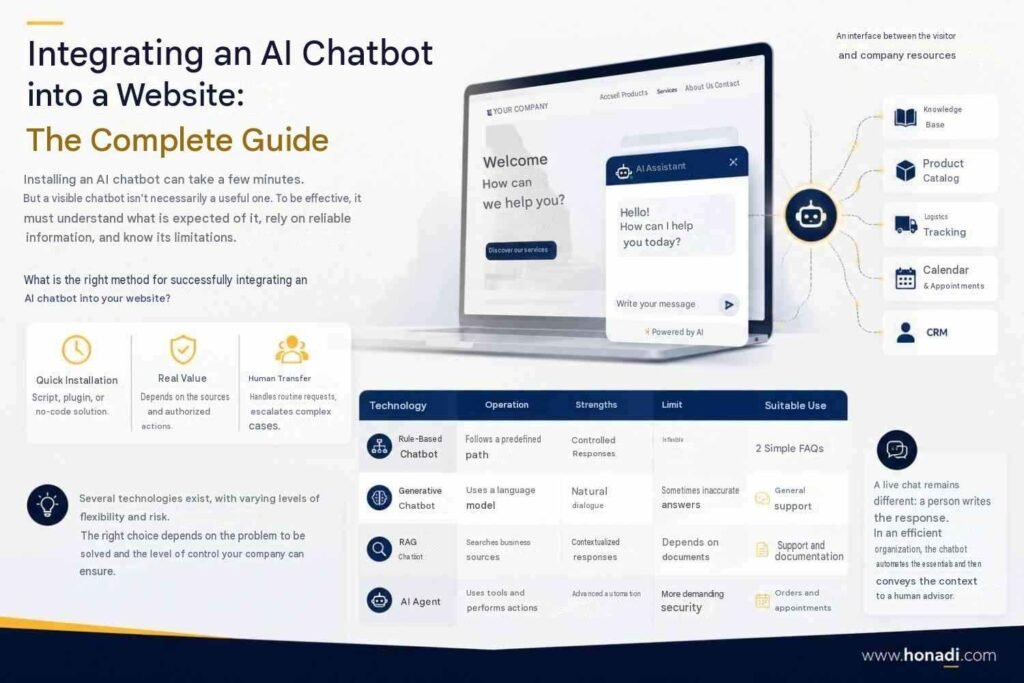
Technically, it can indeed take only a few minutes. The real work, however, begins after installation.
A visible chatbot is not necessarily a useful one. It needs to understand what is expected of it, know where to find reliable answers and recognise when a request falls outside its scope. So, what is the right approach? How should you integrate an AI chatbot into a website effectively?
What Is an AI Chatbot Integrated into a Website?
An AI chatbot integrated into a website is a conversational interface that can interpret requests written in natural language. It then generates a response based on its instructions and the information it is authorised to access.
It usually appears in a chat window, but most of its work happens behind the scenes. Depending on the solution, it may rely on prepared responses or search the company’s documentation for relevant information. More advanced systems can also connect to business tools.
An Interface Between Visitors and Company Resources
The chatbot acts as an intermediary between a visitor’s question and the content available within the business. The visitor no longer has to locate the right page alone. They can describe their request in their own words, and the system searches for a suitable answer.
Consider an e-commerce website. A customer asks whether a product is in stock and whether it can be delivered before a specific date. A chatbot limited to public website pages can explain the usual delivery times. If it is connected to the product catalogue and logistics tracking system, it can answer based on real-time availability.
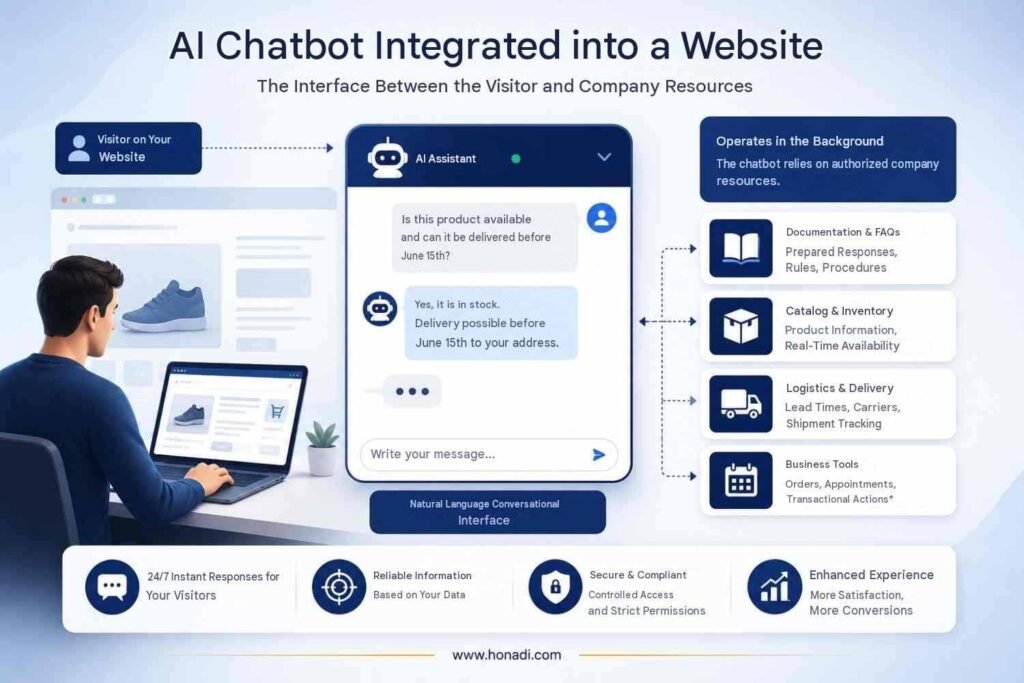
The chatbot’s value therefore depends largely on the quality of its sources and the actions it is allowed to perform. A transactional chatbot integration can, for example, check an order or help schedule an appointment, provided that strict permissions are in place.
Rule-Based Chatbots, Generative AI, RAG and AI Agents: What Is the Difference?
The term “chatbot” covers several technologies. They do not offer the same degree of flexibility, and they do not carry the same level of risk.
| Technology | How it works | Main strength | Limitation | Best suited for |
| Rule-based chatbot | Follows a predefined journey | Controlled responses | Limited flexibility | Simple FAQs |
| Generative chatbot | Uses a language model | Natural conversation | Responses may be inaccurate | General assistance |
| RAG chatbot | Searches business-specific sources | Contextualised answers | Depends on document quality | Support and documentation |
| AI agent | Uses tools and performs actions | Advanced automation | Requires stronger security | Orders and appointments |
A rule-based chatbot works well for simple, predictable journeys. Generative AI understands a wider range of wording, but it still needs clear safeguards. Retrieval-augmented generation, commonly known as RAG, searches validated sources before producing an answer. An AI agent goes further because it can take action through a connected tool.
Live chat is different because a person writes the response. In an effective setup, the chatbot handles routine requests and passes more complex situations to a human adviser together with the relevant context.
The best option is therefore not necessarily the most advanced technology. It depends on the problem you need to solve and the level of control your company can realistically maintain.
Does Your Website Really Need an AI Chatbot?
A chatbot is not always the right solution. Before choosing a platform, check whether the problem you are trying to solve genuinely calls for a conversational interface.
A good starting point is to review the requests your teams receive. If the same questions come up every week, a chatbot can take on part of that workload. It can also be useful when visitors abandon their journey because they cannot find an answer quickly enough.
When an AI Chatbot Delivers Real Value
An AI chatbot is particularly useful when your website receives a steady flow of predictable questions. These may concern opening hours, delivery terms or service features. It can also respond outside business hours, which creates a smoother and more continuous customer journey.
Consider a B2B company that offers several technical services. Visitors may hesitate between two options and leave the website without contacting the team. The chatbot can ask a few questions, direct them to the most relevant page and then offer to connect them with an adviser.
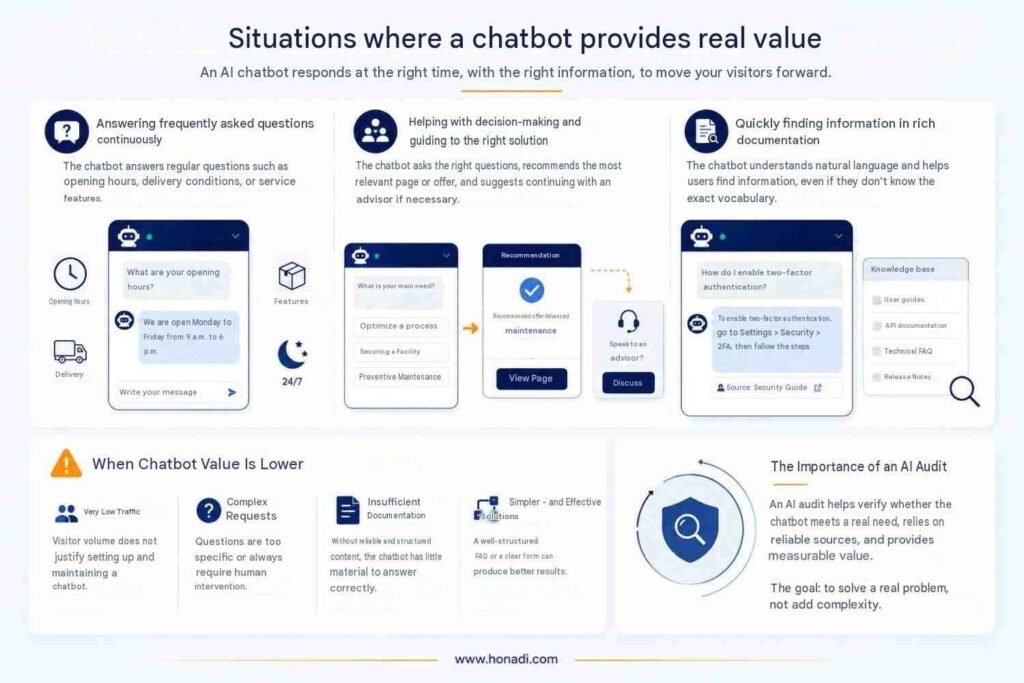
The same principle applies to extensive documentation. On a SaaS website, users do not always know the exact term for the feature they are looking for. A traditional search engine may fail, while a chatbot can understand a naturally worded question more effectively.
A chatbot becomes less valuable when website traffic is very low or when most requests are highly complex. Without reliable documentation, it will also have too little information to provide accurate answers. In that situation, a better-structured FAQ or a clearer form may deliver stronger results.
An AI audit can help determine whether a chatbot addresses a genuine need or simply adds an unnecessary layer of technology.
Chatbot, FAQ or Internal Search: Which Should You Choose?
These solutions are not necessarily mutually exclusive. However, they address different needs.
| Situation | Most suitable solution |
| A small number of questions with short, stable answers | FAQ |
| Extensive documentation with well-known keywords | Internal search engine |
| Questions phrased in many different ways | AI chatbot |
| Sensitive or highly personalised requests | Human adviser |
| Journeys combining simple answers with complex cases | Chatbot with human handover |
An FAQ remains the better option when users want to check a few answers quickly. Internal search is more suitable for a well-organised documentation library. A chatbot becomes relevant when visitors do not know where to look or want step-by-step guidance.
The decision can therefore be summarised simply. If the need is frequent, repetitive and well documented, an AI chatbot is worth considering. If the answers primarily require judgement or negotiation, a human should remain at the centre of the experience.
The Main Use Cases for an AI Chatbot on a Website
A chatbot creates value when it supports users at a specific point in their journey. It should not try to do everything. Businesses generally achieve better results by starting with one or two clearly measurable use cases.
Customer Support and Access to Information
Customer support is the most common use case. The chatbot answers frequently asked questions, explains procedures or retrieves information from the company’s documentation. Its effectiveness can be measured through the self-service resolution rate and the reduction in repetitive requests.
On an e-commerce website, a customer may ask how to return a product. The chatbot checks the returns policy, explains the steps and provides the relevant link. It should never invent a commercial policy that is not supported by its approved sources.
In a SaaS environment, the assistant can guide users through onboarding. It may explain how to configure an account or connect an initial data source. For more technical questions, it searches the documentation and directs the user to the relevant page.
| Use case | Typical question | Required data | Expected action | Main KPI |
| FAQs and support | “How can I change my subscription?” | Help centre | Explain the procedure | Self-service resolution |
| Technical documentation | “How do I connect the API?” | Product documentation | Find the correct procedure | Helpful response rate |
| SaaS onboarding | “What should I configure first?” | User journey | Guide the user | Account activation |
| Website navigation | “Where can I find your pricing?” | Website structure | Direct the user to the right page | Click-through to the target page |
Conversion, Lead Qualification and Recommendations
A chatbot can also support conversions. It collects a small amount of information and then directs the visitor towards a suitable offer. The aim is not to replace the sales representative, but to prepare the conversation.
On a consulting firm’s website, the chatbot may ask about the company’s size and the challenge it is facing. It can then recommend a useful resource or invite the prospect to book a meeting. In this case, the main performance indicator is the number of qualified leads rather than the total number of conversations.
Product recommendations in e-commerce follow a similar approach. The chatbot identifies the intended use, the available budget and one important preference. It then compares the available options without inventing product features.
| Use case | Typical question | Required data | Expected action | Main KPI |
| Lead qualification | “Which solution is right for my company?” | Offers and sales criteria | Direct and hand over the lead | Qualified leads |
| Product recommendations | “Which model should I choose for everyday use?” | Catalogue and stock data | Suggest suitable options | Assisted conversion |
| Appointment booking | “Do you have any availability on Thursday?” | Connected calendar | Display or book an available slot | Confirmed appointments |
Order Tracking and Simple Operations
Transactional use cases often deliver significant value, but they require tighter controls. The chatbot may need to access private data or trigger an action in a third-party system.
A customer may ask where their order is. The chatbot verifies their identity, checks the shipping status and then displays the information. For a return, it can prepare the request without approving it definitively when human verification is still required.
The same approach applies to appointment booking. The assistant checks availability and collects the necessary information. It then confirms the time slot or forwards the request to the team.
These scenarios can be connected to intelligent workflows to prevent duplicate data entry and send the correct information to internal tools.
The more actions a chatbot can perform, the stricter its rules need to be. An informational response can be corrected, but an incorrect order change or booking has an immediate impact. Permissions should therefore be limited, confirmation should be required and sensitive operations should be logged.
The Four Ways to Integrate an AI Chatbot
There is no single way to add a chatbot to a website. The right approach depends on the level of customisation you need, the available budget and your internal technical resources.
A small business may start with an off-the-shelf tool. An organisation that wants to connect the chatbot to its information systems will generally need a specialised platform or a custom-built solution.
Install a No-Code Widget
A no-code widget is the most accessible option. You configure the chatbot through an online interface, then copy a script into your website. The chat window then appears on the pages you have selected.
This solution works well for FAQs, lead qualification and early projects based on straightforward documentation. It allows you to test a use case quickly without involving a development team.
However, ease of installation should not hide the limitations. Customisation options may be restricted, and advanced connectors are often available only on higher-tier plans. Your level of control over the data also depends on the provider you choose.
A no-code widget is therefore a practical way to validate whether a chatbot is genuinely useful. It becomes less suitable when the business needs precise control over hosting or security policies.
Use a WordPress Plugin or Shopify App
WordPress plugins and Shopify apps simplify chatbot integration within a CMS. They generally avoid the need to edit the theme directly and provide settings tailored to the platform.
On WordPress, a plugin can display the chatbot on selected pages or retrieve content from the website. It can also direct enquiries to a contact form. On Shopify, an app can use catalogue data and guide users to the relevant product page.
This method offers a good balance between speed and integration. However, it still depends on the quality of the extension. A CMS or theme update may cause compatibility issues. Some plugins also load heavy scripts that can slow down page performance.
Before installation, check how frequently the extension is updated and assess the quality of its support. You should also review the permissions it requests.
Integrate a Specialised Platform with a JavaScript Snippet
A specialised platform provides more control than a basic plugin. The chatbot is configured in an external dashboard and then loaded onto the website using a JavaScript snippet.
This approach makes it easier to centralise conversations and manage multiple websites. It often supports connections to a CRM or help desk. Some platforms also include advanced analytics features.
The company can customise the chatbot’s behaviour and organise its knowledge sources. It can also apply different rules depending on the page being visited or the visitor’s profile.
The main risk is dependence on the platform. A price increase or technical limitation may affect the project. The location of the data should therefore be checked before making any commitment.
Build a Custom Solution with an API
A custom integration provides the highest level of control. The chatbot connects to an AI model through an API and is then integrated with the company’s internal tools according to its specific requirements.
This approach is suitable for complex use cases. It can, for example, check an order, access a customer record or trigger a workflow. It can also be integrated into a custom web application when the chatbot needs to share data with other features.
Custom development requires more resources. The interface must be designed and the connections secured. Ongoing system maintenance must also be planned.
A custom solution is therefore worthwhile only when the expected value justifies the added complexity. For a simple FAQ, it would often be excessive.
| Method | Difficulty | Implementation time | Customisation | Maintenance | Data control |
| No-code widget | Low | Very fast | Limited | Low | Variable |
| CMS plugin or app | Low to medium | Fast | Moderate | Moderate | Variable |
| Specialised platform | Medium | A few days | High | Moderate | Depends on the provider |
| API-based development | High | Several weeks | Very high | Significant | High |
The right choice is not the option with the most features. It is the simplest method that can support the use case without creating disproportionate dependence or maintenance overhead.
How to Choose the Right Chatbot Solution ?
Comparing chatbots on price alone often leads to the wrong decision. Two similarly priced tools may offer very different levels of control over knowledge sources or security.
Your selection should begin with your actual needs. Assess how the solution performs today, but also consider whether it can grow with your project.
Technical Compatibility and Knowledge Management
Start by checking compatibility with your website. A solution may perform well while still being difficult to integrate with your CMS or existing architecture.
Next, examine how it uses your content. A good RAG system should distinguish reliable documents from secondary material. It should also allow you to remove or update a source without rebuilding the entire chatbot.
The ability to switch AI models also deserves attention. Some platforms lock you into a single provider, while others support several models. This flexibility reduces technical dependence and makes it easier to adapt to future requirements.
For a multilingual website, do not simply check whether the chatbot can translate an answer. Test whether it understands industry-specific terminology and cites the correct source in each language.
Business Integrations and a Seamless User Journey
A chatbot becomes more useful when it connects with the tools your company already uses. It may send a lead to the CRM or create a help desk ticket. It can also check a calendar.
These integrations should remain consistent with the user journey. A visitor should not have to complete a full form in the chatbot and then enter the same information again when speaking with an adviser.
Human handover is therefore a major selection criterion. Check whether the platform transfers the conversation history and the information already collected. You should also review how it informs the user that they are being passed to a different contact.
Conversation analytics should go beyond message volume. A useful solution helps identify unanswered questions and frequent handovers. It should also reveal content that has become outdated.
The visible experience matters just as much as the technology. The widget should remain easy to read on mobile and support keyboard navigation. A thoughtful UI and UX design approach can help integrate it without disrupting the website’s main user journey.
Security, Data and Pricing Model
The location of your data should be clearly documented. Check where conversations are stored and how long they are retained. You should also review the subprocessors used by the provider.
Permission management becomes essential when the chatbot can access internal tools. Not every user should be able to view the same information. Sensitive actions should also require confirmation.
Pricing needs to be assessed as a whole. A low-cost subscription can become expensive as usage grows or additional connectors are added. Some platforms also charge separately for the AI model.
A simple scoring framework makes it easier to compare solutions without being overly influenced by a sales demonstration.
| Criterion | Recommended weighting |
| Response and RAG quality | 25% |
| Website and tool integration | 20% |
| Security and data management | 20% |
| Human handover and analytics | 15% |
| Scalability | 10% |
| Total cost | 10% |
Give each solution a score out of five, then apply the weighting. This method does not replace real-world testing, but it makes the comparison more objective.
The best platform is the one that supports your current use case while leaving reasonable room for growth. Your team should also be able to supervise it without creating a dependency that becomes difficult to manage.
What to Prepare Before Installation
A successful integration begins before you choose a widget or add a script. The chatbot needs a clear objective, usable knowledge sources and boundaries that the entire team understands.
Without this preparation, the technical setup simply makes a poorly defined system available to visitors more quickly.
Define a Measurable Objective and Clear Scope
An objective such as “improve customer service” is too vague. It does not provide enough direction to configure the chatbot properly or assess its effectiveness.
Define an observable outcome instead. The chatbot might aim to reduce repetitive support tickets by 20%, increase appointment bookings or shorten the first-response time. For an e-commerce business, the goal may be to help visitors who are deciding between several products.
Next, define what the assistant is allowed to do. It may explain a procedure, recommend an offer or forward an enquiry. If it must never change an order or provide contractual advice, that restriction should be included in its instructions.
A clear scope prevents the chatbot from becoming a so-called universal assistant. The more topics it tries to cover, the harder its knowledge base becomes to maintain. Its responses also become more difficult to control.
Identify and Clean Up Knowledge Sources
The chatbot may use website pages, an FAQ or internal documents. Product catalogue data and commercial policies may also be included.
These sources should not be imported without review. An outdated price list or two contradictory procedures can be enough to produce inconsistent answers.
Before integration, classify the content into three categories.
- Validated sources that can be used immediately
- Content that must be corrected before import
- Outdated or prohibited documents
Each source should have an owner who is responsible for keeping it up to date. An internal data governance process helps define who validates information and how older versions are removed.
Document structure also matters. Clear headings and paragraphs focused on one idea make information easier to retrieve. Complex tables or scanned PDFs often require additional processing.
Control Sensitive Data and Human Handover
The chatbot should request only the information needed to fulfil its purpose. To direct a prospect towards a suitable service, the business sector and company size may be enough. There is no need to collect a full address or financial information immediately.
Identify the information it must never display. This may include internal notes, other customers’ data or technical keys. Access should be limited to what is strictly necessary.
You should also define the conditions for human handover. A transfer may be triggered when the chatbot lacks reliable information or detects a sensitive request. It should also be available whenever the user clearly asks to speak with a person.
The adviser should receive a summary of the conversation and the information already provided. This continuity prevents the handover from becoming a new and frustrating journey.
How to Integrate an AI Chatbot into Your Website, Step by Step
The integration process can be organised into ten steps. Following them in order helps you avoid choosing a technology too early or launching the chatbot before checking the quality of its responses.
Steps 1 and 2: Define the Use Case, Then Choose the Technology
Start by describing a specific situation. Identify who will use the chatbot, when they will use it and what result they should achieve.
For example, a consulting firm may want to qualify visitors before they book an appointment. The chatbot will need to identify their needs, collect a small amount of information and then suggest the most suitable type of conversation. This scenario is more actionable than a broad objective such as “automate sales”.
Next, assign performance indicators to the use case. You can track the number of qualified enquiries and the rate of confirmed appointments. You should also monitor the handover rate to a human adviser.
Technology selection should come only after this scoping exercise. A no-code widget is often enough to test an FAQ or a simple user journey. A specialised platform becomes more relevant when several knowledge sources need to be managed. An API is generally better suited to advanced integrations and specific business rules.
Avoid choosing a tool solely because its demonstrations look impressive. Make sure it covers your main requirement without imposing an unnecessarily complex architecture.
Steps 3 and 4: Prepare the Knowledge Base, Then Write the Instructions
Gather the content required for the first use case. It is better to start with fifty reliable pages than to import several thousand poorly controlled documents.
Remove duplicates and resolve contradictions. Check the dates, links and commercial terms mentioned in the content. Sensitive information should either be excluded or protected with appropriate permissions.
Next, write the system instructions. This text defines the chatbot’s role and the rules it must follow throughout every conversation.
A useful system prompt can follow this structure:
Role
You are the company’s customer service assistant.
Mission
Answer questions about products, deliveries and returns.
Authorised sources
Use only the validated knowledge base and data available through authorised tools.
Expected behaviour
Respond concisely and explain the relevant steps.
When uncertain
Do not invent information. State that the answer cannot be confirmed.
Prohibited topics
Do not provide legal advice or reveal any data relating to another customer.
Handover
Offer to connect the user with an adviser when the request falls outside your scope or when the user asks to speak with someone.
A prompt cannot compensate for a poor knowledge base. It guides the chatbot’s behaviour, but it cannot make incorrect information reliable.
You should also test refusal messages. A response such as “I do not have confirmed information on this point” inspires more confidence than a vague statement or an assumption.
Step 5: Connect Only the Tools You Need
Each connection should support the defined use case. To book an appointment, the chatbot needs access to calendar availability. It does not need access to the entire CRM.
For order tracking, the assistant can query the logistics system after verifying the user. A more sensitive action, such as cancelling an order, may still require human confirmation.
Apply the principle of least privilege. The chatbot should receive only the permissions required for each operation. You should also separate read access from permission to modify data.
Define what should happen when a connected tool does not respond. The chatbot should inform the user and suggest an alternative rather than inventing a status or repeating the same attempt.
Steps 6 and 7: Customise the Widget, Then Install the Code
The chatbot’s appearance should match the website without covering important content. Adapt the colours and typography. You should also check the size of the chat window on mobile devices.
The welcome message should explain what the assistant can do. A specific message such as “I can help you choose a service or arrange an appointment” is more useful than a generic “How can I help you?”.
Installation then depends on the solution you selected. A no-code tool usually provides a script to place before the page’s closing tag. A plugin handles this step through the CMS. A custom integration requires a website-side component and a server-side service that communicates with the model.
Never place an API key directly in the browser. All secret information must remain on the server. Load the script using deferred loading whenever possible. This reduces its impact on the page’s initial display and prepares the performance optimisations discussed later.
Steps 8 and 9: Configure Privacy, Then Test the Chatbot
Update the information provided to visitors. It should explain that they are interacting with an AI system and specify which data is used. The retention period and the methods available for exercising their rights should also be accessible.
Next, configure the conversation logs. Avoid storing passwords or payment data unnecessarily. Personal information can be masked before it is stored.
Testing should go beyond the ideal questions prepared by the team. Use short phrases and spelling mistakes. You should also include ambiguous requests.
Check the following elements:
- Accuracy of the response
- Source used
- Action triggered
- Quality of the human handover
- Display on desktop and mobile
You should also test out-of-scope requests and manipulation attempts. The chatbot must continue to follow its rules even when a user asks it to ignore them.
Step 10: Launch Gradually and Review Conversations
Avoid deploying the chatbot across the entire website immediately. Start on a small number of pages or with a limited group of users.
This pilot phase helps identify misunderstood questions and missing sources. It also reveals situations in which the chatbot should hand the conversation over more quickly.
Review the first conversations every week. Correct the content and adjust the instructions. Once the responses are stable, you can gradually expand the scope.
Launch is not the end of the project. It marks the beginning of an improvement cycle based on real conversations and measured results.
Installation Instructions for Each Website Platform
The basic process is similar across platforms. You configure the chatbot through the provider, retrieve the integration code and then choose the pages on which it should appear.
However, the exact method depends on the website’s architecture. An HTML website requires direct changes to the code, while a CMS often provides a dedicated plugin or integration block.
Integrate a Chatbot into an HTML Website
For a website built in HTML, the provider will usually supply a JavaScript snippet. This script should be added to the shared template used by the relevant pages, often just before the closing body tag.
<script
src=”https://exemple.com/chatbot.js”
data-chatbot-id=”identifiant-du-chatbot”
defer>
</script>
The defer attribute allows the browser to continue parsing the page before executing the script. The chatbot should not delay the display of the main content.
Visible settings, such as the chatbot ID or language, can be included in the code. However, a secret API key must never appear in the page. All sensitive communication should pass through a server controlled by the company.
You should also review the website’s Content Security Policy, or CSP. If the website blocks external scripts by default, the provider’s domain will need to be added to the list of authorised sources. This change should be limited to the domains that are actually required.
Install a Chatbot on WordPress
There are three main options on WordPress. You can use an official plugin, insert the script into an HTML block or deploy it through a script management tool.
A plugin is generally the simplest option. Once it is installed, you enter the chatbot ID and select the pages on which it should appear. However, check the permissions it requests and how frequently it is updated.
Adding the script manually provides more control. You can do this through a child theme or a plugin designed for code injection. Avoid editing the main theme files directly, as a theme update could remove the integration.
If the website uses several marketing plugins, check for potential conflicts. Two widgets positioned in the same place may overlap on mobile devices. Some plugins also load their scripts on every page even when the chatbot is useful only in one section of the website.
A website designed from the outset with performance and user journeys in mind makes this type of integration easier. The chatbot then becomes part of the service rather than an additional module installed without considering the existing architecture.
Add a Chatbot to Shopify
On Shopify, an app can install the widget in the theme automatically. Some solutions also provide an app block that can be positioned through the visual theme editor.
This method simplifies chatbot display and reduces the need for manual changes. Depending on the permissions granted, it may also make it easier to connect the chatbot to the product catalogue or order status data.
Before enabling the app, review the data it wants to access. A chatbot that recommends products may need access to the catalogue. It does not necessarily need permission to modify orders or view all customer information.
When the app does not provide a block that is compatible with the theme, the script can be added to the theme files. This change should be documented and tested after every significant update.
Finally, check how the chatbot behaves on product pages and in the shopping cart. It must not cover the purchase button or delivery information. On mobile, a misplaced widget of only a few pixels can be enough to disrupt conversions.
Webflow, Wix and Google Tag Manager
Webflow and Wix generally allow you to add custom code through the website settings or a dedicated integration area. The script can be loaded across the entire domain or only on selected pages.
The second option is preferable when the chatbot addresses a specific need. A support assistant may appear in the help centre, while a sales chatbot will be more useful on service or pricing pages.
Google Tag Manager can also deploy a script without requiring direct changes to the website’s code. You create a Custom HTML tag and then define a trigger. The trigger can apply to every page or to a specific selection.
This method makes testing easier and allows the widget to be removed quickly. However, it requires careful permission management because a configuration error may affect several pages at once.
Check That the Installation Works
Do not simply confirm that the chat bubble appears. Open the chatbot in several browsers and test it on mobile devices. You should also check how it works when non-essential cookies are rejected.
Review the script loading process and check the browser console for errors. Then make sure that important events are being recorded correctly in your analytics platform.
Finally, test the complete user journey. The response should appear correctly, every link should work and the human handover should reach the appropriate team. The installation should be considered complete only when the entire scenario works as expected.
Designing a Good Conversational Experience
A chatbot can be technically reliable and still be frustrating to use. The experience depends on when it appears, the questions it asks and the length of its responses.
The aim is not to imitate a human conversation at all costs. Visitors primarily want help that is quick, easy to understand and relevant to their situation.
A Clear Welcome Without Aggressive Interruptions
The welcome message should explain the chatbot’s purpose. A sentence such as “I can help you choose a service or find the right procedure” immediately provides a useful framework.
Avoid opening the chat window automatically a few seconds after the visitor arrives on the page. This interrupts reading and may cover part of the content on mobile devices. A discreet invitation is often more effective.
Suggested questions can help visitors get started. Limit them to the most common requests, such as “Compare services” or “Track an order”. They should reflect actions the chatbot can actually perform.
The chatbot should also make it clear that it is an automated system. This transparency prevents confusion and helps users understand the possible limitations of its answers.
Keep Conversations Short and Action-Oriented
Ask only one question at a time. A conversational form that requests the budget, industry and company size all at once can feel like an interrogation.
Start with the information that determines the next step in the journey. When recommending a service, the visitor’s main requirement will often be more useful than their full contact details.
Responses should address the requested information directly. A short initial answer can be followed by a link or an option to explore the topic further. The chatbot should not display a long block of documentation when a three-step procedure is enough.
When several options are available, explain the differences using simple criteria. Visitors should be able to make a decision without rereading the entire conversation.
Mobile, Accessibility and Handover to a Human Agent
On mobile devices, the close button and message field must remain visible. The on-screen keyboard should not cover the response or prevent the user from sending a message.
The widget should also remain fully usable with a keyboard. Buttons need clear labels, and the contrast should support comfortable reading. Error messages should explain how the user can continue.
An automated response should never become a dead end. Visitors must be able to request a human adviser without having to use a specific phrase. A handover button can appear after an unsuccessful response or as soon as a sensitive request is detected.
When no one is available, state this clearly. Collect only the information required for follow-up, then provide the expected response time.
A good conversational experience ultimately rests on a simple principle. The chatbot should reduce the effort required from the visitor. If it adds steps or hides essential information, it is no longer fulfilling its purpose.
How to Reduce Hallucinations in an AI Chatbot
A hallucination occurs when the chatbot produces an answer that sounds plausible but is false or unverified. The problem does not come solely from the model being used. It may also result from outdated sources, unclear instructions or a question that falls outside the intended scope.
The realistic objective is not to eliminate every risk. It is to reduce how often hallucinations occur and limit their consequences.
Use Validated Sources Through RAG
A chatbot should not answer business-specific questions using only the general knowledge of its model. It should search a controlled knowledge base before generating its response.
This approach is known as RAG. The system identifies relevant passages in your documents and provides them to the model as context. The chatbot therefore answers using sources defined by the company.
However, the quality of the result depends on the documentation. Contradictory procedures will produce uncertain answers. An outdated price may also be selected if the previous version has not been removed.
Each source should therefore include an update date and a responsible owner. Public documents should be kept separate from internal notes. User-generated content should never be treated as reliable automatically.
Asking the chatbot to cite the page or document it used makes verification easier. Visitors can consult the source, while the team can identify the origin of an error more quickly.
Manage Uncertainty and Sensitive Responses
The chatbot must be allowed not to answer. Without this rule, it will often try to produce a complete response even when the available information is insufficient.
Its instructions can require it to state uncertainty clearly. It may explain that no confirmed source is available, then suggest a relevant page or offer a handover to an adviser.
A confidence threshold can strengthen this mechanism. When document retrieval produces a result that is too weak, the chatbot should refuse to generate a specific answer. This prevents it from turning an approximate match into a definite claim.
Sensitive topics require greater caution. A response concerning a contract or financial situation may need human validation. The same applies to a serious complaint.
In these cases, the chatbot can collect the context and prepare a summary. The final decision remains with a qualified person.
Separate Information, Recommendations and Actions
Not every message carries the same level of risk. Explaining a returns policy is less sensitive than recommending a decision or changing an order.
This distinction should be reflected in the chatbot’s architecture.
- Informational responses rely on validated content
- Recommendations clearly state the criteria used
- Sensitive actions require confirmation
An e-commerce chatbot may suggest three products based on the intended use. It should state which features were used to make the selection. It must not invent compatibility that is not included in the catalogue.
Before taking an action, the system should restate what it is about to do. The user then confirms it explicitly. This step reduces errors and helps identify misunderstandings.
Reducing hallucinations therefore requires several layers of control. A reliable knowledge base limits factual errors. Precise instructions govern the chatbot’s behaviour. Escalation to an adviser takes over when the required level of reliability exceeds the system’s capabilities.
How to Test a Chatbot Before Launch
A chatbot should not be evaluated solely using the questions entered during configuration. These formulations are often too polished and too closely aligned with the available documents.
Testing should reproduce the way real visitors behave. It should also assess the chatbot’s responses, actions and user experience across different devices.
Create a Reference Set of Test Questions
Start by building a set of questions that represents the intended use case. Each question should be linked to an expected answer or a specific behaviour.
The test set should cover several categories:
- Simple and frequently asked questions
- Unusual wording
- Ambiguous requests
- Out-of-scope topics
- Personal data
- Manipulation attempts
- Requests requiring human assistance
Include spelling mistakes and incomplete sentences. A user may write “order not received” rather than asking a perfectly structured question. The chatbot should understand the intent without inventing the missing information.
You should also test several ways of asking the same question. This variation helps confirm that the system provides a consistent answer despite differences in wording.
Check Accuracy, Sources and Actions
A response that is pleasant to read is not necessarily correct. Verify every important claim and compare it with the source used.
Next, check that any suggested link leads to the correct page. When the chatbot can perform an action, test the complete scenario. An appointment booking cannot be considered successful if the displayed time slot is not actually saved.
Testing should also cover failures. Simulate an unavailable API or missing information. The chatbot should explain the issue and suggest an alternative. It must never display an invented result.
A user acceptance testing matrix makes progress easier to track :
| Test | Expected result | Actual result | Status |
| Simple FAQ question | Accurate answer with a source | To be completed | Pending validation |
| Question containing a spelling mistake | Intent correctly understood | To be completed | Pending validation |
| Out-of-scope question | Clear refusal followed by appropriate guidance | To be completed | Pending validation |
| Request for private data | Access denied | To be completed | Pending validation |
| Handover to a human | Conversation history transferred correctly | To be completed | Pending validation |
| Business action | Confirmation required before execution | To be completed | Pending validation |
Test the Interface and Run a Pilot Launch
The chatbot should be tested on desktop and across several mobile screen sizes. Check the input field, scrolling and the close button. The widget must not cover the website’s main buttons.
Test keyboard navigation and ensure that messages can be read by a screen reader. Buttons should have clear labels, while error messages should explain what the user needs to do next.
Before a full launch, make the chatbot available to a limited group. This may include employees or a small number of volunteer customers. Their conversations will reveal wording and behaviours that the team had not anticipated.
Then analyse errors and human handovers. Correct the sources, adjust the instructions and repeat the relevant tests. The chatbot should not be launched across the entire website until it has completed several testing cycles without any critical errors.
AI Chatbots, the GDPR and the AI Act: Rules You Need to Follow
A chatbot may process personal data even when it does not ask for a name or require the user to create an account. A conversation history, an IP address or information entered freely by the user may be enough for the GDPR to apply. The CNIL also points out that a conversational agent may retain a record of an exchange without the individual directly providing an identifier.
Compliance therefore involves more than adding a sentence to the privacy policy after installation. It should influence which data is collected, how the widget is configured and which provider is selected.
Inform Users and Limit the Data Collected
Visitors must understand that they are interacting with an artificial intelligence system. This information can appear as soon as the widget opens, using wording that is simple and clearly visible.
From 2 August 2026, Article 50 of the AI Act introduces, among other requirements, a transparency obligation for systems designed to interact directly with individuals. Users must be informed that they are communicating with an AI system unless this is already clear from the context. The information must be provided no later than the first interaction.
This transparency does not replace the information required under the GDPR. The company must also explain which data is used and why it is processed. It must state how long the data is retained and how individuals can exercise their rights.
Data collection should remain proportionate to the service provided. A chatbot that recommends a product does not need the visitor’s postal address from the first question. To qualify a B2B prospect, a small amount of information about their needs may be sufficient before handing them over to a sales representative.
You should also anticipate sensitive data that users may enter spontaneously. A free-text field makes this type of disclosure easier, even when the chatbot does not ask any sensitive questions. The CNIL therefore recommends implementing mechanisms that can limit the risks to individuals.
Define the Lawful Basis, Retention Period and User Rights
Every processing activity involving personal data must rely on an appropriate lawful basis. The same basis will not necessarily apply to every chatbot function.
For example, fulfilling a request may justify processing the information required to track an order. Legitimate interests may be considered in certain contexts, subject to a balanced assessment. Consent remains necessary when it is the appropriate lawful basis or when a non-exempt tracking technology is used.
The retention period should not be selected by default according to the provider’s settings. It must correspond to a specific purpose. A conversation required to process a request may be retained while the request is being resolved, then deleted or archived according to a documented rule.
Users must be able to exercise their rights whenever the GDPR provides for them. In particular, they should know how to request access to or rectification of their data. Deletion must also be arranged when the relevant conditions are met.
The contract with the service provider deserves careful review. Check its subprocessors and hosting locations. You should also examine any transfers of data outside the European Economic Area. When conversations are reused to train a model, this purpose must be identified and governed rather than discovered after deployment. The European Data Protection Board emphasises that the development and use of AI models remain subject to GDPR principles when personal data is involved.
Cookies, Sensitive Decisions and Internal Governance
The widget may place a cookie to preserve the conversation across several pages. According to the CNIL, prior consent is required when the cookie is placed before the user activates the chatbot. If the tracker is placed only after an explicit action and remains strictly necessary for the requested service, it may qualify for an exemption.
This distinction must be verified technically. The mere presence of a button in the consent banner does not guarantee that the script genuinely waits for the user’s choice.
Important decisions should not be delegated to the chatbot without appropriate oversight. An assistant may collect information or prepare a recommendation. It should not independently decide to refuse a service or impose a significant consequence on an individual when the law requires additional safeguards.
Compliance also requires clear internal accountability. Someone should be responsible for monitoring knowledge sources and incidents. The Data Protection Officer should be involved whenever data protection considerations make this appropriate. Training teams in digital tools and AI also helps employees identify sensitive requests and take over transferred conversations correctly.
The GDPR and the AI Act should therefore not be treated as two separate checklists. The former primarily governs the processing of personal data. The latter adds obligations specific to artificial intelligence systems, including transparency requirements that will apply to chatbots from 2 August 2026.
How to Secure an AI Chatbot
A chatbot connected only to a public FAQ presents limited risk. The situation changes when it can access a CRM or customer records. It becomes even more sensitive when it is able to trigger an action.
Security must therefore protect three areas. You need to control the information received, restrict the chatbot’s permissions and verify its output before anything is executed.
Protect Against Prompt Injection
Prompt injection involves introducing a malicious instruction designed to make the model ignore its rules. A user may ask it to reveal its system prompt or bypass a restriction. The attack may also be hidden in a document retrieved by the RAG system.
A simple instruction such as “ignore previous instructions” is not enough to secure the system. Instructions and external data must be clearly separated. Imported content should also be checked before it is added to the knowledge base.
Inputs can be filtered to detect suspicious patterns. Outputs should also be validated before they are displayed or passed to a tool. These layers reduce the risk, although they do not provide absolute protection.
Testing should include both direct and indirect attempts. Add requests to extract data or reveal internal rules. You should also test instructions hidden in a web page or document retrieved by the chatbot.
Restrict Access and Control Actions
An API key must never be exposed in the browser. It should remain on a secure server or in a secrets management system.
Next, apply the principle of least privilege. The chatbot should receive only the permissions required for its use case. An assistant that checks delivery progress may have read-only access to order statuses. It does not need permission to modify refunds.
OWASP recommends restricting API scopes and using read-only accounts whenever possible. Tool calls should be validated according to the user’s permissions and the context of the session.
Keep read access separate from modification rights. A sensitive action should be restated and then confirmed. Human approval may remain mandatory for a cancellation or financial transaction.
The parameters passed to tools must also be controlled. The chatbot should not be able to send an unrestricted technical command constructed from user-provided text.
Monitor Usage and Prepare for Incidents
Logs should make it possible to trace sensitive operations without becoming a new source of data leakage. Passwords and access tokens should be masked. The same applies to personal data that is not required for security analysis.
Introduce rate limiting. This reduces automated abuse and repeated attempts to extract information. Unusual behaviour should trigger an alert.
OWASP recommends monitoring interactions, tool calls and suspicious patterns. Regular testing should complement this monitoring because attack techniques evolve and new knowledge sources may introduce additional risks.
Finally, prepare a shutdown procedure. The team should be able to disable a feature or remove a connector without taking the entire website offline. It should also be clear who investigates an incident and how affected individuals will be informed when a personal data breach is confirmed.
Chatbot security therefore relies on defence in depth. The system prompt provides an initial barrier, but it cannot replace technical permissions or action validation. The more authority the assistant has, the less its security can depend solely on its ability to follow instructions.
What Impact Does a Chatbot Have on Website Performance and SEO?
A chatbot usually adds an external script to the website. This script may load an interface, fonts or tracking tools. If it is poorly configured, it increases the browser’s workload and slows down interactions.
Google can process pages that use JavaScript, but it recommends taking rendering limitations into account. Important content should therefore never depend solely on the conversational widget.
Load the Chatbot Without Slowing Down the Pages
The script should be loaded with defer or after the main content has appeared. Another approach is to display a lightweight icon and load the full interface only when the user clicks it. Web.dev recommends this type of deferred loading to reduce the performance cost of third-party components.
You should also avoid displaying the chatbot on every page by default. A sales assistant may be useful on service and pricing pages. It provides less value on a legal page or an article unrelated to its scope.
Measure the impact before and after installation using Lighthouse or the browser’s developer tools. Optimising Core Web Vitals and page speed helps identify scripts that delay rendering or block interactions.
Preserve SEO Content and the Mobile Experience
The chatbot should not replace essential website information. Service descriptions, delivery terms and important answers should remain available in the pages’ HTML. This keeps them accessible to visitors, search engines and people who do not use the widget.
On mobile devices, check that the chat window does not cover the menu or conversion buttons. The widget should also be easy to close and keep the input field visible when the on-screen keyboard appears.
A well-integrated chatbot therefore complements the existing content. It should never become the only way to navigate the website or the sole place where important information can be found.
How Much Does It Cost to Integrate an AI Chatbot?
The cost depends less on the use of artificial intelligence itself than on the level of integration required. A no-code FAQ chatbot and an agent connected to an order management system do not require the same resources.
You need to distinguish between the initial implementation cost, the software subscription and usage-based fees. Documentation maintenance and the time required for human supervision must also be included.
The Cost of a No-Code Tool or Specialised Platform
Some tools offer a free plan or a limited trial. Plans designed for small teams often range from a few dozen to several hundred euros per month. More advanced platforms may also charge per user, per conversation or per outcome achieved.
Pricing models vary considerably. Tidio charges according to conversation volumes and the products enabled. Intercom uses outcome-based pricing for its AI agent, while Zendesk combines per-agent plans with certain features billed according to usage.
The installation itself may remain inexpensive when the chatbot uses only public website pages. The budget increases when the knowledge base needs to be structured or the user journey customised. Connecting the chatbot to a CRM also requires additional work.
The Cost of a Custom Integration
A solution built with an API involves several cost areas. The interface must be designed and the server-side service developed. The connectors also need to be secured.
The initial cost may range from a few thousand euros for a limited scope to several tens of thousands of euros for a complex transactional agent. These figures are planning estimates rather than universal prices. The existing architecture and the number of connected tools can significantly affect the final quotation.
Model usage is generally billed according to the volume processed. The price depends on the chosen model and the amount of text sent or generated. API providers publish different rates depending on the models and services used.
Recurring Costs and Hidden Expenses
The software accounts for only part of the total budget. Documents need to be updated and unsuccessful conversations reviewed. Security testing should also be repeated whenever the chatbot receives new permissions.
| Cost item | No-code tool | Specialised platform | Custom solution |
| Initial cost | Low | Medium | High |
| Monthly subscription | Free to several hundred euros | Several hundred to several thousand euros | Variable |
| Usage-based billing | Sometimes included | Common | Almost always applies |
| Documentation maintenance | Moderate | Moderate to high | High |
| Main hidden cost | Plan limitations | Connectors and usage volumes | Technical maintenance |
The calculation should therefore focus on the total annual cost. Include the subscription and the time spent maintaining content. Then add supervision and any additional development work.
An ongoing ROI optimisation process makes it possible to compare these expenses with support savings or revenue that can genuinely be attributed to the chatbot. This is precisely the focus of the next section.
How to Measure the ROI of a Chatbot
The number of conversations alone is not enough to prove that a chatbot creates value. A widget may receive a large volume of messages while producing few resolutions, few sales or even more work for the team.
Measurement should begin with the objective defined before installation. A customer support chatbot will be assessed differently from a sales assistant or a product recommendation tool.
Choose Metrics That Match the Use Case
For customer support, the self-service resolution rate shows the proportion of requests handled without human intervention. It should be compared with the rate of incorrect answers, because a request counted as resolved autonomously is useful only when the information provided is reliable.
The human handover rate provides another perspective. A high rate may reveal an incomplete knowledge base or a poorly defined scope. However, it is not always a negative result. For a sensitive or sales-related request, handing the conversation over may be exactly the intended outcome.
For a conversion journey, monitor the number of qualified leads and confirmed appointments. The assisted conversion rate also helps identify visitors who used the chatbot before making a purchase or contacting the company.
Other metrics can provide additional insight:
| Metric | What it measures |
| Engagement rate | Proportion of visitors who start a conversation |
| Self-service resolution | Requests handled without an adviser |
| Incorrect answers | The system’s actual reliability |
| User satisfaction | Perception of the support received |
| Assisted conversion | Actions completed after a conversation |
| Cost per resolution | Average cost of handling a request correctly |
Satisfaction can be measured with a short question at the end of the conversation. Avoid lengthy surveys, as few users will complete them.
Calculate Attributable Savings and Revenue
Savings mainly come from support time that no longer needs to be spent by the team. Estimate the number of requests genuinely resolved by the chatbot, then multiply it by the average cost of handling each request manually.
For a sales assistant, add the revenue generated through assisted conversions. Be cautious with attribution. A sale should not be credited entirely to the chatbot if the visitor also spoke with an adviser or interacted with several marketing campaigns.
The formula can be presented as follows:
ROI = (savings achieved + revenue attributed to the chatbot – total cost)
÷ total cost × 100
The total cost includes the subscription and usage fees. It should also include knowledge-base maintenance and the time spent on testing.
Consider a simple example. A chatbot costs €12,000 per year and generates €15,000 in support savings. It also contributes €6,000 in additional margin. Its annual ROI is therefore 75%.
This estimate should be recalculated regularly. Performance may improve as the knowledge sources are expanded, but it may also decline when the content becomes outdated.
How to Improve a Chatbot After Launch
A chatbot is never completely finished. Real conversations reveal unexpected wording, missing content and user journeys that are more complex than those anticipated during testing.
Improvement should follow a regular cycle rather than a series of improvised fixes.
Analyse Failures and Expand the Knowledge Base
Start by reviewing unanswered questions and abandoned conversations. Group them by topic to identify the most common problems.
A poorly handled question may have several causes. The relevant source may be missing or outdated. In other cases, the information exists, but the way it is written prevents the system from retrieving it correctly.
Correct the most frequently used content first. Add clear headings and remove duplicates. Then check that the chatbot is selecting the updated version.
Human handovers are also a valuable source of insight. If advisers repeatedly receive the same request, it may be suitable for inclusion in the automated scope. Conversely, some topics should deliberately remain with the team.
Version the Instructions and Test Every Change
Every change to the system prompt should be documented. Keep the previous version and record the problem the change is intended to solve.
Do not change several important rules at the same time. Otherwise, you may no longer know which adjustment improved or reduced performance.
Rerun the reference test set after every major update. Add new cases observed in real conversations. This approach prevents a local fix from causing a regression elsewhere.
The welcome message can also be tested. More specific wording may increase engagement, while a message that is too broad can attract requests outside the chatbot’s scope.
Establish Monthly Governance
Schedule a monthly review involving the people responsible for content, customer support and technical operations. Review the main performance indicators and high-impact errors. You should also check any new knowledge sources that have been added.
A security review should verify permissions and activity logs. Unused connectors should be removed. Data retention rules also require regular review.
This governance prevents the chatbot from deteriorating unnoticed. It turns conversations into a source of improvement for the website, documentation and internal processes.
The Most Common Mistakes
Problems that emerge after launch rarely come from one spectacular failure. They are more likely to appear when a poor initial decision is repeated across hundreds of conversations.
Importing Too Much Content Without Cleaning It
Copying an entire website into the knowledge base may seem efficient, but it also imports duplicate content and outdated pages. The chatbot may then retrieve several conflicting answers.
The same problem arises when internal documents have no date or responsible owner. An old procedure remains accessible even though the team is already using a newer version.
The better approach is to begin with a limited, validated scope. Each source should address a specific need and be easy to remove.
Allowing the Chatbot to Answer Everything
A poorly governed assistant will often try to satisfy the user even when it does not have the necessary information. It may then invent a commercial policy or present an assumption as a fact.
The chatbot must be able to acknowledge when it does not know the answer. It should also provide a source or hand the conversation over when no reliable response is available.
Presenting the system as a human is another mistake. Transparency builds trust and helps users understand the limits of the interaction.
Neglecting Human Support, Security and Monitoring
A chatbot without human handover becomes a dead end as soon as a request falls outside the expected scenario. Conversely, an assistant with excessive permissions may change data or trigger an action without sufficient oversight.
Launching the chatbot across the entire website on the first day increases these risks. A limited pilot makes it possible to identify errors before they affect a large number of visitors.
Finally, measuring only the number of messages provides a misleading picture. You need to track incorrect answers and human handovers, as well as requests that were genuinely resolved successfully.
Ready-to-Use Configuration Examples
The following templates should be adapted to your business and knowledge sources. They provide a starting point, but they do not replace security rules or testing.
Prompt for a Customer Support Chatbot
Role
You are the customer support assistant for [Company].
Mission
Answer questions about products, deliveries and returns.
Authorised sources
Use only the validated knowledge base and tools that have been explicitly connected.
Style
Respond in clear English using short sentences. Explain the relevant steps without copying long passages.
Limitations
Do not invent delivery times or commercial terms. Never provide information relating to another customer.
When uncertain
Explain that the information cannot be confirmed, then offer to hand the conversation over to customer support.
Handover
Send a summary of the conversation and the information already provided.
Prompt for Lead Qualification
Role
You are the sales assistant for [Company].
Objective
Understand the visitor’s needs and direct them towards the most relevant service.
Method
Ask one question at a time. Begin by identifying the main problem, then request only the information required to qualify the lead.
Rules
Do not promise any result or provide pricing that is not included in the validated sources.
Guidance
Suggest a useful resource or offer to book an appointment when the visitor’s needs match the available services.
Out of scope
Explain clearly when the company does not provide the solution being requested.
Prompt for Product Recommendations
Role
You are a product recommendation assistant for [Store Name].
Objective
Help visitors choose a product based on their intended use, budget and main preference.
Sources
Use only the current catalogue, product specifications and available stock information.
Recommendations
Suggest no more than three products. Briefly explain why each one matches the stated criteria.
Prohibited behaviour
Do not invent product features or assume compatibility that is not stated on the product pages.
No suitable product available
If no product is suitable, state this clearly and suggest a relevant alternative.
Prompt for Appointment Booking
Role
You are the appointment booking assistant for [Company].
Mission
Identify the reason for the request and offer an available time slot.
Data collection
Request only the person’s name, contact method and the information needed to prepare for the appointment.
Calendar
Use only the availability returned by the connected tool.
Confirmation
Summarise the date and time before creating the appointment. Perform the action only after receiving explicit confirmation.
Technical failure
If the calendar does not respond, do not suggest an invented time slot. Forward the request to the team.
Fallback and Handover Messages
When an answer is unavailable, the message should remain direct.
I do not have sufficiently reliable information to answer this question. I can direct you to the relevant page or forward your request to an adviser.
For a human handover, explain what will happen next.
I will forward your request to our team along with a summary of this conversation. You will not need to repeat the information you have already provided.
These messages prevent vague answers and promises that cannot be kept. They also give visitors a clear next step, even when the automation reaches its limits.
Pre-Launch Checklist
This checklist helps you review the critical points before making the chatbot available to all visitors. An unchecked item does not always prevent a pilot launch, but it should be documented and linked to a corrective action.
Objectives and Scope
- The chatbot’s primary objective is measurable
- Baseline KPIs have been recorded
- Permitted topics are clearly defined
- Excluded requests have been identified
- Human handover conditions have been configured
Data and Knowledge
- Each source has been approved by its responsible owner
- Duplicate and outdated documents have been removed
- Private content is separated from public sources
- A content update procedure is in place
- The chatbot cites its sources when this provides useful verification
User Experience
- The welcome message explains the chatbot’s purpose
- Users know that they are interacting with an AI system
- Suggested questions correspond to functions that are genuinely available
- The widget works correctly on desktop and mobile devices
- Keyboard navigation has been tested
- A human adviser remains available when the situation requires one
Security, Compliance and Quality
- API keys remain protected on the server side
- Permissions follow the principle of least privilege
- Sensitive actions require confirmation
- The privacy policy has been updated
- Data retention rules have been defined
- Tracking technologies are managed correctly
- Prompt injection tests have been completed
- The reference set of test questions has been validated
- Analytics tools and alerts are enabled
FAQ About Integrating an AI Chatbot into a Website
Can You Install an AI Chatbot on Your Website for Free?
Yes, some solutions offer a free plan or a limited trial. These options are mainly suitable for a prototype or a simple FAQ. However, check the conversation limits, authorised sources and terms governing data use. To move beyond the testing stage, Honadi can help you choose a solution that matches your real-world requirements.
Do You Need Coding Skills to Add a Chatbot?
No. A no-code widget or CMS plugin can be installed without advanced development work. Technical expertise becomes necessary when the chatbot needs to access a CRM, apply business rules or perform secure actions. In this case, an AI chatbot integration can provide a more reliable solution without requiring your teams to manage the entire technical implementation.
Which Chatbot Should You Choose for WordPress?
Choose a solution that is updated regularly and compatible with your version of WordPress. Compare the quality of its RAG capabilities, its impact on performance and its approach to data management. The best plugin depends on the use case, not simply on its rating in the plugin directory.
How Do You Add a Chatbot to Shopify?
A Shopify app can add the chatbot as an app block or as an element integrated into the theme. Check the permissions it requests and how it behaves on mobile devices. The widget must not cover the shopping cart or slow down product pages.
Can You Connect ChatGPT Directly to a Website?
To create its own chatbot, a company will generally use an API rather than the consumer ChatGPT interface. The API makes it possible to integrate a model into an application, then add your own instructions and knowledge sources. Honadi can manage this connection when it requires business logic or a custom interface.
How Much Does an AI Chatbot Cost?
The cost can range from a free plan to several thousand euros per month. It depends on conversation volume, connectors and the level of customisation required. A custom integration also adds development and maintenance costs. An AI audit helps estimate the useful scope before committing a disproportionate budget.
How Do You Train a Chatbot on Your Own Documents?
In most projects, retraining a model is not necessary. A RAG architecture searches your documents for relevant passages before generating an answer. However, the content still needs to be cleaned and updated regularly.
How Can You Stop a Chatbot from Inventing Answers?
Use only validated sources and define a strict scope. Instruct the chatbot to refuse to answer when no reliable information is available. Then add testing, source citations and human validation for sensitive topics.
Can an AI Chatbot Comply with the GDPR?
It can, provided the processing relies on an appropriate lawful basis and follows the principle of data minimisation. The company must also inform users and enable them to exercise their rights. Simply choosing a European provider is not enough to guarantee compliance.
Do You Need to Obtain Visitors’ Consent?
Not for every use of the chatbot. The lawful basis depends on the purpose of the processing. However, some cookies or tracking technologies require prior consent, while those that are strictly necessary may qualify for an exemption.
Do You Need to State That It Is an Artificial Intelligence System?
Yes. This transparency prevents users from being misled. The AI Act also introduces information requirements for certain systems that interact directly with individuals. Most of the regulation becomes applicable on 2 August 2026, with several exceptions in the European implementation timetable.
Can You Connect a Chatbot to a CRM?
Yes, through a native connector or an API. The chatbot can create a lead record and send a summary of the conversation. However, limit the data transferred and the permissions granted. Honadi can also connect this journey to intelligent workflows to prevent duplicate data entry.
How Do You Hand a Conversation Over to a Human?
Define rules based on the nature of the request or the chatbot’s level of uncertainty. The handover should include the relevant conversation history and the information already collected. The user should not have to repeat their entire explanation.
Can a Chatbot Slow Down a Website?
It can increase loading time if its script is heavy or runs too early. Use deferred loading and display it only on relevant pages. A review of Core Web Vitals and website performance helps measure its real impact before a broader deployment.
How Do You Measure a Chatbot’s Effectiveness?
Track self-service resolution and incorrect answers. Add user satisfaction or assisted conversion metrics depending on the objective. Message volume matters only when it leads to a useful outcome. Honadi can help you define KPIs that align with your commercial and operational objectives.
How Often Should You Update the Chatbot’s Knowledge?
The frequency depends on how quickly your information changes. A dynamic catalogue may require daily synchronisation, while stable documentation can be reviewed less often. At a minimum, schedule regular reviews of unanswered questions.
Conclusion
An AI chatbot can be integrated into a website using a no-code widget, a CMS extension or a specialised platform. A company can also build an API-based solution when its requirements call for greater control.
However, technology should never be the project’s starting point. Begin with a specific problem and a measurable outcome. Then prepare the knowledge sources, response rules and human handover process.
A conversational FAQ can be implemented quickly. By contrast, an agent connected to a CRM or order management system requires strict permissions and more extensive testing. It also needs ongoing supervision.
The right chatbot is therefore not the one that automates the greatest number of tasks. It is the one that provides reliable assistance without complicating the user journey or exposing data unnecessarily.
After launch, review the conversations and correct the sources. Monitor errors as closely as conversions. This continuous improvement gradually turns the chatbot into a genuine service channel rather than a simple chat window added to the website. HONADI can help you design, implement and optimise a solution tailored to your objectives.