
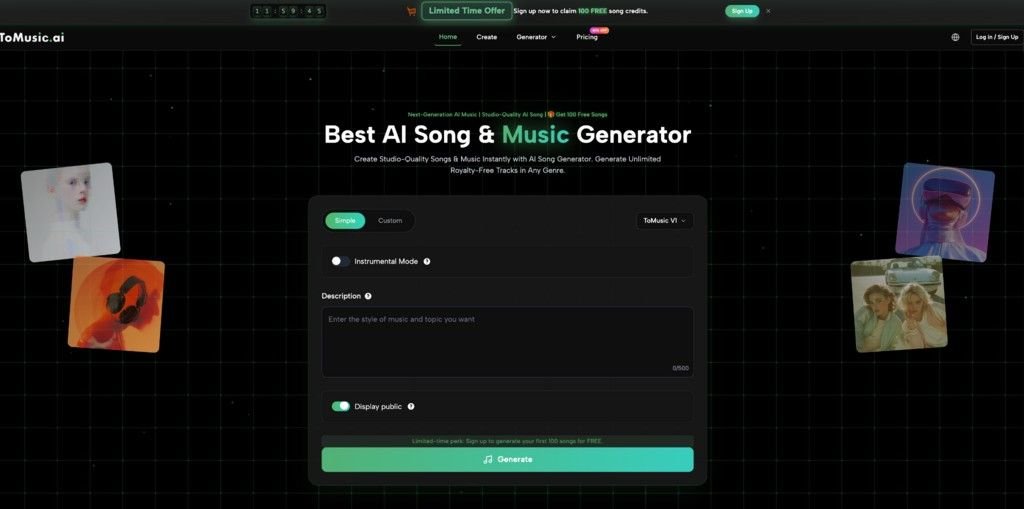
Music creation is no longer limited to producers with full studio setups or years of technical training. Today, creators, marketers, educators, and indie artists increasingly want faster ways to turn ideas into usable audio. That shift is one reason text to music tools are becoming more important: they help users convert prompts or lyrics into finished tracks without starting from scratch. ToMusic positions itself directly in this space, offering AI-powered generation from text descriptions or custom lyrics through its browser-based platform.
For users who want a practical way to create songs from prompts, lyrics, mood, and genre instructions, ToMusic offers a flexible workflow with multiple models, custom controls, and a built-in music library. The platform says it supports four AI models, lets users generate from text or lyrics, and provides storage for created tracks and metadata for later reuse.
Why Text to Music Matters for Modern Creators
Creating original music the traditional way can be slow, expensive, or technically overwhelming for many users. That is especially true for people who need background music, demo tracks, social content audio, or quick concept songs rather than a long studio process.
- High production barriers Many creators know the mood or idea they want, but they do not know composition, arrangement, or sound design. A text-driven workflow lowers that barrier by letting users describe the song in plain language instead of building it manually. ToMusic explicitly presents its product as a text-to-music and lyric-to-song generator for quick music creation.
- Slow iteration cycles Traditional music workflows often require switching between writing, arrangement, recording, and editing tools. By contrast, ToMusic says users can generate music from text descriptions or custom lyrics directly on the platform, which shortens the idea-to-output loop.
- Limited control of many entry-level tools Some beginner tools make music quickly but do not offer enough control over output. ToMusic’s music page says users can work from either text descriptions or custom lyrics, and that different models emphasize different strengths such as vocal expression, harmony, longer compositions, or faster generation.
- Poor organization after generation Creating tracks is only part of the workflow. Users often also need to revisit prompts, lyrics, settings, and versions. ToMusic’s Music Library stores generated tracks together with metadata such as titles, tags, descriptions, lyrics, and generation parameters, and says storage, search, access, and downloads do not consume credits.
- Budget sensitivity Creators who publish frequently need predictable pricing. ToMusic’s pricing page highlights a Starter plan with low per-song cost estimates and a yearly option that reduces cost per song, which helps position it for repeat use rather than one-off experiments.
These are the reasons more users are searching for a reliable text to music workflow rather than a basic demo tool. They want speed, usable control, and a platform that supports both experimentation and repeatable production.
Why ToMusic Works Well for Text to Music Creation
If this article is meant to support your own site, the strongest positioning is not “AI music is cool.” It is that ToMusic gives users multiple practical ways to create music from words, then manage those outputs inside the same ecosystem.
For creators looking for a browser-based text to music ai workflow, ToMusic says its AI Music Generator can create professional music instantly from text descriptions or custom lyrics, with access to four AI models: ToMusic V4, V3, V2, and V1. The platform describes V4 as stronger in vocal expression, V3 as richer in harmony and rhythm, V2 as suitable for longer compositions up to eight minutes, and V1 as focused on rapid generation.
Feature Highlight 1: Multiple Generation Modes
One of ToMusic’s clearest advantages is that it supports both text-to-music and lyric-to-song workflows. That matters because different users start from different places: some only have a mood or genre idea, while others already have complete lyrics. ToMusic’s pages repeatedly present both routes as first-class creation methods rather than side features.
Feature Highlight 2: Four AI Models With Different Strengths
Another practical advantage is model choice. Instead of giving every request to one engine, ToMusic says it offers V4, V3, V2, and V1, each optimized differently. This model variety is one of ToMusic’s strongest differentiators, because it gives users a reason to choose the platform not only for speed, but also for more intentional output selection based on vocals, arrangement quality, duration, or generation speed.
Feature Highlight 3: Music Library and Reusable Metadata
ToMusic also extends beyond generation itself. Its Music Library automatically saves created songs and stores related metadata including titles, tags, descriptions, lyrics, and generation parameters. That library-and-metadata system is another major differentiator, because it makes reuse and iteration easier for creators who publish often and need to track what worked. The platform also says stored music can be accessed, played, and downloaded unlimited times without extra cost, and that storage does not use credits.
How to Use Text to Music More Effectively
A tutorial-style section usually performs better for search than vague benefit claims because it matches what users actually look for.
Step-by-step workflow
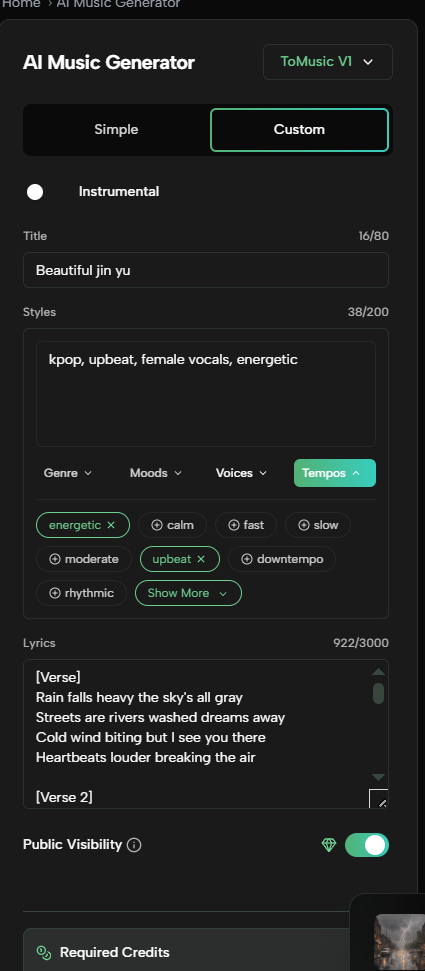
- Describe the song idea clearly Start with the mood, genre, tempo, instrumentation, or use case. ToMusic’s platform is built around generating from text descriptions, so clearer prompts should produce more targeted results.
- Choose between prompt-based creation or lyric-based creation If you already have words, use the lyrics route. If not, begin with a short concept prompt and let the system handle more of the composition. ToMusic positions both text prompts and custom lyrics as supported inputs.
- Select the right model for the goal Use V4 when vocal performance matters, V3 for richer harmony and rhythm, V2 for longer compositions, and V1 when fast generation is the priority. That model-specific workflow is one of the most useful parts of the platform.
- Store and refine your outputs Save the best tracks in the Music Library, review the lyrics and generation parameters, and reuse successful settings for future songs. ToMusic says all of this remains accessible across devices, and storage or downloads do not consume credits.
Common use cases
- Content creators making original tracks for videos, social media, or branded content. ToMusic’s pages explicitly mention presentations, videos, gifts, and personal enjoyment as examples.
- Educators and students create songs for learning materials, study content, and classroom projects.
- Indie artists and songwriters testing lyrics and musical directions before deeper production. ToMusic’s lyric-to-song positioning and story-song page both align with that use case.
- Teams that need reusable music assets and want an organized library of prompts, lyrics, and settings for iteration.
Text to Music Tool Comparison and Buying Advice
A good comparison section should show where ToMusic fits without overclaiming.
| Tool | Core Advantage | Best For | Free Version |
| ToMusic | Text prompts or custom lyrics, four AI models, Music Library with metadata, and low estimated per-song Starter pricing | Creators who want flexible song generation and organized reuse inside one platform | Yes |
| Suno | Daily free credits and broad consumer-facing song generation workflow | Users who want a large mainstream AI music platform | Yes |
| Udio | AI music generation with paid Standard/Pro subscription options | Users focused on song generation and subscription-based scaling | Yes / trial-based paid path available |
| AIVA | AI composition assistant with explicit licensing tiers and MIDI downloads | Users who want composition-oriented workflows and structured licensing choices | Yes |
For users comparing platforms, the real question is not just “Which tool makes songs?” It is “Which tool fits my workflow?” Suno is highly visible and easy to try, Udio is positioned around subscription-based AI music creation, and AIVA is more composition-oriented with explicit licensing and download limits on free plans. ToMusic’s strongest position is its combination of multiple generation models, text and lyric inputs, organized library storage, and cost-per-song pricing signals for repeat creation.
Final Thoughts
The appeal of text to music is simple: it lets more people create usable songs from ideas, moods, and lyrics without needing a traditional production setup. ToMusic stands out because it does more than just generate tracks. It combines multiple AI models, prompt and lyric workflows, organized music storage, and accessible pricing structure in one browser-based platform.
If you want a text-driven music workflow that is fast to start and easier to scale over time, ToMusic is a strong option to explore.